
BabyLoveGrowth offers more than AI content creation and backlink building. Its platform also includes a Site Health audit for identifying website issues, AI Visibility monitoring for tracking brand mentions in AI-generated answers, and social media tools for discovering discussions and creating promotional content.
In my earlier BabyLoveGrowth review, I covered the onboarding process, content planning, AI article generation, WordPress integration, backlink building and pricing.
In this hands-on review, I continued on testing using my website, TechFin2k.com. I explore the Site Health audit, investigate its recommendations and verify selected corrections in WordPress. I also test AI Visibility monitoring, the Reddit and Quora agents, and Facebook’s AI-generated carousel posts.
Rather than relying only on the platform’s feature descriptions, I share the results I observed, the changes I made, and where I believe the tools are useful or still require human review.
1. BabyLoveGrowth Website Health Audit: Initial Results
The website health audit was one of the features I wanted to examine more closely.
BabyLoveGrowth’s Site Health dashboard provides an overall health score along with three supporting scores: Page Speed, LLM Optimization and Technical SEO.
The initial report for TechFin2k displayed the following results:
| Audit category | Initial score |
|---|---|
| Overall website health | 92/100 |
| Page Speed | 99 |
| LLM Optimization | 89 |
| Technical SEO | 91 |
The initial report recorded 20 URL entries and identified 47 issues.
Rather than showing only an overall score, BabyLoveGrowth listed individual pages and grouped problems by issue. This made it easier to identify which parts of the website needed attention.
The audit covered several areas, including:
- SEO titles and meta descriptions
- Page heading structure
- Image alt text
- Large image files
- Category-page metadata
- Technical SEO elements
- AI crawler access and configuration
I found this page-level approach useful because it provided specific recommendations to investigate instead of simply asking me to improve the website’s overall score. This gave me a starting point for reviewing the recommendations and deciding which corrections were relevant to TechFin2k.
These scores are BabyLoveGrowth’s own audit measurements, not Google PageSpeed Insights scores or Google Search Console results.
2. Page Selection and Audit Frequency: How Does It Work?
While exploring the Site Health dashboard, I noticed that BabyLoveGrowth provides both automatic auditing and an option to select pages for checking.
Automatic weekly checks
During my three weeks of using BabyLoveGrowth, I observed that its Site Health dashboard scheduled automatic checks weekly.
One audit-history entry showed that the previous check was completed on November 19, 2026, with 19 pages audited. These pages had been selected automatically by BabyLoveGrowth.
The dashboard also displayed November 26, 2026, as the next scheduled automatic check.
Choosing pages for the next audit
I also explored the Choose pages option in the Site Health dashboard.
To access it, open Site Health and click the three-dot menu in the upper-right corner, next to the next-check date. Select Choose pages.
The selection window displays the website’s available URLs and allows users to select up to 20 pages for the next audit. The homepage is included automatically.
I reviewed the available pages and selected the ones I wanted BabyLoveGrowth to prioritise for TechFin2k. My selection included important hosting reviews, WordPress tutorials, SEO guides and other relevant articles.
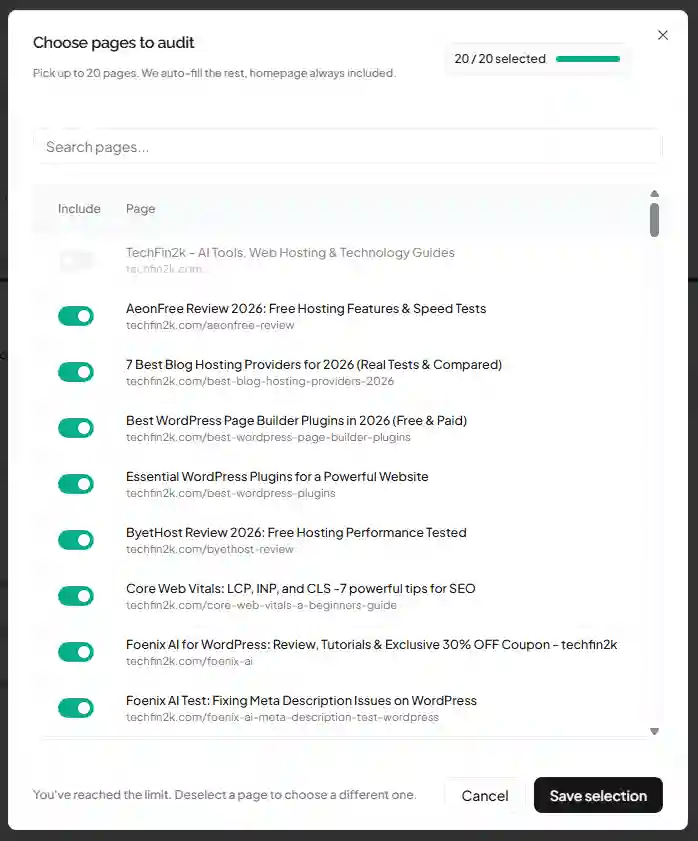
This is particularly useful for websites with a growing content library because it gives users control over which pages they want to prioritise during the next audit.
In my latest manual recheck on November 24, the dashboard reported 21 pages audited. The page-selection window allows users to select up to 20 pages and indicates that the homepage is included automatically.
Testing the manual recheck option
After making corrections to my website, I wanted to check whether BabyLoveGrowth could re-examine the pages already included in the Site Health audit.
The dashboard provides a Recheck all issues option. It checks the previously audited pages again to determine whether the reported issues have been resolved or still require attention. It does not add different pages to the audit; those need to be selected separately using the Choose pages option.
I clicked Recheck all issues on November 24, 2026, while my Grow subscription was active. The manual check completed successfully, and the dashboard updated its history to show 21 pages audited.
After the check, the option became disabled. The dashboard displayed the next available recheck time as November 25, 2026, at 7:43 PM.
This showed that manual rechecking is limited to one run within approximately 24 hours.
3. Identifying and Correcting Homepage Issues
One of the first issues I investigated involved the TechFin2k homepage.
BabyLoveGrowth identified a problem with the homepage heading structure. When I checked my WordPress configuration, I found that the Reading settings were configured to display the latest posts rather than the intended static homepage.
I corrected this by going to:
WordPress Dashboard → Settings → Reading
I selected the option to display a static page and chose the correct HOME page as the homepage.
After saving the changes, the website displayed the intended homepage content, including its main heading and introductory text.
I then asked BabyLoveGrowth to check the live page again. The platform marked the relevant heading issue as fixed.
This was a useful example of the audit workflow. BabyLoveGrowth identified an issue, explained what needed attention and allowed me to check the affected page again after making the correction.
However, the correction itself was made in WordPress. The platform did not automatically change the Reading settings for me.
4. Reviewing Category SEO Titles, Meta Descriptions and Content Assignments
Another useful part of the BabyLoveGrowth Site Health audit was its recommendations for category pages.
The platform identified category pages that needed attention and provided suggested SEO titles and meta descriptions for all the categories on TechFin2k.
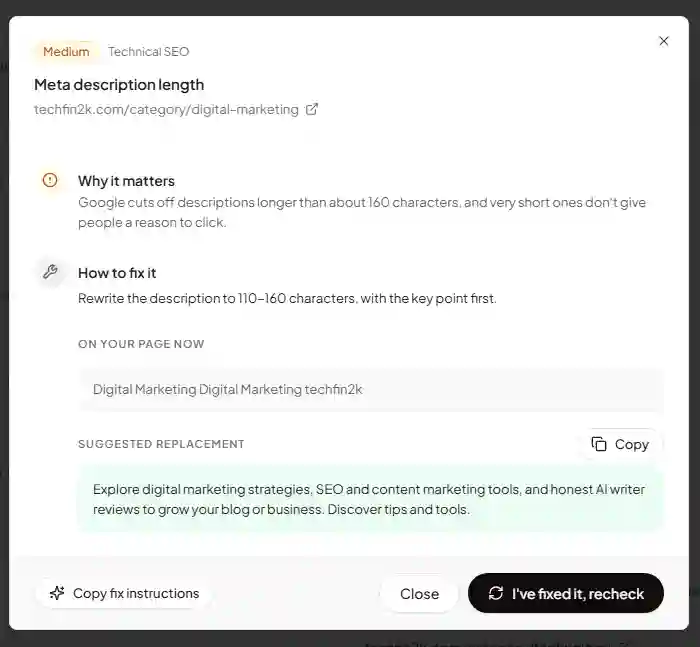
I found this helpful because it provided a starting point for improving category metadata without having to write every title and description from scratch.
However, I did not apply all the suggestions exactly as generated. I reviewed the wording, made some structural adjustments and refined the descriptions to better reflect the actual content of each category.
One particularly interesting finding involved the Free AI Generators category.
This category on TechFin2k is intended for free tools such as resume, leave-letter and job-application generators. However, a Foenix AI WordPress automation review had also been assigned to it.
BabyLoveGrowth identified that the Foenix AI review did not belong in this category. I removed the unrelated category assignment and adjusted the category metadata to reflect its intended purpose.
What made this finding particularly interesting was that the audit went beyond metadata recommendations and identified a mismatch in the website’s category structure.
After making the necessary changes, I asked BabyLoveGrowth to check the affected pages again. The updated category-related issues were subsequently marked as fixed in the dashboard.
I found this workflow useful: BabyLoveGrowth provided the initial recommendations, but I retained control over the final wording and category assignments. It is worth reviewing the suggestions carefully rather than applying every recommendation without checking whether it accurately represents the website’s content.
5. Image Optimization: Reducing an Image by 92.9%
BabyLoveGrowth also identified a large image on TechFin2k’s Digital Marketing category page. It classified this as a low-priority Technical SEO issue and recommended reducing the image size to below 150 KB.
Interestingly, the image identified in the audit was associated with my QuillBot Review post. The affected URL shown by BabyLoveGrowth was the Digital Marketing category page, while the image file displayed in the report was Quillbot-Review-768x768.png. In other words, the audit flagged the image being loaded on the category page, rather than showing a separate issue for the QuillBot Review article itself.
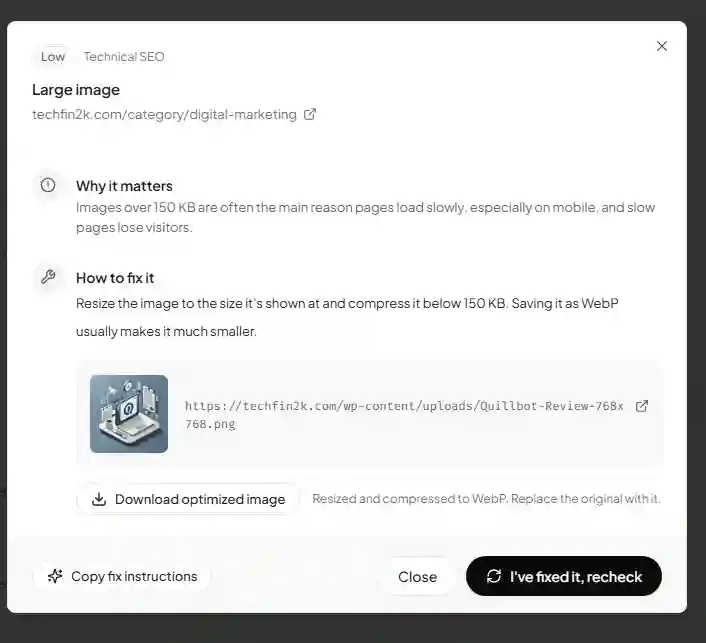
BabyLoveGrowth provided a downloadable optimized version of the image and recommended replacing the original with it. I downloaded the replacement, which was in WebP format, and used it in place of the original PNG on my website.
The difference in file size was substantial:
| Image detail | File size |
|---|---|
| Original PNG | 756 KB |
| Optimized WebP | 53.6 KB |
| Size reduction | 92.9% |
After replacing the original image, I selected I’ve fixed it, recheck in BabyLoveGrowth. The live recheck subsequently marked the large-image issue as fixed. This completed the image optimization test, with the file size reduced by approximately 92.9%.
6. Live Issue Verification: Does BabyLoveGrowth Check Corrections?
One feature I found useful during my testing was the ability to recheck issues after making changes to my website.
BabyLoveGrowth groups its findings by priority and issue type, making it easier to identify which areas need attention. In my audit, it reported high-priority issues such as multiple H1 tags and duplicate meta description tags. Medium-priority findings included low page speed, meta title length issues, broken images, irrelevant meta titles and meta description length. It also identified lower-priority issues involving missing image alt text and large images.
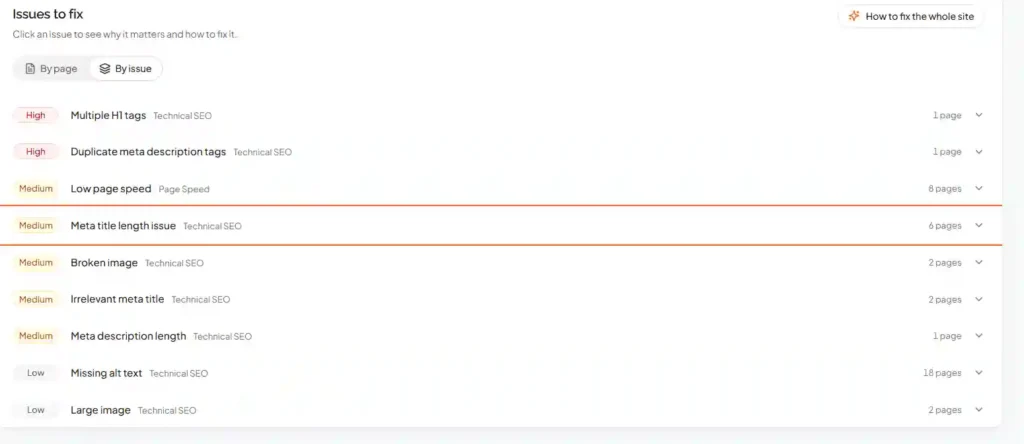
I worked through the recommendations and addressed the issues that required corrections. My changes included fixing the homepage heading, reviewing and updating category SEO titles and meta descriptions, correcting category assignments and optimizing an oversized image.
My verification workflow was straightforward:
- Open an issue in the BabyLoveGrowth Site Health report.
- Review the affected page and the suggested correction.
- Make the necessary changes manually in WordPress.
- Return to BabyLoveGrowth and select the I’ve fixed it, recheck option.
- Check whether the platform detects the correction and marks the issue as fixed.
I used this process for several of the corrections described earlier. BabyLoveGrowth marked the corresponding homepage heading, category-related and large-image issues as fixed after rechecking the affected pages.
This makes the audit more useful than a report that simply lists problems. Website owners can make corrections and then check whether the platform has detected those changes.
Not Every Recommendation Needs to Be Applied
Although I addressed several important findings, I did not automatically implement every recommendation.
For example, some missing-alt-text warnings involved Gravatar author-profile images displayed alongside the author’s name. I did not consider it necessary to add repetitive descriptive alt text to every avatar when the author’s name was already visible next to it.
I also reviewed the remaining suggestions individually and left some unchanged where the recommendation was not particularly relevant or where I felt an additional change was unnecessary.
This is an important distinction when using automated website audits. A tool can identify potential issues, but not every recommendation is necessarily a problem that needs correcting. Website owners should review the affected page and use their own judgement before implementing suggested changes.
Overall, I found the live recheck feature useful because it allowed me to verify corrections rather than simply relying on the initial audit report. It also gave me control over which recommendations to implement and which ones to leave unchanged.
7. Follow-Up Site Health Results: Did the Score Improve?
After addressing several issues identified in the initial Site Health audit and implementing selected recommendations in WordPress, I checked the BabyLoveGrowth dashboard again.
The follow-up dashboard displayed an overall health score of 97/100, compared with the initial score of 92/100. This was the result shown after my corrections and is the score used for the comparison below.
Here is a comparison of the two recorded results:
| Audit category | Initial result | Follow-up result |
|---|---|---|
| Overall website health | 92/100 | 97/100 |
| Page Speed | 99/100 | 99/100 |
| LLM Optimization | 89/100 | 96/100 |
| Technical SEO | 91/100 | 96/100 |
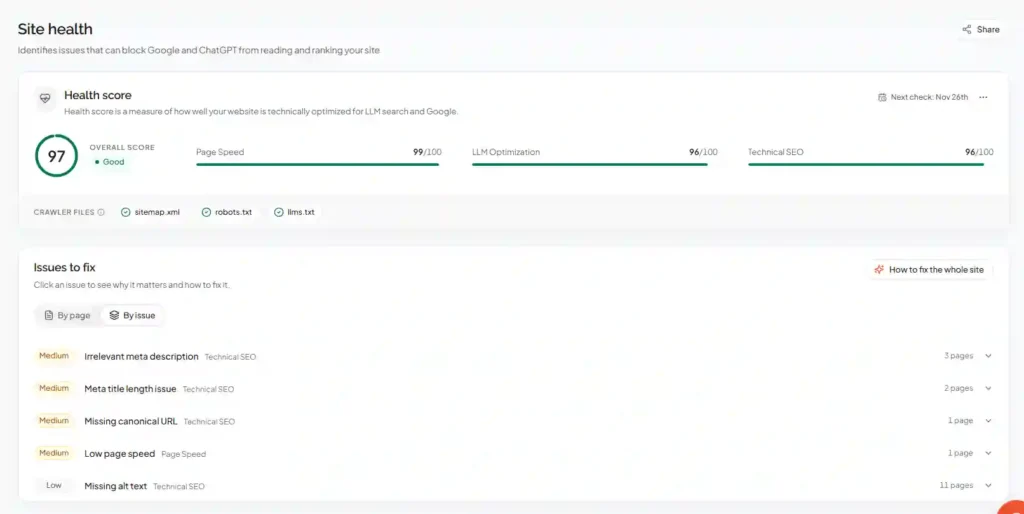
The follow-up dashboard showed an overall score of 97/100, with Page Speed at 99, LLM Optimization at 96 and Technical SEO at 96. It also showed that the sitemap.xml, robots.txt and llms.txt crawler-file checks were passing.
The overall score increased by five points. LLM Optimization improved by seven points, while Technical SEO increased by five points. Page Speed remained unchanged at 99.
BabyLoveGrowth’s documentation explains that its overall health score uses the following weighting:
- Page Speed: 20%
- LLM Optimization: 40%
- Technical SEO: 40%
This means LLM Optimization and Technical SEO have a greater influence on the overall score than Page Speed. Consequently, improvements in those two categories can contribute more to the overall result.
There is one important qualification when comparing these results. The initial report contained 20 URL entries, while the follow-up audit history showed 19 pages audited. BabyLoveGrowth had automatically selected the pages for that earlier weekly audit. Since the audited page sets were not identical, this is not a perfectly controlled comparison.
The 97/100 figure is the score displayed in the follow-up dashboard snapshot. It is an improvement in the platform’s recorded score, but it does not establish that my corrections alone caused the entire increase.
Remaining Issues in the Follow-Up Audit
Despite the higher score, the dashboard still displayed several issues requiring attention:
- Irrelevant meta descriptions: 3 pages
- Meta title length issues: 2 pages
- Missing canonical URL: 1 page
- Low page speed: 1 page
- Missing alt text: 11 pages
Therefore, a score of 97/100 did not mean that every issue had been resolved. I still needed to review the remaining recommendations individually and decide which ones were relevant to my website.
Want to Explore BabyLoveGrowth?
Explore its Site Health audit, AI Visibility monitoring and content tools to see how they could fit into your website workflow.
Explore BabyLoveGrowth8. BabyLoveGrowth AI Visibility: Tracking Brand Mentions
The second major feature I wanted to investigate was AI Visibility.
Traditional SEO monitoring focuses on search engine performance, while AI Visibility monitoring attempts to show whether a brand appears in answers generated by AI assistants.
BabyLoveGrowth provides prompt-based monitoring for this purpose.
During my testing, I configured 10 prompts related to the topics covered by TechFin2k.
The dashboard displayed 20 responses in total.
Here were the initial results:
| AI Visibility metric | Initial result |
|---|---|
| AI Visibility score | 0/100 |
| Prompts tracked | 10 |
| Responses displayed | 20 |
| Responses mentioning TechFin2k | 0 |
| Brand visibility | 0% |
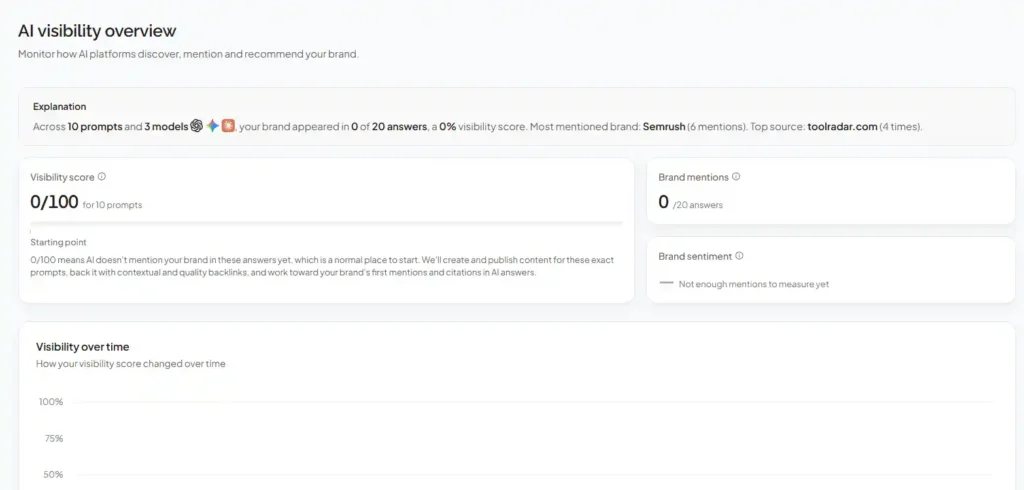
The initial result showed that none of the 20 responses displayed in the dashboard mentioned TechFin2k.
I wanted to understand which AI platforms were included in these results because the dashboard presentation initially raised a question about model coverage.
Does BabyLoveGrowth track ChatGPT, Claude and Gemini?
When I opened the individual prompt results, I could see responses from ChatGPT and Claude, but I could not find Gemini results.
I contacted BabyLoveGrowth support to clarify whether Gemini tracking was included and whether I needed to enable anything in my account.
Antoine from BabyLoveGrowth confirmed:
- AI Visibility currently tracks ChatGPT and Claude.
- The 10 prompts produce 20 answers across these two models.
- Gemini tracking is not live yet.
- Nothing needs to be enabled on my side.
This clarified the discrepancy. The 20 responses shown in my dashboard were the complete results for the two currently supported AI platforms, rather than three.
What does a 0/100 AI Visibility score mean?
The 0/100 score means that TechFin2k did not appear in the 20 responses displayed for these 10 prompts. It does not establish whether the brand appears in other ChatGPT or Claude answers. I therefore treat this as an initial monitoring baseline rather than a universal measurement of AI visibility.
The feature provides a way to monitor brand mentions for selected prompts, but its usefulness depends on the relevance of those prompts, the models supported and how consistently the results are collected.
Note: At this stage, only one new post has been published since my recent content updates, so I consider these results an initial baseline rather than a final assessment of TechFin2k’s AI visibility. I plan to review the dashboard again on December 3, 2026, and update this section with the new results. This will help me see whether the tracked responses and brand mentions have changed over time.
9. Social Media and Community Engagement Features
BabyLoveGrowth includes social tools designed to help users discover relevant discussions, prepare responses and create content for social platforms.
In my testing, I explored the Reddit and Quora agents, which identify relevant discussions and questions and prepare suggested replies. I also tested Facebook’s article-based carousel generation feature.
I did not test Instagram publishing because I do not currently have an Instagram account connected.
Reddit AI Agent: Finding Discussions and Drafting Replies
BabyLoveGrowth’s Reddit AI Agent identifies discussions in relevant subreddits and prepares suggested replies based on the topics it monitors.
The dashboard displays the subreddit, the original discussion title, a suggested response and the keyword or topic that matched the discussion. It also provides two options: Copy & open and Mark as replied.
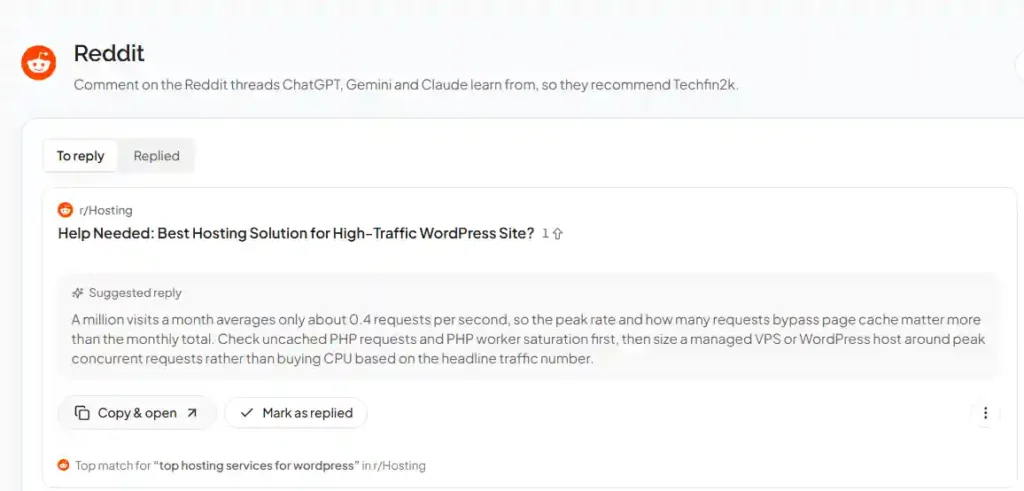
I clicked Copy & open to test the workflow. BabyLoveGrowth copied the suggested reply and opened the original Reddit discussion. I then clicked Join the conversation to open the comment box and manually pasted the copied response. I could review or edit the text before clicking Reddit’s Comment button to submit it.
I tested the feature with three discussions from relevant subreddits. The posts varied in age: one was approximately two years old, another was around one year old, and the third was published about 27 days earlier.
First test: High-traffic WordPress hosting discussion
One suggestion was a discussion in r/Hosting titled “Help Needed: Best Hosting Solution for High-Traffic WordPress Site?” The original post was approximately two years old and asked for advice on finding a reliable hosting solution for a WordPress website receiving more than one million monthly visits.
BabyLoveGrowth prepared a technical response explaining that peak concurrent requests, uncached PHP requests and PHP worker capacity are important considerations when choosing hosting for a high-traffic website.
I used the Copy & open option, reviewed the response and submitted it through Reddit. When I checked the discussion, the comment was visible publicly, with one upvote.
Second test: General WordPress hosting recommendation
Another suggestion was a discussion in r/Hosting titled “What is the best Hosting for WordPress?” The original post was approximately one year old.
BabyLoveGrowth generated a response recommending a managed WordPress hosting plan with free SSL and automatic backups. However, it also included a promotional reference to TechFin2k and mentioned the site’s coverage of hosting plans and WooCommerce.
I submitted this suggested reply without editing it. When I checked the discussion later, Reddit displayed a Comment removed by Reddit notice.
Third test: Alternatives to FTP clients for WordPress deployments
I also tested a more recent discussion in r/ProWordPress, published approximately 27 days earlier. The post was titled “Tired of FTP clients for WordPress deploys. What do you use instead?”
BabyLoveGrowth prepared a relevant technical response covering Git, SSH, rsync, database transfers and WP-CLI’s search-and-replace functionality. However, the suggested version also included a promotional reference to TechFin2k.
This time, I edited the response and removed the promotional sentence, retaining the technical advice. I then submitted the revised comment through Reddit.
The edited reply initially appeared publicly under the discussion. However, when I checked again later, Reddit had also removed this comment.

What I found during the Reddit test
The Reddit Agent was useful for discovering discussions related to hosting and WordPress and preparing relevant starting points for replies. The Copy & open option also made it convenient to move from the BabyLoveGrowth dashboard to the original Reddit discussion.
However, my three tests highlighted an important limitation. Although the first reply was visible publicly when I checked, the other two were subsequently removed by Reddit.
At the time of testing, I was also experiencing separate issues with my Reddit account and my own subreddit, TechFiReViews. This made it difficult to determine whether the two removals were related to the suggested responses, account activity or subreddit moderation. Reddit did not provide a confirmed reason in the results I observed, so I cannot attribute the removals to any single cause.
Possible factors could include Reddit’s automated filters, account karma, posting activity or individual subreddit moderation. However, I could not establish the exact reason from the information available.
I also noticed that the suggested discussions were not all recent. They ranged from approximately 27 days old to two years old. Users should therefore check the age and continuing relevance of a discussion before replying.
Overall, I found the Reddit Agent useful for discovering discussions and drafting responses, but the suggestions still require human review. The tool does not publish comments automatically, and using Copy & open does not guarantee that Reddit will retain or approve a submitted reply.
Quora AI Agent: Finding Questions and Drafting Answers
After testing the Reddit Agent, I moved on to BabyLoveGrowth’s Quora AI Agent to see how it identifies relevant questions and prepares answers.
Similar to Reddit, the Quora section displays questions related to the topics monitored by BabyLoveGrowth, along with an AI-generated suggested reply. The suggestions I reviewed covered topics such as WordPress eCommerce plugins, payment plugins and comparisons between popular WordPress SEO plugins.
For example, it identified questions about useful free and paid WordPress plugins for eCommerce websites and which SEO plugin to choose between All in One SEO, Yoast and Rank Math.
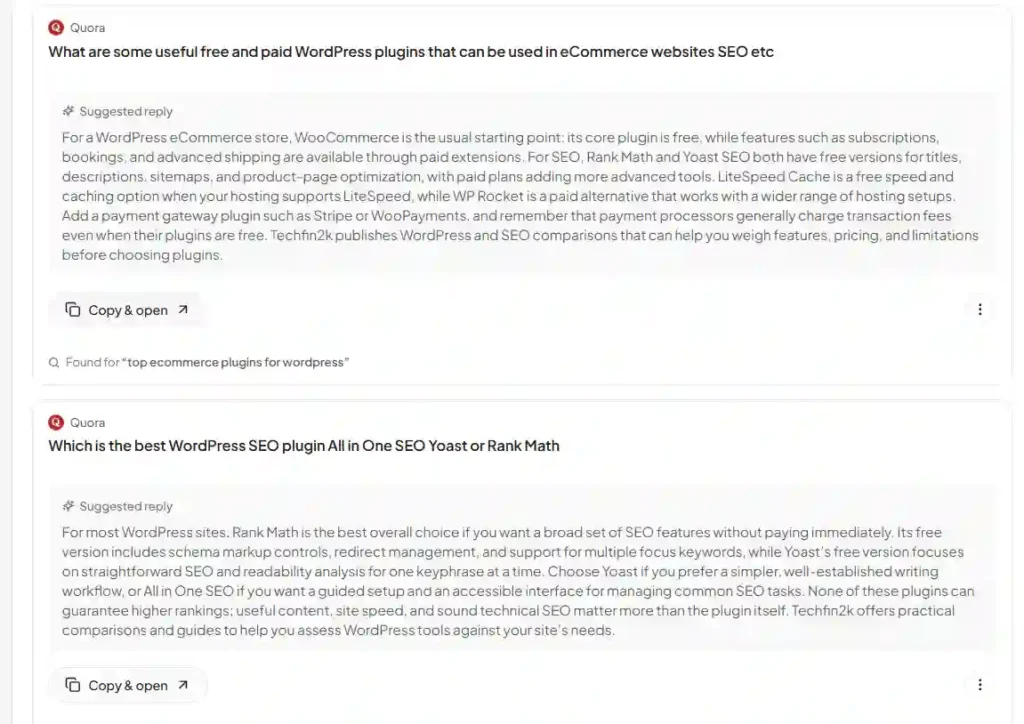
The suggested answers included recommendations for plugins such as WooCommerce, Rank Math, Yoast SEO, LiteSpeed Cache and WP Rocket. Another response discussed eCommerce options such as Easy Digital Downloads, SureCart and MemberPress.
Testing the Copy & open workflow
I clicked Copy & open on a suggested answer to test the process. BabyLoveGrowth opened the corresponding question directly on Quora.
Unlike automatically publishing an answer, the tool leaves the actual submission to the user. I needed to click Quora’s Answer button, open the answer editor and manually paste the copied response. I could then review and edit the text before deciding whether to submit it.
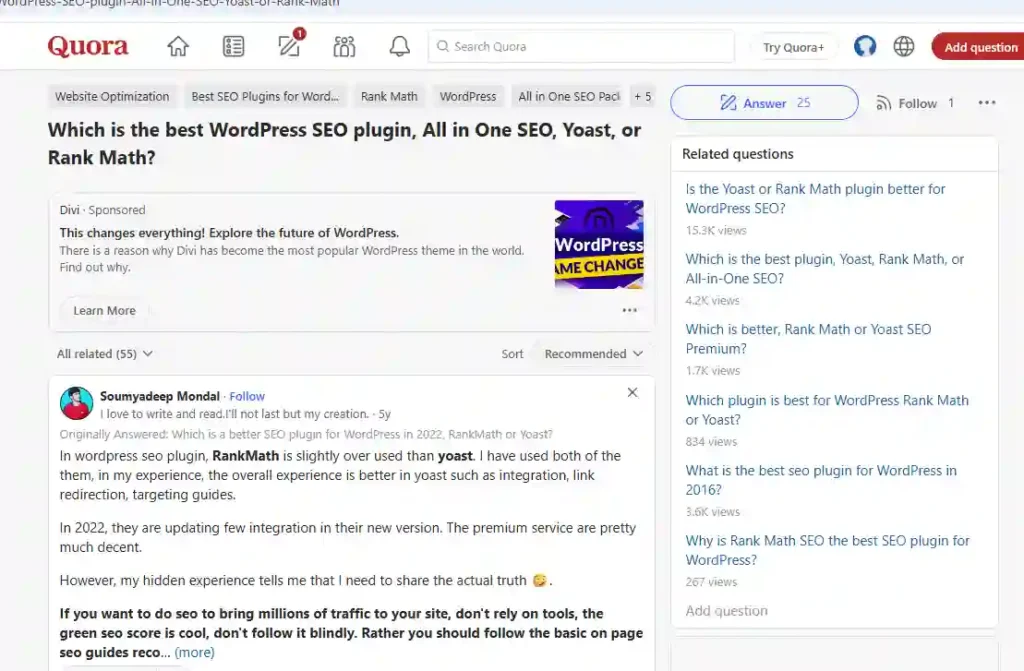
I found this workflow convenient because it takes users directly from the BabyLoveGrowth dashboard to the relevant Quora question, without having to search for the question themselves.
An important observation: Promotional references in suggested answers
One thing I noticed across the suggested replies I reviewed was that BabyLoveGrowth repeatedly included a reference to TechFin2k near the end of the answer.
For example, one suggested response concluded by saying that TechFin2k publishes WordPress and SEO comparisons to help readers evaluate plugins. Another mentioned that TechFin2k offers practical comparisons and guides for choosing WordPress tools.
Although these references relate to my website, I would not recommend publishing every suggested answer without reviewing this wording. Repeatedly inserting the same brand mention can make otherwise useful answers appear promotional, particularly when the website reference is not necessary to answer the question.
I would therefore revise the suggested responses before publishing them, keeping the useful information while removing promotional wording that does not add value to the particular discussion. Any genuinely relevant affiliation should also be disclosed appropriately.
My initial impression of the Quora Agent
The Quora Agent was useful for discovering relevant questions and preparing draft answers. I particularly liked the Copy & open workflow because it took me directly to the corresponding Quora question, where I could use the Answer option and paste the copied response.
Overall, I found the Quora Agent useful for discovering relevant questions and preparing draft answers. The Copy & open workflow was convenient, but the repeated TechFin2k references meant that I would review and edit the answers before submitting them. The actual answer still needs to be pasted and published manually by the user.
Facebook: Testing AI-Generated Carousel Posts
After connecting my Facebook Page to BabyLoveGrowth, I explored its social content creation feature to see how it converts website articles into posts for social media.
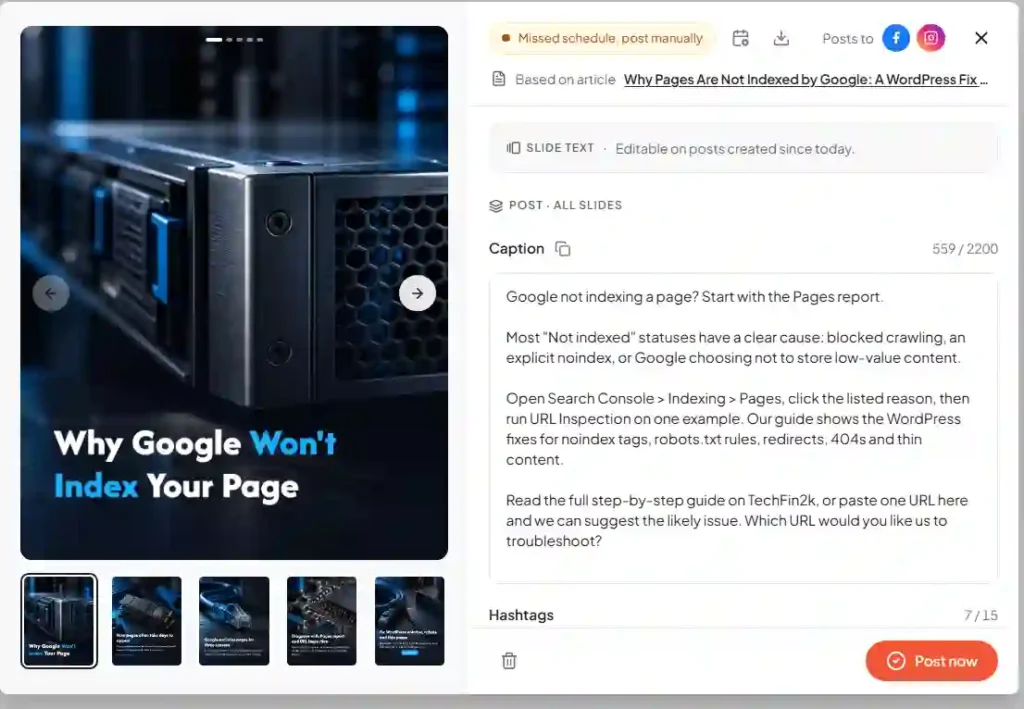
The platform had generated three posts based on TechFin2k articles. Each post included a five-slide carousel, a caption and relevant hashtags.
When I opened the Facebook section after connecting my account, all three posts displayed a Missed schedule, post manually status. This was because Facebook had not been connected when the original posting schedules were due. Once connected, BabyLoveGrowth made the generated posts available for manual publication.

Three article-based carousel posts
The three generated posts covered different topics from TechFin2k:
- Why Google Won’t Index Your Page: Based on my WordPress indexing guide, this carousel explains indexing problems and introduces relevant Google Search Console checks and fixes.
- AI Editing Needs a Human: Based on my AI content editing article, this carousel discusses reviewing AI-generated drafts, checking claims and maintaining content quality.
- Write One Primary Keyword Per Post: Based on my keyword research guide, this carousel explains choosing a primary keyword and avoiding unnecessary keyword targeting.
Each post contained five slides with a consistent visual style. The designs used dark backgrounds, large white headlines and blue highlights, with images relevant to the respective topics.
I particularly liked how BabyLoveGrowth presented the information across multiple slides rather than creating a single promotional image. It also generated the captions and hashtags for each post.
Captions and hashtags
BabyLoveGrowth generated a separate caption and hashtags for each carousel. The captions included an introduction to the topic, supporting information and a question or call to action to encourage engagement.
The three captions ranged from approximately 405 to 559 characters, comfortably within the displayed 2,200-character limit. Each post also included seven hashtags out of the available maximum of 15.
Overall, I found the generated captions and hashtags relevant to their respective articles. Only minor wording adjustments would be needed before publishing.
One detail worth mentioning is that the source articles were still saved as WordPress drafts during my testing. Therefore, the generated captions did not contain live article URLs. Once the articles are published, their respective links can be added to the captions before posting.
Posting frequency and the daily posting add-on
BabyLoveGrowth includes one post per week in its standard posting allowance. It also offers an optional Daily Posting add-on for $49 per month.
The upgrade advertises up to seven posts per week instead of one, with a carousel for every new article. It also offers automatic publishing or the option to approve each post before it goes live. The subscription renews monthly and can be cancelled.
I did not purchase this additional add-on. One suggestion I would make is to offer an intermediate allowance of two or three posts per week. This would give websites publishing several articles weekly more flexibility without requiring an upgrade to daily posting.
My experience with Facebook content generation
Among the social media features I tested, I found Facebook carousel generation particularly useful for content promotion.
BabyLoveGrowth converted existing website articles into five-slide carousels and prepared the accompanying captions and hashtags. This provides a convenient starting point for promoting published articles without having to create every social media post from scratch.
I also liked the consistent visual design and the way the slides presented the main points of each article. With only minor editorial adjustments and the addition of the relevant published article links, these posts would be ready for publication.
Overall, this was one of the more practical features I explored during my BabyLoveGrowth testing. It makes repurposing website content for Facebook considerably easier.
10. What I Liked About BabyLoveGrowth
After testing the different features, I found several aspects particularly useful.
1. Detailed, page-level Site Health audit
Rather than providing only an overall website score, BabyLoveGrowth identified individual URLs and grouped the problems by issue type and priority. This made it easier to investigate specific pages.
2. Practical SEO recommendations
The platform suggested SEO titles and meta descriptions for category pages and also identified a mismatch between an article and its assigned category. This went beyond simply providing metadata suggestions.
3. Downloadable image optimization
The image optimization test was a useful feature. BabyLoveGrowth provided a WebP replacement that reduced the original image size from 756 KB to 53.6 KB, an approximate 92.9% reduction.
4. Live verification of corrections
After making changes in WordPress, I could request another check and see whether BabyLoveGrowth detected the corrections. The manual recheck option made the audit more useful as an ongoing workflow.
5. Flexible page selection and scheduled checks
The weekly automatic checks and option to prioritise up to 20 pages for the next audit were useful for managing a website with a growing content library.
6. Prompt-based AI Visibility monitoring
The feature provided an initial way to check whether TechFin2k appeared in responses to selected prompts across ChatGPT and Claude. Although my first result was zero mentions, the monitoring interface gives me a baseline to compare with future checks.
7. Reddit and Quora discussion discovery
Both agents helped identify discussions or questions related to WordPress and hosting and prepared suggested responses. The Copy & open workflow made it easier to reach the original discussion or question, even though the final responses still required manual review and submission.
8. Facebook carousel generation
This was one of the most practical social features I tested. BabyLoveGrowth converted existing articles into five-slide carousels and generated captions and hashtags. The designs were consistent, and only minor editorial polishing was needed before publication.
Overall, I particularly valued the combination of website diagnostics, correction verification and content repurposing in one platform.
11. Limitations and Things to Consider
My testing also highlighted some limitations and points worth considering before relying on these features.
- Audit recommendations need human judgement: Some recommendations require checking the actual page and website context. I did not consider every automated suggestion necessary to implement.
- Corrections are not all automatic: I had to make the homepage, category metadata and image changes manually in WordPress. BabyLoveGrowth helped identify and verify the issues but did not make those changes for me.
- The audit score is not a Google ranking measurement: The 97/100 result is BabyLoveGrowth’s own Site Health score. It does not establish improvements in Google rankings, indexing or organic traffic. Its Page Speed score should also not replace independent performance testing.
- Audited page selection matters: Users can prioritise up to 20 pages for the next audit, with the homepage included automatically. The results therefore need to be considered in the context of which pages were checked.
- AI Visibility model coverage was limited: At the time of my test, the feature monitored ChatGPT and Claude. Gemini was not yet available.
- AI Visibility results depend on the prompts tested: My initial 0/100 score represented 20 responses across 10 prompts. It should not be interpreted as a measurement of every AI-generated answer.
- Reddit and Quora responses need careful editing: The suggested replies repeatedly included promotional references to TechFin2k. I would review and adjust these before submitting them. Two of my three Reddit comments were subsequently removed, although I could not establish the exact reason.
- Community responses are submitted manually: The Reddit and Quora agents prepare and copy suggested replies, but users still need to open the original discussion or question, paste the response, review it and submit it.
- Facebook posting frequency: The standard allowance includes one post per week, while the optional Daily Posting add-on costs $49 per month for up to seven posts per week. An intermediate allowance of two or three posts weekly would be a useful additional choice.
I did not test Instagram publishing because I do not currently have an Instagram account connected. Therefore, my social media assessment is based on Reddit, Quora and Facebook testing.
12. Final Verdict: Is BabyLoveGrowth Worth Using?
After testing the additional features, I found that BabyLoveGrowth offers more than AI article generation and backlink building. Its Site Health audit, AI Visibility monitoring and social media tools provide additional ways to manage and promote a website.
The Site Health audit was the most useful feature in this part of my testing. It identified issues on individual TechFin2k pages, provided recommendations for category metadata and image optimization, and allowed me to recheck selected corrections. The later dashboard displayed an overall score of 97/100 compared with the initial recorded score of 92/100, although the audited page sets were not identical.
The AI Visibility feature is a useful addition for monitoring selected prompts, but its initial coverage was limited to ChatGPT and Claude. My first test returned no TechFin2k mentions across 20 responses. I would like to assess its longer-term usefulness after collecting more results.
The Reddit and Quora agents were helpful for discovering relevant discussions and questions and preparing draft responses. However, their generated replies need careful editing, particularly where they include repeated promotional references to TechFin2k. My Reddit tests also showed that submitted comments may subsequently be removed, and the exact reason cannot always be established.
The Facebook carousel feature was another highlight. It converted existing articles into five-slide posts and prepared the accompanying captions and hashtags. I found this more immediately useful for content promotion because the generated material required only minor editorial polishing before it could be prepared for publication.
My overall impression is that BabyLoveGrowth combines useful website diagnostics, AI monitoring and social content workflows in one platform. The Site Health audit and Facebook carousel generation were the strongest additions in my hands-on testing. AI Visibility is worth monitoring over time, while the Reddit and Quora agents are best treated as research and drafting assistants rather than automatic community-publishing tools.
As with any SEO and AI tool, I would use its recommendations as a starting point, verify important findings independently and retain editorial control over the content and changes made to the website.
For my earlier assessment of BabyLoveGrowth’s onboarding, AI content generation, WordPress integration, backlink building and subscription plans, see my detailed BabyLoveGrowth review.
Ready to Try BabyLoveGrowth?
Discover the platform’s website audit, AI monitoring and content creation features. Check its current plans and decide whether it suits your needs.
Visit BabyLoveGrowth13. Frequently Asked Questions
What does the BabyLoveGrowth Site Health audit check?
BabyLoveGrowth’s Site Health audit checks areas including Page Speed, LLM Optimization and Technical SEO. It identifies issues on individual pages, such as heading structure, meta titles, meta descriptions, missing alt text and large images, and provides recommendations for addressing them.
Does BabyLoveGrowth automatically fix website SEO issues?
No. In my testing, I made the necessary corrections manually in WordPress. BabyLoveGrowth then allowed me to use its I’ve fixed it, recheck option to check whether the reported issue had been resolved.
How often does BabyLoveGrowth run Site Health checks?
During my testing, the dashboard showed weekly automatic checks. It also provided a manual Recheck all issues option, which became available again after approximately 24 hours. Users can also prioritise up to 20 pages for the next audit, with the homepage included automatically.
Which AI models does BabyLoveGrowth AI Visibility monitor?
At the time of my test, AI Visibility supported ChatGPT and Claude. BabyLoveGrowth support confirmed that Gemini tracking was not yet live.
Does a 0/100 AI Visibility score mean a website is never mentioned by AI?
No. My initial 0/100 result meant that TechFin2k was not mentioned in the 20 responses generated for my 10 tracked prompts. It does not establish whether the website appears in other AI-generated answers.
Does the BabyLoveGrowth Reddit or Quora Agent publish replies automatically?
No. The agents identify relevant discussions or questions and prepare suggested replies. Users must open the original Reddit or Quora page, paste the copied response, review it and submit it manually.
Can BabyLoveGrowth create Facebook posts from website articles?
Yes. In my test, it generated five-slide carousel posts based on TechFin2k articles, together with captions and hashtags. The standard posting allowance included one post per week, while an optional $49-per-month add-on advertised up to seven posts per week.
Enjoying our content?
Make TechFin2K a preferred source on Google to see more of our content when it is relevant to you.
