

Last Updated on October 10, 2026 by RADHIKA VATLAM
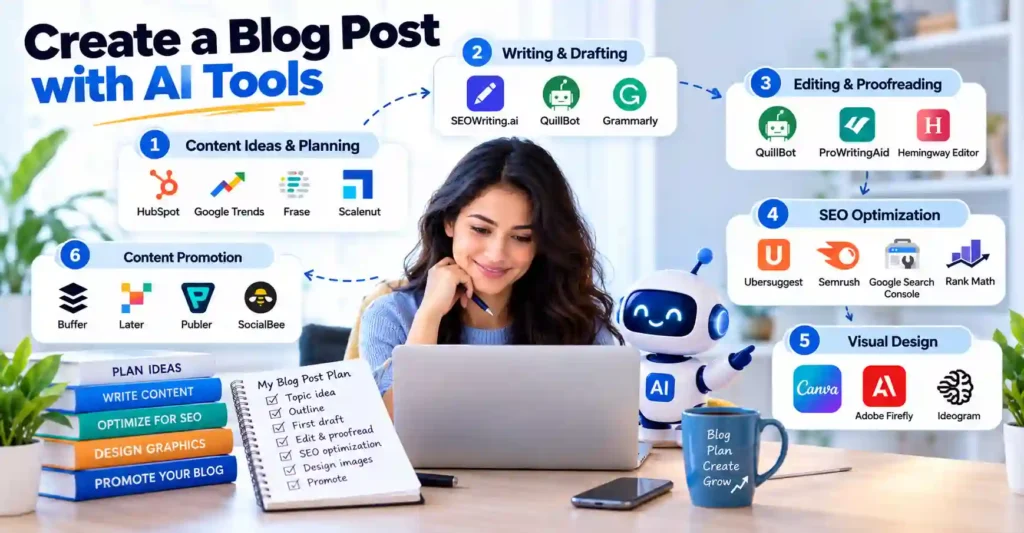
Running a blog involves more than writing articles. Bloggers also need to research topics, plan content, edit drafts, optimize posts for search engines, create visuals, and promote their work. Managing these tasks consistently can be challenging, especially for solo bloggers and small teams.
AI tools can help simplify different stages of this process, from generating content ideas and improving drafts to researching keywords, designing graphics, and planning social media posts. However, AI-generated content still requires human review, fact-checking, and original insights to ensure accuracy and provide genuine value to readers.
In this guide, we’ll explore the best AI tools for bloggers in 2026, covering content planning, writing and editing, SEO, visual design, and promotion. We’ll explain their key features, practical uses, and available free or paid options to help you choose tools that fit your needs and budget.
Affiliate Disclosure: This article contains affiliate links. If you purchase through these links, we may earn a commission at no additional cost to you.
How AI Tools Can Simplify Blogging
AI tools can support different stages of the blogging process, but you don’t need every tool available. Start by identifying the tasks that take you the most time, then choose tools that address those specific needs.
Key Takeaways
- Content planning: Discover topic ideas, research audience interests, and organize article outlines.
- Writing and editing: Develop first drafts, refine wording, check grammar, and improve readability.
- SEO and research: Find keyword opportunities, analyze content, and improve on-page SEO.
- Visual design: Create blog graphics, featured images, and other visual assets.
- Content promotion: Schedule social media posts and repurpose articles for different platforms.
Use AI to support your workflow, not replace your expertise. Review facts, check sources, and add your own experience before publishing.
AI tools for Content Ideas and Planning
Choosing the right topic is an important first step in creating a useful blog post. Before writing, bloggers need to understand their audience, explore search interest, identify relevant subtopics, and organize ideas into a content plan.
The following tools can help with different parts of this process, from discovering topic ideas and analyzing search trends to researching competing pages and building SEO-focused content briefs.
1. HubSpot AI Blog Writer
HubSpot’s AI-powered blog-writing tools can help bloggers develop article ideas, generate outlines, and create initial drafts from prompts. Depending on the product and subscription, HubSpot also offers features for editing content, generating SEO elements, and managing blog posts.
These features can provide a useful starting point when you’re planning a new article. Review the suggestions, research the topic independently, and add your own expertise before publishing.
Best for: Bloggers and marketers who want AI-assisted blog planning and drafting within HubSpot’s content platform.
Pricing: HubSpot offers free access to some blog and AI features, while certain capabilities require eligible paid subscriptions. Check the current product and plan details before signing up.
2. Google Trends: Discover Topics People Are Searching For
Google Trends is a free tool that helps bloggers explore how search interest in a topic changes over time. You can compare search terms, examine interest by location, and identify seasonal patterns that may influence your content calendar.
For example, a technology blogger could compare interest in different hosting platforms or AI tools before deciding which topic to research further. Remember that Google Trends shows relative search interest rather than exact search volumes, so use it alongside keyword research and your audience’s needs.
Best for: Bloggers who want to compare topics, explore trends, and identify seasonal content opportunities.
Pricing: Free.
3. Frase – Content Research and Planning
Frase helps bloggers research topics by analyzing pages that appear in search results. It can identify common headings, related topics, questions, and potential content gaps, helping you create a structured content brief before drafting an article.
This research can help you decide which subtopics to cover and how to organize your post around readers’ likely questions. Frase also offers AI-assisted writing and content optimization, making it useful beyond the initial planning stage.
Pricing: The Starter plan is listed at $49 per month, or $39 per month when billed annually. It includes 10 articles and 50 audit pages per month. A seven-day free trial is available without a credit card.
Best for: Bloggers who want search-result research, structured content briefs, and article outlines before writing.
Try Frase: Start your 7-day free trial
4. Scalenut – SEO Research and Content Planning
Scalenut combines keyword research, topic clustering, AI-assisted content creation, and SEO optimization. Its Keyword Planner can group related keywords into topic clusters, helping bloggers plan supporting articles around a main subject.
For example, a blogger writing about WordPress hosting could create a main hosting guide and supporting articles about performance testing, security, backups, and control panels. This approach helps organize related content into a more coherent strategy.
Scalenut also offers features for monitoring brand visibility across AI-powered search experiences. These capabilities may be useful if you want to explore how your brand appears in AI-generated answers, although availability and usage limits depend on your plan.
Pricing: Scalenut lists its Starter plan at $59 per month and currently advertises a discounted price of $24 per month. Check the pricing page for the applicable billing terms, offer conditions, and current trial availability.
Best for: Bloggers who want keyword clustering, topic planning, content creation, and SEO tools within one platform.
Try Scalenut: 7 Day free trial
Writing and Drafting with AI Tools
Once you have chosen a topic and prepared an outline, the next step is turning your ideas into a complete article. AI writing tools can help you develop a first draft, organize information into sections, improve sentence flow, and prepare content more efficiently. However, you should still review the output, verify factual claims, and add your own experience and insights before publishing.
Different tools serve different purposes. Some generate full articles, while others help rewrite sentences, correct grammar, or make your writing easier to read.
Essential Tools for Writing and Drafting
1. SEOwriting.ai – AI Article Generation and SEO Content Creation
SEOwriting.ai is designed for bloggers and content creators who want to generate articles with less manual drafting. Its 1-Click Blog Post feature lets you enter a main keyword, generate a title, and create a structured article. Depending on the selected model and settings, the workflow can also use live search-engine results to inform the article structure and keyword selection.
The platform also offers Super Page, which analyzes top-ranking competitor pages and uses their structure and calls to action to help generate more comprehensive pages. This is particularly useful when creating landing pages or other content that needs a clear structure and a specific goal. SEOwriting.ai also provides rewriting and humanization features that can help you revise the wording of a draft.
These features can speed up the initial writing process, but the generated article should not be treated as publication-ready automatically. Check its accuracy, add original examples and insights, and make sure the content genuinely addresses your readers’ needs.
For a closer look at its features and updates, read our SEOwriting.ai features guide
The Starter plan is listed at $19 per month when billed monthly, or $14 per month when billed annually ($168 per year). It includes 50 credits and advertises up to 50 articles, depending on credit usage and the model selected.
Affiliate offer: Use coupon code TECHFIN through SEOwriting.ai for 25% off monthly plans or 50% off yearly plans, subject to the current offer terms.
Watch the tutorial: See how the 1-Click Blog Post workflow works in this step-by-step demonstration.
2. QuillBot – Paraphrasing and Rewriting
QuillBot helps writers revise existing text without having to rewrite every sentence manually. Its Paraphraser offers different modes for adjusting wording and fluency, while its other writing tools can help with grammar, summarization, and clarity.
For bloggers, QuillBot can be useful when a paragraph sounds awkward, a sentence is difficult to follow, or a draft needs a clearer expression of the same idea. You can use it to explore alternative phrasing while retaining the meaning you intend to communicate.
QuillBot also includes other writing tools, such as summarization, that can help bloggers work with and refine text. Free access has usage limits, while Premium unlocks additional features and higher limits.
Remember to check every rewritten passage yourself. Paraphrasing should improve clarity and expression, not simply disguise copied material or replace the original research and insight needed for a useful article.
Try QuillBot: Explore QuillBot’s writing tools
3. Grammarly – Grammar and Writing Assistance
After drafting an article, it is worth reviewing the writing for grammar, clarity, and readability. Grammarly and Hemingway Editor can help with different aspects of this process.
Grammarly checks spelling, punctuation, and grammar, and provides suggestions to improve clarity, conciseness, and tone. Its AI writing features can also suggest paragraph-level rewrites. Bloggers can use it to identify errors and make their articles easier to understand before publishing.
Editing, Polishing, and Proofreading
Creating a first draft is only one part of writing a useful blog post. Before publishing, you should review the article for grammar mistakes, unclear sentences, repetitive wording, and readability issues. Editing tools can help identify these problems and suggest improvements, but your own review remains important for preserving the intended meaning and accuracy.
Tools That Help You Edit and Proofread
1. QuillBot Grammar Checker
QuillBot’s Grammar Checker identifies spelling, punctuation, and grammatical errors and suggests corrections to help bloggers polish their drafts before publishing. It can also help improve sentence clarity, making it useful when reviewing articles, tutorials, and product reviews.
For bloggers who want to refine their wording as well as correct errors, QuillBot’s paraphrasing tools provide additional ways to revise sentences. Review the suggested changes carefully to ensure that they preserve your intended meaning.
Best for: Bloggers who want a straightforward way to check grammar and polish their writing before publication.
For more details about its features, see our QuillBot review.
2. ProWritingAid
ProWritingAid goes beyond basic grammar correction by analyzing writing style, sentence structure, repeated words, readability, and other aspects of your text. Its writing reports help identify unnecessary wording, inconsistent phrasing, and sentences that could be clearer.
For bloggers publishing long tutorials, product reviews, or detailed guides, these reports can help improve the flow and consistency of an article. ProWritingAid also offers rephrasing suggestions and integrations with supported writing applications.
It is particularly useful when you want more detailed feedback on your writing rather than just a quick spelling and grammar check.
3. Hemingway Editor
Hemingway Editor focuses on making writing clearer and easier to read. It highlights complicated sentences, excessive adverbs, passive voice, and other patterns that may make an article difficult to follow.
Bloggers can use it to identify paragraphs that need simplifying, particularly when explaining technical topics to beginners. The aim is not to remove every long sentence, but to make sure that the writing is easy to understand without losing important details.
Hemingway Editor also offers paid AI-assisted editing features, while its core readability-focused editor provides a straightforward way to review prose.
Content Optimization and SEO: Helping Readers Discover Your Blog
Publishing a well-written article is only one part of building a successful blog. You also need to make sure that search engines can discover your pages and that your content addresses the information people are looking for.
SEO tools can help you research keywords, understand competitors, monitor search performance, identify technical issues, and improve on-page elements such as titles, headings, and internal links. However, no tool can guarantee higher rankings. Useful content, sound technical foundations, and ongoing evaluation all matter.
SEO Tools That Help Optimize Your Content
1. Ubersuggest – Keyword Research and Competitor Analysis
Ubersuggest is an SEO research tool that helps bloggers discover keyword ideas, examine estimated search volume, assess keyword competition, and explore competitor websites. These features can help you evaluate potential topics before writing and identify related search terms to consider in an article.
You can also use its site-audit and backlink features, depending on your plan, to investigate technical SEO issues and understand a site’s link profile.
Ubersuggest can be a useful starting point for bloggers who want keyword and competitor research without immediately committing to a more expensive enterprise-oriented SEO platform. Keep in mind that search volumes and competition metrics are estimates, not guarantees of future traffic.
2. Semrush – Comprehensive SEO Research
Semrush is an extensive SEO platform for keyword research, competitor analysis, backlink research, rank tracking, and technical site audits. Its tools can help you identify keyword opportunities, compare your website with competitors, monitor rankings, and find issues that may affect search visibility.
Depending on the subscription, Semrush also provides content research and optimization tools. This makes it useful for bloggers who want to manage several parts of their SEO workflow from one platform.
The standard SEO Pro plan is listed at approximately $139.95 per month when billed monthly, with a lower effective monthly price available on annual billing. A free trial is available for eligible plans and offers. Check the official pricing page for the current price and trial conditions before subscribing.
You can also follow our Ahrefs AI Content Helper tutorial to explore another approach to content optimization.
3. ClickFlow – AI-Powered SEO and Content Optimization
ClickFlow offers an AI-powered SEO platform designed to help businesses plan, create, publish, and refresh content based on search performance data. Its workflow connects content optimization with Google Search Console data, helping publishers identify opportunities to improve existing pages as well as develop new content.
This type of platform may be useful for bloggers who want to manage content updates more systematically rather than focusing only on publishing new articles. Before choosing it, review the current features, integrations, pricing, and level of automation to determine whether it fits your publishing workflow.
4. Google Search Console – Monitor Search Performance
Google Search Console is a free tool that helps website owners understand how their pages perform in Google Search. The Performance report shows impressions, clicks, click-through rates, and average search positions for queries and pages.
It also provides information about indexing, sitemap processing, and certain technical issues affecting how Google accesses or indexes a website. Bloggers can use this information to identify pages receiving impressions but few clicks, discover queries that already bring visitors, and investigate indexing problems.
Search Console does not generate articles or automatically optimize your content. Instead, it provides first-party Google search data that helps you make more informed SEO decisions.
5. Rank Math SEO – On-Page Optimization for WordPress
Rank Math SEO is a WordPress plugin that provides on-page SEO analysis directly within the post editor. It helps you review elements such as the focus keyword, SEO title, meta description, headings, internal links, and other optimization checks.
Depending on the version and features enabled, it can also offer schema markup, redirects, and additional SEO tools. This makes it convenient for bloggers who want to manage many common optimization tasks without leaving WordPress.
Rank Math’s recommendations should be treated as guidance rather than a checklist that guarantees rankings. Prioritize clear writing, useful information, appropriate internal linking, and accurate metadata over trying to achieve a perfect plugin score.
Once your content is published and optimized, earning relevant editorial backlinks can help improve its visibility and reach. Link building tools like MentionAgent help bloggers streamline outreach to relevant websites and pursue opportunities to earn editorial mentions and backlinks.
Creating Stunning Visuals with AI: Make Your Blog Visually Stand Out
Images, infographics, and videos can make a blog post easier to understand and more visually appealing. They can also help you repurpose an article for Pinterest, YouTube, and other social platforms. Design tools make it possible to create these assets without advanced graphic-design or video-editing skills.
AI Tools to Create Visual Content Easily
1. Canva – Blog Graphics, Images, and Infographics
Canva is an all-purpose design platform for bloggers, content creators, and small businesses. Its templates and AI-assisted design features help you create attractive visuals without starting from a blank canvas.
You can use Canva to create:
- Featured images and blog banners.
- Pinterest pins and social media graphics.
- Infographics that summarize important points.
- YouTube thumbnails and presentation slides.
- Branded templates with consistent colors, fonts, and logos.
Canva also includes AI features for generating designs and images, editing visual elements, and adapting designs to different formats. Some AI tools and premium assets have usage limits or require a paid plan.
The free plan is a practical starting point for bloggers who mainly need templates and basic design tools. Paid plans provide additional assets, AI allowances, brand-management features, and other capabilities.
Best for: Bloggers who need one versatile tool for blog images, social graphics, infographics, and thumbnails.
2. Adobe Express – AI-Assisted Graphic Design
Adobe Express is another option for creating blog graphics, promotional images, short videos, flyers, and social media posts. It combines ready-made templates with editing tools and generative AI features.
You can start with a template or describe the design you want, then customize the layout, text, images, colors, and other elements. Its resizing and content-scheduling features can also help when preparing graphics for multiple social platforms.
Adobe Express offers a free plan with basic editing tools, templates, and limited AI features. The Premium plan adds more creative assets, generative credits, advanced editing options, and additional scheduling capabilities.
Best for: Bloggers who want an alternative to Canva, especially if they also use Adobe’s creative tools.
3. Lumen5 – Turn Blog Posts into Videos
Lumen5 helps bloggers repurpose written content into video. You can provide a blog URL, paste text, or upload a document, and its AI tools can extract key points, suggest a script, and assemble a video using relevant visuals, text, timing, and transitions.
For example, a detailed tutorial can be turned into a short explainer video that highlights its main steps. You can then edit the script, change visuals, customize the branding, and adjust the video format before sharing it.
Lumen5 also provides AI voiceovers and other video-creation features, depending on the plan. Its free plan lets you try the platform, while paid plans offer additional customization, media, and branding options.
Remember that AI-generated videos still need review. Check that the selected visuals match the article, that the text is accurate, and that the final video works well on the intended platform.
Best for: Bloggers who want to turn existing articles into videos without manually editing every scene.
Social Media Integration and Promotion: Getting Your Content in Front of More People
Publishing a blog post is only the beginning. Sharing it through relevant social media channels can help you reach new readers and bring attention to your existing content. However, managing multiple accounts and publishing consistently can become time-consuming.
Social media management tools help you prepare posts in advance, schedule publication, organize your content calendar, and review engagement data. Some also provide AI-assisted caption writing and tools for reusing older posts. The best choice depends on how many accounts you manage and how much automation you need.
Top Tools for Social Media Scheduling and Promotion
1. Buffer – Simple Social Media Scheduling
Buffer is a straightforward option for bloggers who want to plan and schedule posts across multiple social networks from one dashboard. You can prepare captions, add images or videos, organize drafts, and view your upcoming posts in a content calendar.
Buffer also provides an AI Assistant that can help draft or refine captions, while its analytics features help you understand how your content performs. Supported networks include platforms such as Facebook, Instagram, LinkedIn, Pinterest, TikTok, YouTube, and others, although publishing options vary by network.
Buffer’s free plan supports up to three connected channels, with up to 10 scheduled posts per channel at a time. Paid plans add features such as unlimited scheduled-post capacity under the fair-use policy, advanced analytics, and additional publishing tools.
Best for: Solo bloggers and small creators who want an easy way to schedule social posts.
2. Metricool – Social Scheduling and Analytics
Metricool combines social media scheduling with analytics and performance reporting. Bloggers can plan posts in a calendar, publish content to supported networks, and review engagement data to understand which posts perform best.
It is particularly useful if you want to go beyond scheduling and compare results across your social channels. Depending on the plan and connected network, Metricool also provides competitor analysis, reporting features, and AI-assisted text generation.
Metricool’s free plan includes one brand, up to 20 planned posts per month, basic analytics, and a limited number of AI text-generation credits. Some networks and advanced features require a paid plan.
Best for: Bloggers who want scheduling and analytics together, particularly when tracking performance across several platforms.
3. MeetEdgar – Automate Evergreen Content Recycling
MeetEdgar focuses on scheduling and reusing social media content. Its content library and category-based scheduling let you organize posts and automatically share selected material according to a schedule.
This can be useful for evergreen blog content—such as tutorials, product reviews, and how-to guides—that remains relevant over time. Instead of manually remembering to promote an older article, you can place suitable posts into a library for future sharing.
MeetEdgar also offers AI-assisted caption creation through its Inky feature. Its paid plans include scheduled-post automation and support for multiple social accounts. The service offers a 30-day free trial rather than a permanent free plan.
Because recycled content should remain accurate and relevant, review older posts periodically and update or remove those that are outdated.
Best for: Bloggers with a growing library of evergreen articles who want to automate repeat promotion.
Choosing the Right AI Tools for Your Blog
The best AI tools for bloggers depend on your workflow, budget, and the type of content you publish. You do not need to subscribe to every tool in this guide. Start with the tasks that take you the most time, then add tools when they provide clear value.
Consider these factors before choosing:
- Features and use cases: Decide whether you need help with topic research, article writing, proofreading, SEO, graphic design, or social media scheduling. Choose tools that address your actual needs rather than paying for features you rarely use.
- Budget: Compare subscription prices, usage limits, and annual billing options. Free tools such as Google Trends and Google Search Console can support important parts of your workflow without adding subscription costs.
- Ease of use: Choose tools that fit your existing workflow and are easy to learn. Consider whether they integrate with your website, writing process, or social media accounts.
- Free plans and trials: Test a tool before committing to a paid subscription. Check trial duration, credit limits, and whether payment details are required.
- Content quality and control: AI-generated content still needs human review. Check factual claims, add original examples and experience, and make sure the finished article answers readers’ questions.
- Privacy and support: Review how a tool handles uploaded content and personal data. Documentation and customer support can also be important when you rely on a tool regularly.
A simple workflow could be to research a topic with Google Trends, create an initial article draft with SEOwriting.ai, refine the writing with QuillBot or Grammarly, and design the featured image using Canva. You can then monitor search performance in Google Search Console and schedule promotional posts using a social media management tool.
The aim is to build a practical toolkit in which each tool serves a clear purpose.
Final Thoughts: Choosing the Right AI Tools for Bloggers
AI tools can help bloggers spend less time on repetitive tasks and more time researching, improving, and publishing useful content. From planning topics and drafting articles to checking readability, optimizing pages, creating visuals, and scheduling social posts, different tools can support different stages of the blogging process.
However, using more AI tools does not automatically produce better content or higher search rankings. The most useful approach is to choose tools that suit your needs, verify their output, and add your own expertise and perspective.
If you want to start with a small toolkit, consider an AI writing tool for drafting, an editing tool for improving clarity, and a design tool for creating visuals. Add paid SEO or social media platforms when their features justify the cost.
Ready to Build Your Blogging Toolkit?
Here are three tools to consider for different tasks:
- SEOwriting.ai — Generate article drafts and create SEO-focused content. Use coupon code TECHFIN for 25% off monthly plans or 50% off yearly plans, subject to the current offer terms.
- QuillBot — Rewrite sentences, improve phrasing, and check grammar.
- Canva — Create featured images, infographics, Pinterest pins, and social media graphics.
Start with the tools that address your biggest challenges, explore free options where available, and upgrade only when you need additional features or capacity.
Frequently Asked Questions (FAQs)
Q1. What are AI tools for bloggers?
AI tools for bloggers are applications that use artificial intelligence to assist with tasks such as brainstorming topics, drafting articles, editing text, researching keywords, creating visuals, and preparing social media content. They can make parts of the blogging workflow more efficient, but human judgment remains important for accuracy, originality, and usefulness.
Q2. How do AI tools help with blog post creation?
AI writing tools can generate ideas, suggest titles and outlines, and create initial article drafts from a prompt or keyword. Editing tools can then help improve grammar, wording, and readability. Bloggers should review the final article, verify factual information, and add original insights before publishing.
Q3. Are AI tools suitable for beginner bloggers?
Yes. Many tools offer templates, guided workflows, free plans, or trial options that make them accessible to beginners. Start with a small number of tools, learn their limitations, and expand your toolkit as your blog grows.
Q4. What are the main benefits of using AI tools for blogging?
AI tools can help bloggers brainstorm topics, draft content, improve writing clarity, research SEO opportunities, create visual assets, and schedule social media posts. The time saved depends on the task and the amount of editing required.
Q5. How should I choose the right AI tools for my blog?
Identify the tasks you need help with, then compare each tool’s features, pricing, usage limits, ease of use, privacy practices, and trial options. Choose tools that complement one another rather than paying for several services that perform the same functions.
Q6. Can AI tools improve my blog’s search engine rankings?
AI tools can support SEO by helping with keyword research, content structure, title and meta-description drafting, and content optimization. However, using AI does not guarantee higher rankings. Search performance also depends on content usefulness, search intent, technical accessibility, competition, and other factors.
Q7. Should AI replace human creativity in blogging?
No. AI is best used as an assistant for research, drafting, and repetitive tasks. Bloggers still need to contribute their own experience, judgment, original ideas, fact-checking, and understanding of their audience to produce valuable content.
Q8. Are there free AI tools for bloggers?
Yes. Some tools offer free plans or limited free access. Google Trends and Google Search Console are free research and SEO tools, while services such as Canva and QuillBot offer free access with limitations. Check each provider’s current terms because features and usage limits can change.
Q9. How can AI tools help create visuals for blog posts?
Design platforms such as Canva and Adobe Express provide templates and AI-assisted features for creating images, banners, infographics, and social media graphics. Video tools such as Lumen5 can help turn written content into videos. Review all generated assets for accuracy, relevance, licensing requirements, and visual quality.
Q10. Can bloggers earn money by promoting AI tools?
Some AI software providers operate affiliate programs that pay commissions for qualifying referrals or sales. Bloggers can explore these programs when the products are relevant to their audience. Always disclose affiliate relationships clearly, follow the program’s terms, and recommend tools based on their actual usefulness rather than commission potential.
Enjoying our content?
Make TechFin2K a preferred source on Google to see more of our content when it is relevant to you.
