
Sponsored Content & Affiliate Disclosure: This article is sponsored by Bluehost as part of its Bluehost AI Builder campaign and contains affiliate links. If you sign up or purchase through these links, TechFin2K may earn a commission at no additional cost to you. My review and observations are based on my hands-on experience testing Bluehost AI Builder using its free plan.
Building a website no longer needs to involve hours of coding, installing plugins or configuring themes. AI website builders promise to make the process easier by turning simple instructions into working websites and applications. But how well do they actually perform?
In this Bluehost AI Builder review, I share my hands-on experience using its free plan to build DealFinder, a coupon website covering web hosting, AI tools, SEO platforms and software. Rather than creating a basic landing page, I wanted to see whether the builder could handle a more practical project involving brand directories, coupon management, affiliate links and AI-generated content.
During my testing, I created and published the website, imported 11 hosting providers using an Excel spreadsheet, generated coupon offers and tested features such as search, copy-code buttons and affiliate redirects. I also evaluated its AI content generation, mobile responsiveness, publishing process and credit consumption.
So, is Bluehost AI Builder capable of creating a useful website without requiring an upfront payment? Let’s look at what worked, what didn’t and the limitations I discovered during my testing.
You can find it at Bluehost AI Builder.
What Is Bluehost AI Builder?
Bluehost AI Builder is a conversational AI platform for creating websites and browser-based applications without traditional coding.
Instead of manually designing individual pages, you describe your requirements through natural-language prompts. The builder generates the website structure, visual design and requested functionality. You can then request further changes through its AI chat interface.
It is important to distinguish this product from Bluehost’s older WordPress AI Website Builder. This review covers the newer standalone AI Builder, which allows you to publish projects on a Bluehost-generated subdomain or connect a custom domain through a paid plan.
Bluehost AI Builder Plans and Pricing
Bluehost AI Builder offers four plans: Free, Lite, Standard and Pro. You can start without paying or providing a credit card, then upgrade when you need more AI credits or want to connect your own domain. All plans include cloud hosting, and hosting usage does not consume AI credits.
AI Builder Free
Explore websites and apps without paying
Maximum 30 per 30 days
- Unlimited websites and apps
- Forms and data storage
- Bookings and scheduling
- User accounts and admin panel
- Bluehost.ai domains
- Cloud hosting and 24/7 support
AI Builder Lite
Launch your site or app on a custom domain
- Everything included in Free
- Connect a custom domain
- On-demand credit top-ups
- Remove Bluehost badge
- 24/7 human support
AI Builder Standard
For more frequent website and app updates
- Everything included in Lite
- Higher monthly credit allowance
- Custom domain connection
- On-demand credit top-ups
- 24/7 human support
AI Builder Pro
For users needing a larger credit allowance
- Everything included in Lite
- Higher monthly credit allowance
- Custom domain connection
- On-demand credit top-ups
- 24/7 human support
| Annual Billing Option | Additional AI Credit Top-Ups |
|---|---|
|
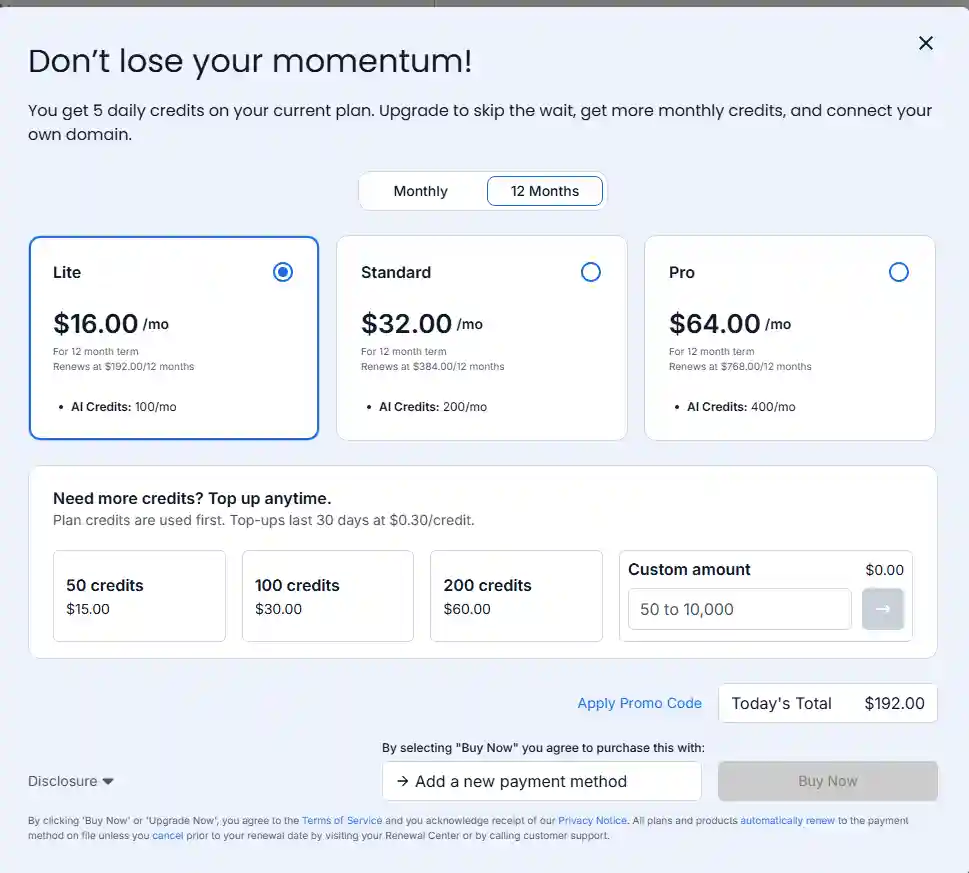
Bluehost also offers a 12-month billing option for its paid plans. The upgrade screen displayed these prices:
The full 12-month amount is charged upfront. Check the displayed renewal price before purchasing. |
You can purchase additional credits without upgrading your subscription. The upgrade screen showed these options:
Top-ups cost $0.30 per credit. Regular plan credits are used first, and purchased top-up credits last 30 days. |
How Does the AI Credit System Work?
Bluehost AI Builder uses a credit-based system for creating websites and making changes through AI prompts.
Each message that creates or modifies your website or application consumes one AI credit, regardless of how many changes are included in that request or how long the prompt is.
For example, a single AI request can include:
- Creating your initial website.
- Adding new pages or functionality.
- Updating website content and design.
- Adding brands, coupon offers and other records.
- Fixing existing website elements.
If you combine several related changes into one request, they are processed as a single AI operation and use one credit when the builder executes the request.
During my testing, I submitted a combined request to add two AI software brands, create three coupon offers, generate product descriptions and FAQs, and fix the IONOS logo. The entire successful operation took approximately three minutes and consumed one AI credit.
Which Activities Do Not Consume AI Credits?
The following activities do not consume AI credits:
- Asking questions that do not modify your website or application.
- Answering or skipping the initial questions asked by the AI Builder.
- Attaching files or images does not incur a separate credit charge. However, asking the AI Builder to use an attachment to create or modify your website may consume one AI credit.
- Previewing your website.
- Publishing your website for the first time.
- Clicking Publish or Update to make subsequent changes available on the live website.
- Sharing your published website.
- Hosting your published website.
I confirmed this during my testing: publishing DealFinder initially and publishing subsequent updates did not reduce my credit balance. Asking the builder questions about an operation also did not consume credits.
What Happens if a Build Fails?
One important detail to understand is that a build that fails or ends in an error still consumes one AI credit, according to Bluehost’s documentation. If this happens, you can contact Bluehost Support and ask them to review the failed build.
How Many Free AI Credits Do You Get?
The Free plan provides:
- 5 AI credits per day.
- A maximum of 30 credits during each 30-day period.
- Daily credits reset at 00:00 UTC.
- The 30-day allowance is calculated from your account’s sign-up date, not the calendar month.
Unused credits do not roll over. They expire 30 days after being added to your account.
Plan related website changes carefully and combine them into a clear, well-structured prompt. This can help you accomplish more within the free AI credit allowance. However, check the preview and confirm that the AI has completed the requested changes before publishing.
Building DealFinder with Bluehost AI Builder: My Hands-On Experiment
To test Bluehost AI Builder beyond a basic website, I decided to create a coupon and deals directory called DealFinder. I wanted to see whether the AI could understand a detailed project brief and generate a website with multiple categories, brand listings, coupon management and useful interactive features.
Rather than building everything manually, I used natural-language prompts to describe the website’s requirements. I also uploaded my TechFin2k logo as a visual reference, while instructing the builder to create a separate brand identity for DealFinder.
What Did I Ask the AI to Build?
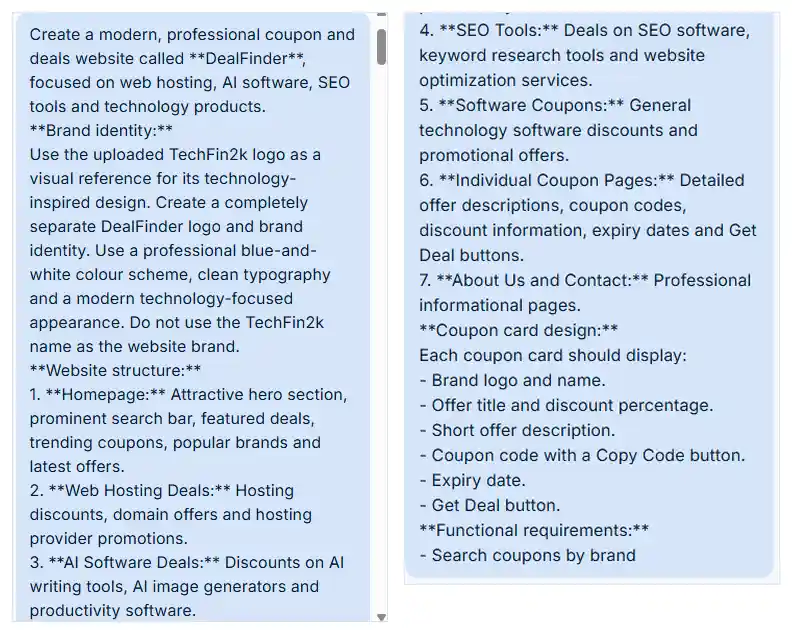
I provided a prompt describing the type of website I wanted, its visual design and the features it needed.
The main requirements were:
1. Website design and structure
- Create a modern, professional coupon and deals website named DealFinder.
- Use a blue-and-white colour scheme.
- Cover four categories: Web Hosting, AI Software, SEO Tools and Software.
- Include homepage sections for featured deals, trending offers, popular brands and categories.
2. Search and coupon functionality
- Add a search feature to help visitors find brands and offers.
- Display individual coupon cards containing the brand name, offer title, discount, coupon code and expiry information.
- Include Copy Code and Get Deal buttons.
- Add brand and category listings for easier navigation.
3. Website pages
- Include About and Contact pages.
- Maintain a consistent visual design across the website.
- Make the search, filters and coupon buttons functional wherever supported.
I also supplied my existing logo as a visual reference, rather than asking the builder to copy the TechFin2k branding directly.
I have included screenshots from the actual setup process below to show the requirements I provided to Bluehost AI Builder.
What Did Bluehost AI Builder Generate?
The initial generation took approximately 6 minutes and 30 seconds. The result was a complete coupon-directory interface rather than just a basic landing page.
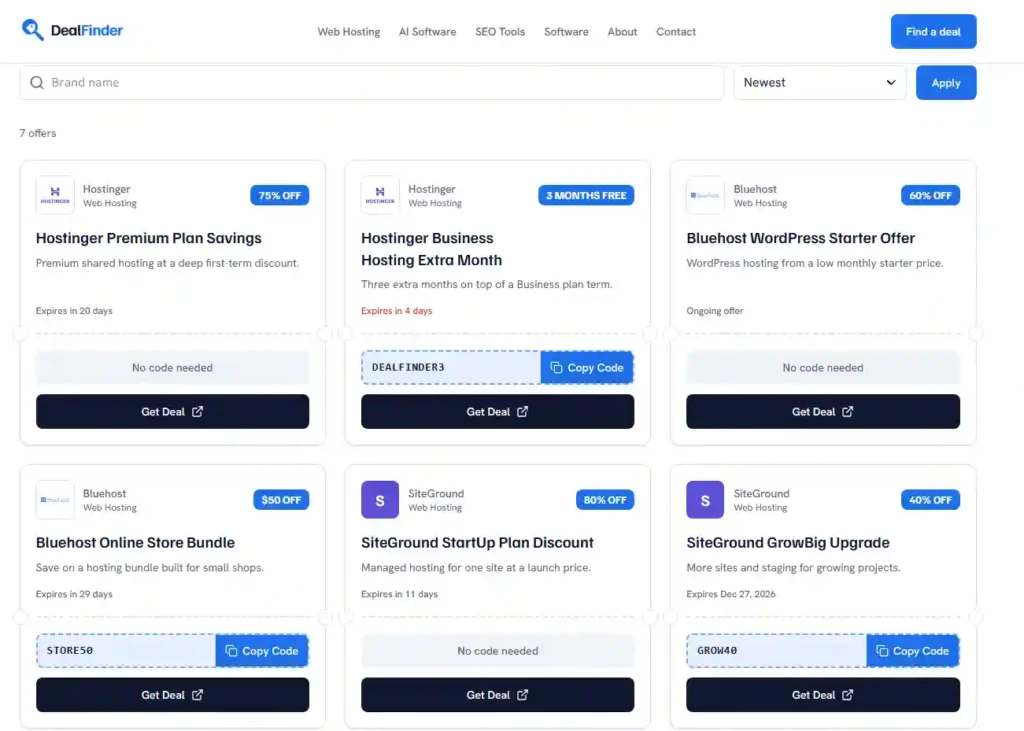
The generated homepage included a prominent search box, navigation menu, category cards, featured deals, trending offers, popular brands and latest offers.
It also generated coupon cards with discount labels, descriptions, expiry information, coupon codes and action buttons.
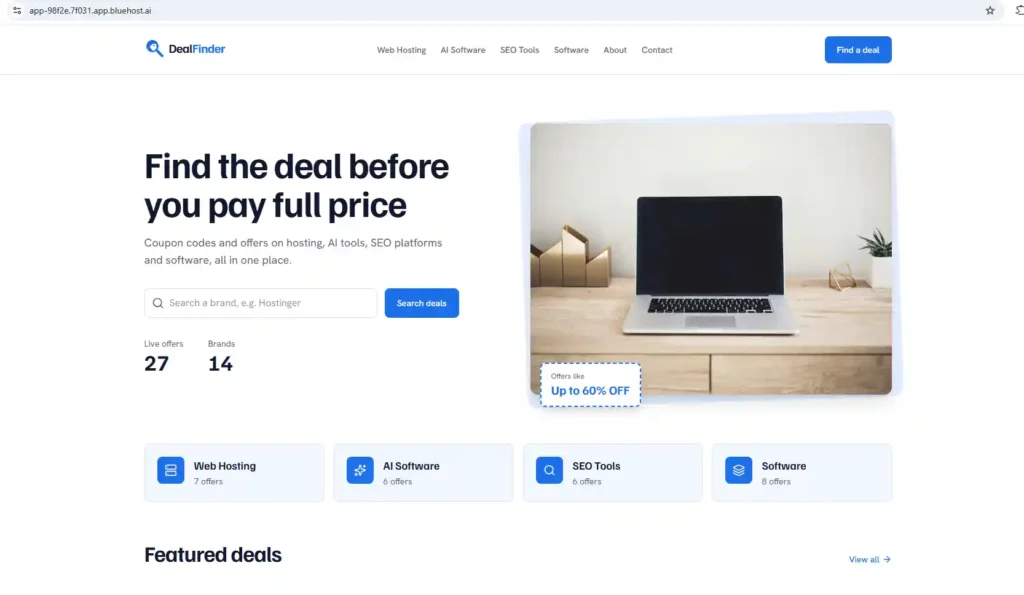
The website also included separate category pages. For example, the Web Hosting Deals page has its own heading, brand search, sorting controls, coupon listings and a directory of hosting providers.
The initial published website displayed 14 brands and 27 offers across the four categories.
Administrative Dashboard
Another interesting part of the generated website was its management dashboard.
The dashboard included sections for:
- Brands
- Categories
- Coupons
- Users
- Messages
- Business details
- Secrets
It also displayed summary information such as active coupons, expired offers, Get Deal clicks, messages and popular coupon records.
The Brands section included options to add and edit providers, while the Coupons section provided controls for creating and managing offers.
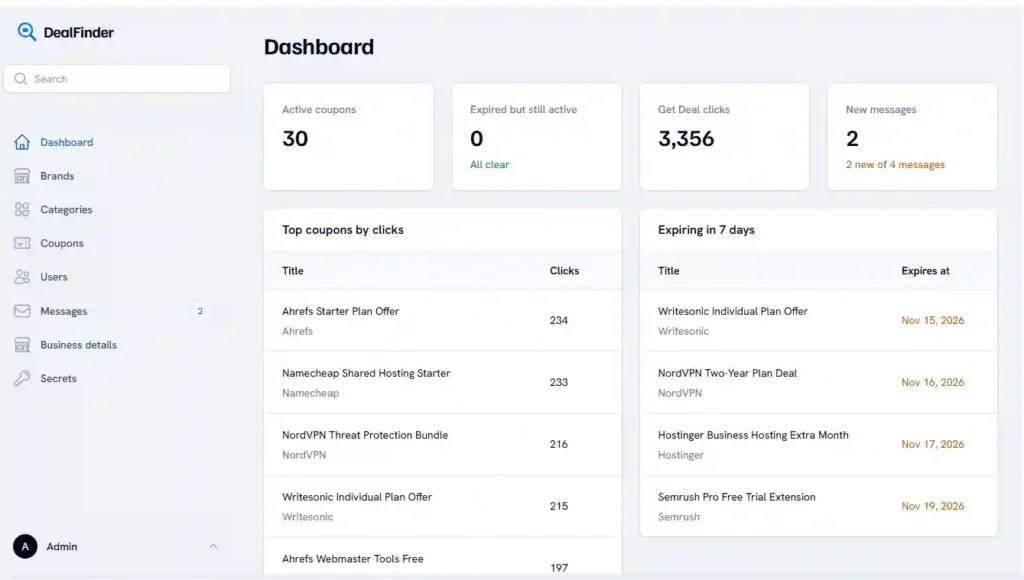
The initial records and statistics included demonstration data. Therefore, I treated the sample coupon offers and dashboard figures as test data rather than genuine business activity.
My Initial Impression
I was impressed that a single detailed prompt produced a website with multiple sections, separate category pages, coupon cards and a management interface in around six and a half minutes.
However, a website that looks complete is not necessarily functional. I therefore proceeded to test its search, Copy Code and Get Deal buttons manually before moving on to importing real affiliate partners.
The initial generation gave me a useful foundation for the rest of my hands-on testing.
Importing 11 Hosting Affiliate Partners Using an Excel Spreadsheet
After generating the initial DealFinder website, I wanted to test whether Bluehost AI Builder could import existing business data rather than requiring me to add every hosting provider manually.
I already had an Excel spreadsheet containing 11 hosting providers and their affiliate URLs. The nine new brands were HostArmada, Verpex, InterServer, InMotion Hosting, GreenGeeks, BigRock, IONOS, MilesWeb and AccuWeb Hosting.
I uploaded the workbook and instructed the builder to:
- Add all listed providers to the existing Web Hosting category.
- Update existing brand records instead of creating duplicates.
- Save the complete affiliate URLs without changing their tracking parameters.
- Find and assign appropriate brand logos.
- Preserve the existing sample coupon offers without creating unverified discounts or codes.
Import Results
The builder reported that it successfully read all 11 provider records, adding nine new brands and updating two existing records.
The following table summarises the result.
| Import Result | Number |
|---|---|
| New brands added | 9 |
| Existing brands updated | 2 |
| Total providers processed | 11 |
Note: Before the import, DealFinder already contained Namecheap and SiteGround as sample hosting brands. From the 11 providers in my spreadsheet, the builder added nine new brands and updated the existing Bluehost and Hostinger records rather than creating duplicates. After the import, the Web Hosting directory displayed 13 providers in total.
For readers comparing hosting services, see my guide to the best blog hosting providers for 2026.
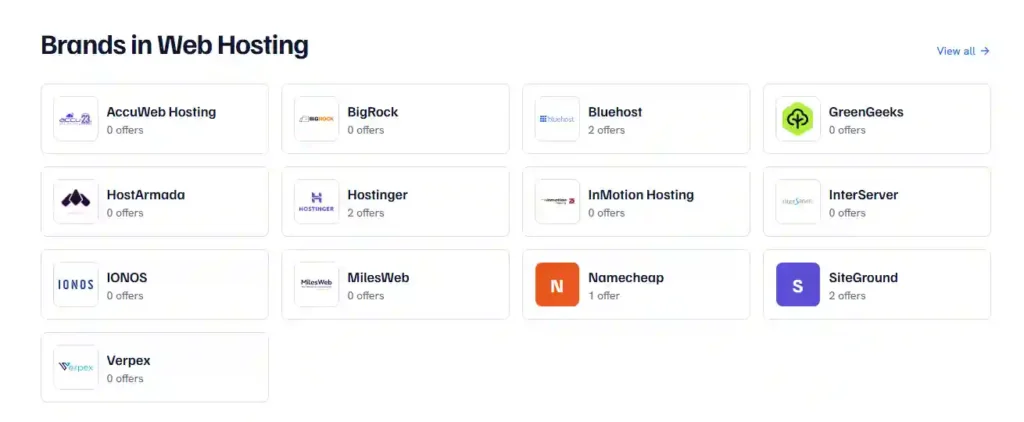
The imported providers appeared in the Web Hosting brand listing. The nine newly added providers initially showed zero offers because we had not supplied coupon offers for them. The existing Bluehost and Hostinger records retained their existing offers.
Logo handling: an important observation
The builder attempted to retrieve the hosting providers’ logos automatically, but the results were not completely consistent.
During testing:
- HostArmada: Used a logo from a public company profile because its website did not provide a usable logo file.
- Hostinger: Used a logo from Wikimedia Commons.
- GreenGeeks: Displayed only its icon.
- InMotion Hosting: Used its 25th-anniversary logo.
- IONOS: Initially displayed a broken image placeholder instead of the logo.
The builder had updated the existing Bluehost and Hostinger brand records rather than creating duplicate entries.
I later asked the AI Builder to check and include the missing IONOS logo in a follow-up prompt while generating the SEOWriting.ai coupon content. It successfully corrected the issue.
This showed that the builder could retrieve and assign brand images, but the results still needed to be checked manually. Follow-up instructions were useful for correcting the missing logo.
Affiliate Link Redirects: An Important Finding
Bluehost AI Builder uses internal redirect URLs for individual coupon buttons instead of displaying the original affiliate links directly.
For example, a Bluehost offer uses an address such as:
https://app-98f2e.7f031.app.bluehost.ai/go/bluehost-wordpress-starter-offer
When visitors click Get Deal, they first pass through this internal /go/ route before being redirected to the merchant.
Understanding How Affiliate URLs Work
The internal URL displayed on the live website does not mean the original affiliate link has been replaced. I found that affiliate URLs are stored at the brand level in the admin dashboard, while individual coupon offers have their own Deal URLs.
When a brand-level Affiliate URL is saved, the internal redirect uses it instead of the ordinary Deal URL. This means multiple offers from the same brand can share one affiliate destination, even though their front-end buttons display different /go/ addresses.
Testing Affiliate Tracking
I wanted to check whether this additional redirect layer would preserve affiliate tracking. I replaced the general Bluehost affiliate URL saved in the brand settings with my dedicated Impact tracking link for Bluehost AI Builder.
After saving and publishing the changes, I tested the live Get Deal button and checked Impact’s Individual Click Action Listing report.
The report identified DealFinder’s Bluehost AI Builder subdomain as the referring website and recorded an entry for the dedicated Bluehost AI Builder advertisement (Ad ID: 4131511). The final destination also contained the expected Impact tracking parameters.
The report showed another entry associated with my earlier general Bluehost advertisement, but both records contained the same click ID, so I have not counted them as two separate visitor clicks.
My assessment: The internal /go/ redirect can preserve affiliate tracking. In my test, Impact successfully identified DealFinder as the referring website. This centralised approach is useful for coupon directories because affiliate destinations can be managed at the brand level without displaying the original tracking links on every coupon button.
Testing Search, Coupon Copying and Get Deal Buttons
A coupon website needs working controls, not just attractive coupon cards.
I manually tested three important functions:
1. Search functionality
I searched for hosting brands and checked whether the relevant records appeared.
The search worked as expected during my tests.
2. Copy Code
I clicked the Copy Code button on a coupon card and pasted the result into a text editor.
The coupon code was copied successfully.
3. Get Deal
I clicked the Get Deal button and confirmed that it redirected to the intended destination.
These initial functional tests were successful.
Testing Bluehost AI Builder as a Content Writer
I also wanted to see whether Bluehost AI Builder could do more than create website layouts. Could it research products and generate complete brand pages for a coupon directory?
To test this, I selected two platforms familiar to TechFin2k: SEOWriting.ai and Foenix.ai.
I provided their affiliate links and coupon details, then instructed the AI Builder to research each product using the provider’s official website and create descriptions, key features, benefits, target audience information, FAQs and coupon redemption instructions.
SEOWriting.ai
I asked the builder to add SEOWriting.ai with two offers:
- TECHFIN – 25% OFF monthly plans.
- TECHFIN – 50% OFF yearly plans.
It generated a detailed brand page containing a platform overview, target audience information, six key-feature sections, practical benefits, seven FAQs and coupon redemption instructions.
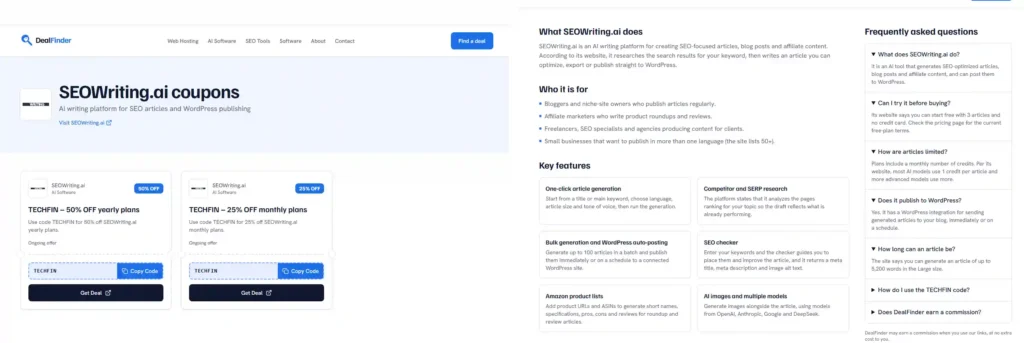
For a closer look at the platform and its AI article-generation capabilities, read my SEOWriting.ai review.
Foenix.ai
Next, I asked it to add Foenix.ai with this offer:
- TECHFIN – 30% OFF the first month.
It generated a similar brand page containing an overview, target audience information, six key-feature sections, practical benefits, seven FAQs and redemption instructions. The content covered Foenix’s WordPress AI agent capabilities, including chat-based actions, visual editing, scheduled agents, website building and its Verifier agent.
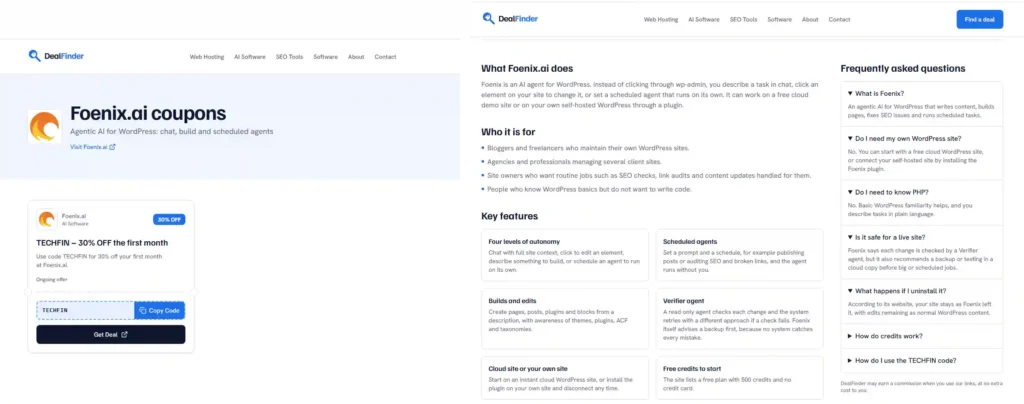
For a more detailed look at the platform, see my Foenix AI Review 2026, where I tested its WordPress automation capabilities.
My Experience
This was one of the most impressive parts of my test. Apart from providing the affiliate links and coupon information, I did not write or supply the product descriptions, feature explanations, benefits or FAQs.
I instructed Bluehost AI Builder to research the products from their official websites and generate the content. It created two detailed brand pages with relatively little input from me.
I also cross-checked the generated descriptions and feature information against the providers’ official websites and found the content accurate at the time of my testing.
This demonstrated that Bluehost AI Builder can function as more than a website builder. It can also act as an AI content writer, researching products and turning the information into structured brand pages for a coupon directory.
Another interesting result was how quickly the builder completed this work. It generated both brand pages, including 14 FAQs in total, as part of a combined update that also added three coupon offers and corrected the missing IONOS logo. The entire operation took approximately three minutes.
Website Design and Mobile Responsiveness
DealFinder uses a blue-and-white visual design with a straightforward navigation structure.
The homepage includes several sections to help visitors discover offers:
- A hero section with brand search.
- Category cards.
- Featured deals and trending offers.
- Popular brands.
- Latest offers.
The separate Web Hosting Deals page has its own heading, brand search, sorting controls, coupon listings and hosting-provider directory.
The AI Software section displays the three TECHFIN offers I created for SEOWriting.ai and Foenix.ai.
I also checked the website on my mobile device. The navigation, coupon cards, Copy Code and Get Deal buttons, and hosting-provider directory adapted to the smaller screen. The screenshots below show different sections of the website in its mobile layout.
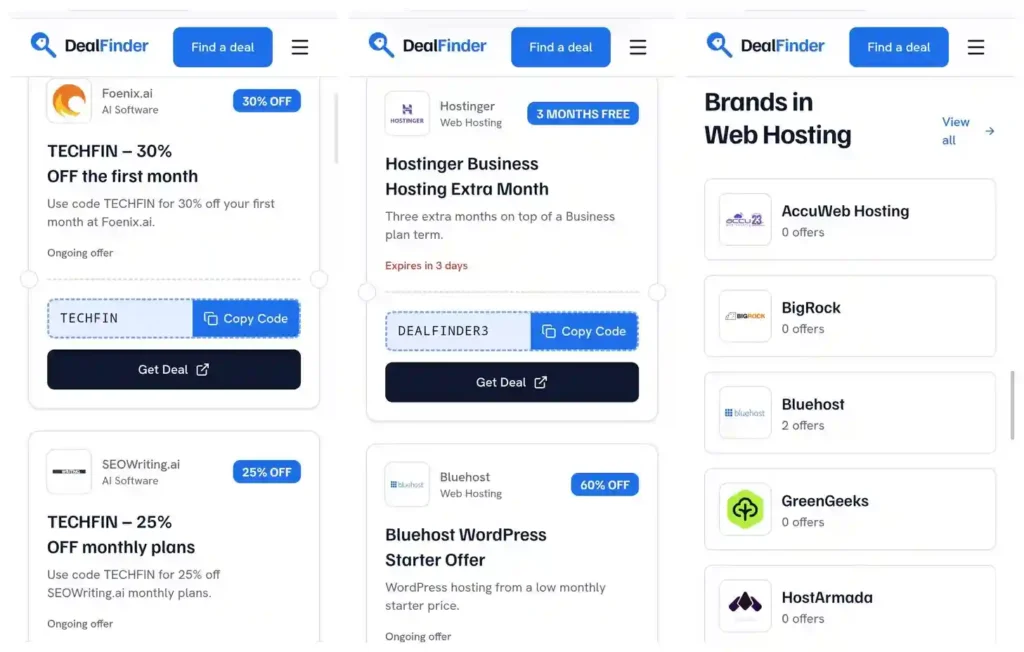
Overall, I found the design clean, visually consistent and reasonably easy to navigate on both desktop and mobile devices.
Publishing the Website on the Free Plan
Once I was satisfied with the initial version, I published DealFinder.
Bluehost automatically assigned a free address ending in .app.bluehost.ai.
The published website opened successfully, and I confirmed that the live version displayed the generated design.
An observation during publishing: On my test, the builder continued to show the publishing process as in progress for an extended period, even though the website was already accessible at its assigned subdomain. So, the publishing indicator did not necessarily reflect whether the website was already live.
An important detail from my test: publishing did not consume an AI credit. I also made subsequent changes through the builder and published the updated version without consuming additional credits.
The free plan does not allow a custom domain connection. A paid plan is required to connect an existing domain or purchase a new one.
The free subdomain is also not indexed by search engines, so this plan is better suited to testing and experimentation than launching an SEO-focused public business website.
Bluehost AI Builder Limitations
Although my overall experience was positive, there are some limitations worth considering before choosing Bluehost AI Builder for a public website or business project.
1. Free Subdomain and Custom Domain Restrictions
Websites published on the free .app.bluehost.ai address are not indexed by search engines.
This is a significant limitation if your main objective is to attract organic search traffic. The Free plan does not allow you to connect an existing custom domain.
You need to upgrade to Lite, Standard or Pro to connect your own domain and publish your website using your preferred address.
A paid custom domain makes search engine indexing possible, but it does not guarantee that Google will index your pages or that they will achieve search rankings.
2. No Built-In E-commerce Functionality
The standalone Bluehost AI Builder currently does not support building a complete e-commerce store with product catalogues, shopping carts, checkout and online payment processing.
If you want to sell products online, Bluehost offers a separate product called AI Store, which uses WooCommerce to power its e-commerce functionality. You can also choose traditional WordPress hosting with WooCommerce.
However, these are separate solutions rather than e-commerce features available directly within the standalone AI Builder tested in this review.
Bluehost’s current documentation does not provide a confirmed release date for adding e-commerce functionality to this AI Builder.
3. Limited AI Credits
The free plan provides five credits per day, up to 30 credits per 30-day period.
Each message that creates or changes the website consumes one credit, regardless of how many changes are included in the request. Frequent modifications can exhaust the allowance, so it is worth combining related changes into well-planned prompts.
During my testing, I also received another five credits on the following day, confirming the daily credit replenishment.
4. No Built-In Backups, Version History or Source Code Access
Bluehost AI Builder currently does not include restorable backups, version history or a built-in data export feature.
You also cannot directly access or export the website’s underlying source code or use FTP to move the project to another hosting platform.
However, you can ask the AI Builder to add a CSV export option to your admin dashboard and download copies of important data.
This is worth considering if you plan to build a larger website or application that stores important business information. Keep your own copies of important content, uploaded files and data.
5. No Built-In Website Analytics
Bluehost AI Builder does not currently provide built-in website analytics for monitoring visitor numbers or traffic sources. Although my DealFinder dashboard displayed some application-level information, such as Get Deal clicks and popular coupon records, it did not provide a complete website traffic analytics system.
If you plan to operate a public business or affiliate website, consider how you will monitor visitors and traffic sources using external analytics tools.
6. Production Readiness Requires Additional Checks
The builder can generate a functional website quickly, but you should review sample data, replace placeholder business details, verify coupon codes and expiry dates, check brand logos and test all important functions before promoting the website.
My recommendation: Before publishing a website for real visitors, check its content, images, affiliate links, forms and other important functions.
For additional information, refer to Bluehost’s official guide:
Who Should Use Bluehost AI Builder?
Based on my hands-on testing, Bluehost AI Builder may be worth exploring for:
- Beginners who want to create websites without coding.
- Small businesses looking to establish an initial online presence.
- People experimenting with website and application ideas.
- Users who want to build simple directories, trackers, booking systems or browser-based tools.
- Entrepreneurs who want to test an idea before investing in a custom domain.
However, it may not be the best choice for users who need complete control over website files, extensive customization options or more advanced development capabilities.
Overall, it is a useful option for beginners and anyone who wants to turn an idea into a working website or application without getting involved in traditional development.
Final Verdict: Is Bluehost AI Builder Worth Trying?
My hands-on experience with Bluehost AI Builder was encouraging. I was able to build a coupon directory, import 11 hosting providers using Excel, create individual brand pages, add coupon offers, generate product descriptions and FAQs, and publish the website using a free Bluehost subdomain.
The initial website was generated in approximately six and a half minutes. A later combined update involving new brands, coupon offers, researched content and a logo correction took about three minutes and consumed just one AI credit.
The search, coupon-copying and Get Deal functions worked in my manual tests, and the website displayed properly on mobile devices.
I also tested affiliate link tracking using Impact. Although the builder displays its own internal /go/ URLs on the live website, the original affiliate tracking link was successfully used as the redirect destination. Impact recorded the test and identified my Bluehost-hosted DealFinder subdomain as the referring website.
The free plan makes it possible to experiment with website and application ideas without an initial subscription payment. However, the restrictions on custom domains, search engine indexing and e-commerce functionality are important considerations when moving towards a production website.
My conclusion: Bluehost AI Builder is a promising no-code website and application creation tool, particularly for beginners, small businesses and people looking to turn an idea into a working website quickly. Its free plan, conversational editing, spreadsheet import and AI-powered content generation make it worth exploring. While it is not a complete replacement for WordPress or a dedicated e-commerce platform, it offers a practical way to build and test a working website without traditional development.
Ready to Build Your Own Website with AI?
Give Bluehost AI Builder a try and turn your website idea into a working project. Start with the free plan and explore its AI-powered website and app creation features.
Try Bluehost AI Builder for Free →No credit card required to start. The free plan includes 5 daily credits, up to 30 credits per 30 days.
Frequently Asked Questions
1. Is Bluehost AI Builder free?
Yes. The AI Builder Free plan costs $0, does not require a credit card and has no fixed end date. It includes five credits per day, up to 30 credits per 30-day period.
2. Does publishing a website consume AI credits?
No. Publishing, republishing and sharing a website do not consume AI credits. However, each message that creates or modifies your website consumes one credit, regardless of the number of changes requested.
3. Can I connect my existing domain on the free plan?
No. The free plan publishes your website on an automatically generated Bluehost AI Builder subdomain ending in .app.bluehost.ai. Connecting your existing domain requires a paid plan.
4. Will a free Bluehost AI Builder website be indexed by Google?
No. Websites published on the free .app.bluehost.ai address are not indexed by search engines. A paid plan allows you to connect a custom domain, making search engine indexing possible. However, indexing and search rankings are not guaranteed.
5. Do I need coding knowledge to use Bluehost AI Builder?
No. You can describe your website and its required features using natural-language prompts. The AI generates the initial website and allows you to request changes through conversational instructions.
6. Can Bluehost AI Builder create an application as well as a website?
Yes. It can create browser-based websites and web applications that work on computers, tablets and mobile devices. However, it does not currently create native Android or iOS applications for distribution through Google Play or Apple’s App Store.
7. Can I build an online store using Bluehost AI Builder?
The standalone Bluehost AI Builder does not currently support selling products or processing online payments. For e-commerce functionality, Bluehost offers its separate AI Store, which uses WooCommerce, as well as traditional WordPress hosting with WooCommerce.
8. Can I change my website after publishing?
Yes. You can continue making changes through the AI Builder chat. After making changes, publish or update your website again to ensure the latest version is reflected on the live website.
9. What happens when I run out of AI credits?
You can wait for your credits to refresh, purchase a credit top-up or upgrade to a paid plan. Credit top-ups are also available on the Free plan. Your already published website remains online even when you run out of credits.
10. Is Bluehost AI Builder suitable for affiliate websites?
Yes. It can create brand directories, coupon listings and affiliate redirect buttons. It also supports internal /go/ redirect URLs that forward visitors to the saved affiliate destinations. In my testing, Impact successfully recorded a test click and identified my Bluehost-hosted DealFinder subdomain as the referring website. However, I recommend testing your own affiliate links and checking the respective affiliate dashboards after publishing.
About the Author
I’m Radhika Vatlam, the founder of TechFin2k, where I publish real, data-backed reviews of web hosting, AI writing tools, WordPress optimization, and website growth strategies. My goal is simple: test everything personally and share honest, practical results that beginners can trust.
Enjoying our content?
Make TechFin2K a preferred source on Google to see more of our content when it is relevant to you.
