

SEOWriting.AI recently introduced its new SEOWriting Engine for both the One-Click Blog Post and Super Page tools. For this SEOWriting.AI review, I tested the One-Click Blog Post feature using the keyword “WordPress page builder plugin” to see how it performs.
During the test, I explored features such as matching the article type and length to Google’s top 10 search results, real-time Search Data, AI-generated images, automatic internal and external linking, and WordPress integration.
In this article, I’ll walk you through my experience, including what worked well and what needed manual editing before the article was ready to publish.
How to Create an Article Using SEOWriting.AI’s One-Click Blog Post
SEOWriting.AI offers several settings to customize your article, including the title, writing style, images, links, web research, and publishing options. I’ll walk you through the settings I used for my test article and explain my choices along the way.
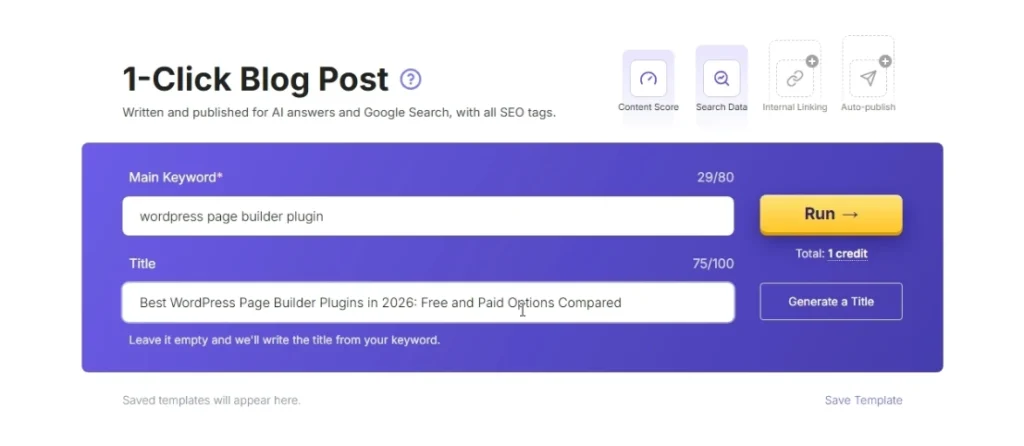
1. Enter Your Keyword and Choose a Title
First, select One-Click Blog Post and enter your target keyword. For my test, I used “WordPress page builder plugin.”
Next, you can generate a title using AI or enter your own. I tried the title-generation option, but the suggested title was less specific than I wanted for a comparison article. So, I chose my own: “Best WordPress Page Builder Plugins in 2026: Free and Paid Options Compared.”
With the keyword and title set, I moved on to the other settings to customize the article before running the generation process.
2. Configure the Core Settings
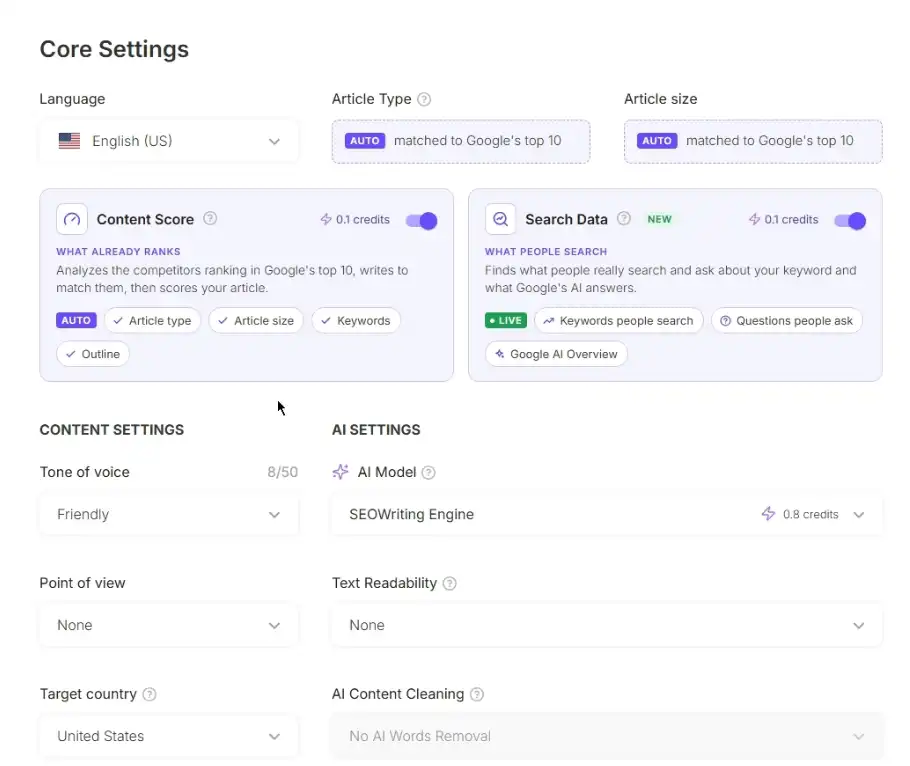
After locking in the title, I moved to the Core Settings section to define the language, article structure, and search intent analysis.
- Language: I kept the default, English (US). SEOWriting.AI also supports multiple other languages.
- Article Type and Article Size: I selected the option to match Google’s top 10 search results. This automatically instructs the AI to analyze current top-ranking pages for “WordPress page builder plugin” and adapt the content format and target word count accordingly.
- Search Data: I enabled Search Data in Live mode (which costs 0.1 extra credits). Rather than just scraping generic text, this setting specifically analyzes Google SERP intent, popular search questions, and Google’s AI Overview for the keyword so the outline matches what is currently ranking.
Once these structural parameters were set, I moved to content settings.
3. Customize the Content Settings
Next, I configured the writing style, voice, and content parameters to control how the article would be written.
- AI Model: I selected the SEOWriting Engine, which is designed for SEO-focused content generation. The platform also offers other models, including options such as GPT-6 Astra, Claude Opus 5.5, GPT-6 Luna, Claude Haiku 5.5, and DeepSeek V4.1 Flash, among others, to suit different writing and reasoning needs.
- Tone of Voice: I chose Friendly to keep the comparison approachable and easy to digest for readers.
- Point of View: I selected First Person Singular (I, me, my), which fits my blogging style since I run TechFin2k.com on my own.
- Text Readability: I kept the recommended 8th–9th grade readability level to make the guide clear and accessible.
- Target Country: I selected the United States as the target country.
- AI Content Cleaning: I enabled Extended AI Word Removal. This option is intended to remove common AI-style words and expressions, repetitive phrasing, and unnecessary filler, helping the article sound more natural and less formulaic.
- Brand Voice: I selected my saved custom brand voice, Practical Guide for TechFin2k, to help the generated article follow my website’s writing style.
- Details to Include: I added custom instructions asking the AI to:
- Compare free and paid WordPress page builder plugins, including their key features, pricing, pros, cons, and recommendations.
- Include a structured comparison table.
- Cover the native WordPress block editor (Gutenberg) and Gutenberg extensions.
- Use concise language and verify technical details against official sources.
Once these content settings were in place, I moved on to media generation and SEO settings.
4. Configure Media Hub and SEO Settings
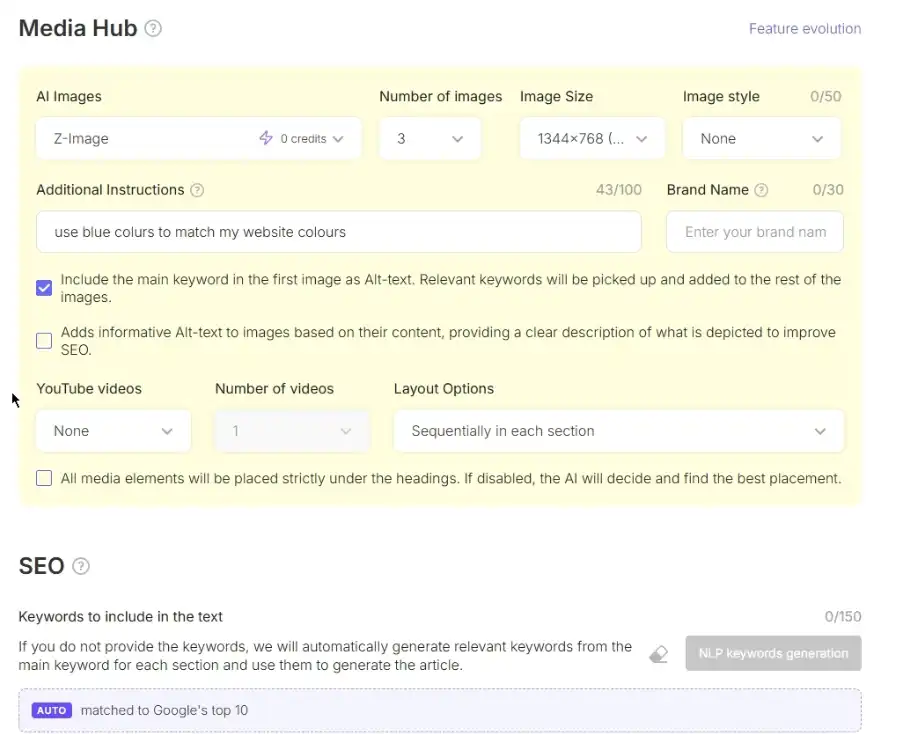
Next, I moved to the Media Hub section to configure visual assets and video embeds for the article.
- Image Model: I selected Z-Image, which was available without additional generation credits. The platform also offers premium image models like Nano Banana at an additional cost.
- Image Count & Dimensions: I set the tool to generate 3 images in a 1344 × 768 landscape format.
- Custom Style Instructions: I added a brief prompt specifying blue accent colours to align the generated visuals with TechFin2k’s website colour scheme.
- YouTube Embeds: I set the video count to zero because the tool selects videos automatically, and I couldn’t choose specific videos from my own YouTube channel.
SEO Settings: NLP keywords are automatically included in the article based on the AI model selected in the Content Settings.
5. Configure the Article Structure
Next, I configured the Structure settings to control the layout, formatting elements, and structural components for the article.
- Introductory Hook: I selected Question to open the post with an engaging prompt for readers.
- Core Layout Elements: I enabled Conclusion, H3 Headings, Lists, and Key Takeaways to break up long blocks of text and make the content easier to scan.
- Comparison & FAQ Sections: I enabled Tables to compare free and paid page builder features side by side, and FAQs to cover common questions.
- Styling Options: I disabled Italics and Quotes to keep the formatting clean and simple.
With the article structure defined, I moved on to internal linking, external linking, and web research.
6. Configure Internal Linking, External Linking, and Web Research
Next, I configured the linking options and web research settings to help the AI include relevant links and use up-to-date information when generating the article.
- Internal Linking: I selected TechFin2k as the website, set the number of links to 3–4, and chose to distribute them evenly throughout the article. I selected dofollow links placed within the text.
- External Linking: I selected Automatic and set the number of links to 1–2. I chose nofollow links, distributed evenly throughout the text, and disabled external links in the FAQs.
- Connect to Web: I enabled Real-Time Search Results and selected Last Month as the source date range. When this option is enabled, SEOWriting.AI can use recent web information during content generation. If it is disabled, the AI relies on its pre-trained knowledge instead of retrieving current search results for the article. Search Data provides search-related insights, such as queries and questions people are interested in, while Connect to Web allows the AI to retrieve recent web information during content generation. They serve different purposes.
With the linking and web research settings configured, I moved on to Syndication, which lets me choose social platforms where I want to share content related to the generated article.
7. Configure Syndication
Next, I moved to the Syndication settings, where you can configure social media promotional content alongside the main article generation.
- Social Platforms (X, LinkedIn, Facebook): I enabled X (Twitter), LinkedIn, and Facebook because I actively use these platforms to share content.
- Disabled Platforms: I left Email, WhatsApp, and Pinterest disabled because I don’t currently use them for sharing my articles.
- Page Link: I left this field empty because the article had not yet been published, so I didn’t have a live URL to add.
With syndication configured, I moved on to the final step: setting up the WordPress publishing options.
8. Outline Editor
SEOWriting.AI also includes an Outline Editor to customize the structure of an upcoming article. You can generate an outline based on top-ranking search results using the Magic Bag button when Connect to Web is enabled, add headlines manually, and rearrange them using drag-and-drop. Outline generation is powered by the platform’s top-tier AI model.
In my initial setup, the outline was set to Auto, matched to Google’s top 10 results, but no keyword or title was displayed in the editor. I left this section unchanged and continued with the remaining settings.
9. Configure WordPress Publishing Settings
Finally, I configured the publishing settings to send the generated article to my WordPress website.
- Website: I selected techfin2k.com.
- Content Type: I selected Post to create a blog post.
- Publishing Status: I chose Draft so I could review and edit the generated article before publishing it.
- Categories: I selected Technology and WordPress.
- Other Settings: I left the remaining options at their default values.
With the settings configured, I was ready to generate the article using SEOWriting.AI’s new SEOWriting Engine.
10. Generate the Article
After configuring all the settings, I started generating the article. The process took around 5 minutes to complete, and SEOWriting.AI generated a draft titled “Best WordPress Page Builder Plugins in 2026: Free and Paid Options Compared.”
You can also read the WordPress page builder plugins comparison created during my SEOWriting.AI test to see how the generated content looks in a real article.
What Did SEOWriting.AI Generated Based on My Settings?
After configuring the settings and generating the article, I reviewed the output to see whether SEOWriting.AI followed my instructions and included the elements I had selected.
Overall, the tool generated the main elements specified in my settings. The article included an introduction, key takeaways, individual plugin sections, a comparison table, a conclusion, and FAQs. It also generated three AI images, added three internal links and two external links, and prepared social media content through the syndication settings I had enabled.
The generated article was more than 4,000 words long, and the generation process took approximately five minutes. The Content Score was 71.
At this stage, I found that the tool had included the main elements I requested. However, this did not necessarily mean that every detail was accurate or that the article was ready to publish. I therefore reviewed the generated content section by section to check its completeness, pricing accuracy, links, images, and overall quality.
Let’s look at the individual sections and features in more detail.
SEOWriting.AI Review: Testing the Generated Article
After generating the article, I reviewed the output to assess its content quality, structure, images, and links. I also checked the content score and identified areas that needed manual corrections before the article would be ready to publish.
Search Data and Search Insights
I also checked the “Searches people make” section displayed by SEOWriting.AI. It showed 6 of 6 searches in the article, including:
- Free WordPress page builder plugin
- Best WordPress page builder plugin
- Fastest WordPress page builder
- Best WordPress editor plugin
- WP Builders
- WordPress editors
These phrases provide an idea of the different ways people search for WordPress page builders and editors.
Another interesting feature was the selection of reference articles. SEOWriting.AI displayed existing articles from websites such as WP Mail SMTP, WP All Import, Experte, and WP Marmite, along with other page-builder comparison articles. These were selected as reference sources for content generation, giving the AI examples of existing content and its coverage of the topic.
I found this useful because the tool did not rely only on the target keyword. It also provided search-related phrases and existing articles as references when preparing the content. I used these results as a starting point when reviewing the generated article’s topic coverage and structure. starting point when reviewing the generated article’s topic coverage and structure.
Article Introduction, Key Takeaways, and Topic Coverage
The generated article began with an introduction to WordPress page builders, followed by a Key Takeaways section highlighting the main points for readers. It also explained what WordPress page builders are before moving into the individual plugin reviews and comparisons.
I reviewed these opening sections to see how the SEOWriting Engine introduced the topic and organized the information for readers. The article then moved on to the individual plugin reviews, covering their features and available plans, along with a comparison table.
WordPress Page Builders Covered in the Article
The generated article, “Best WordPress Page Builder Plugins in 2026: Free and Paid Options Compared,” covered nine plugins: SeedProd, Elementor, Bricks, Divi, Beaver Builder, Breakdance, Brizy, Thrive Architect, and SiteOrigin.
Each plugin had its own section covering its features and pricing. The article also included a separate comparison table to help readers compare the available options.
During my review, I found that some pricing details were inaccurate and needed correction. I also noticed issues with the comparison table, which I’ll cover separately.
Comparison Table: Pricing and Missing Plugins
The generated comparison table included only five of the nine plugins covered in the article: SeedProd, Elementor, Bricks, Divi, and Beaver Builder. Breakdance, Brizy, Thrive Architect, and SiteOrigin were missing from the table.
I also found inaccuracies in some of the original prices generated by SEOWriting.AI. For example, the tool listed Elementor at $59 per year, Divi at $89 per year, and Beaver Builder at $99 per year. After checking the pricing details, I corrected these entries to $60, $79, and $89 per year, respectively. The other entries were retained in the updated table.
To make these changes, I used the AI Editor’s Ask AI feature and supplied the correct prices in my instructions. The editor did not perform a live search to verify the latest pricing during this process, so I had to check the prices myself and provide the information needed for the corrections.
The updated table now reflects the revised prices and license details. However, the four missing plugins would still need to be added to provide readers with a complete comparison of all nine plugins reviewed in the article.
Individual Plugin Sections and Pricing Accuracy
Apart from the comparison table, I also reviewed the individual sections for all nine WordPress page builder plugins to check their features, pricing details, and plan information.
I noticed that Elementor and Bricks did not include pricing details in their respective sections, even though their prices were listed in the comparison table. I used the AI Editor’s Ask AI feature to add the missing pricing information.
I also found pricing discrepancies in several other plugin sections. Divi and Beaver Builder had incorrect prices, while Breakdance included a “Pro Plus” plan that I could not find among its available plans. Brizy and Thrive Architect also had pricing details that needed correction. SeedProd and SiteOrigin appeared to have accurate pricing information during my checks.
As mentioned in the comparison table section, the AI Editor did not perform a live search to verify the latest prices, so I had to provide the correct pricing details in my instructions.
Overall, although SEOWriting.AI generated detailed sections for all nine plugins, the pricing information required manual verification and corrections before the article was ready to publish.
Content Quality and Accuracy
Although SEOWriting.AI generated a detailed article with a clear structure, I noticed some repetition during my review.
For example, the article explained the differences between the WordPress block editor, Gutenberg extensions, and full page builders across multiple sections. It also repeated similar advice about testing pages safely, checking compatibility, and choosing features according to individual needs.
These points are useful, but some explanations could have been consolidated to make the article more concise and easier to read. I would therefore recommend reviewing the generated content for repetition and refining the wording before publishing.
Internal and External Links
Based on my settings, SEOWriting.AI added three internal links and two external links to the generated article. I checked the links to see whether they opened correctly and were relevant to the surrounding content.
All three internal links opened successfully. The link to my website-building guide was relevant to the introductory discussion, and the WordPress setup guide fitted the section about hosting, caching, and performance. The link to my Hostinger backup and restore guide also worked, although its placement in the performance discussion was less directly related to the surrounding text.
Both external links also opened successfully. One linked to SeedProd’s website from its dedicated section, while the other linked to the Thrive Architect product page from the corresponding plugin section.
Overall, the links were functional, and most were relevant to the content around them. However, checking that a link works is not enough; its placement and relevance also matter. I found that one internal link could have been placed in a more suitable context.
AI-Generated Images
SEOWriting.AI generated three images for my article based on the image settings I selected. I chose the Z-Image model, specified a blue colour scheme to match my website, and requested images at 1344 × 768 resolution.
The generated images were related to the article topic and were automatically placed within the content. However, when I reviewed them, I noticed that some of the text appearing inside the images contained irrelevant words, spelling mistakes, and was not clearly readable.
Since I used the free Z-Image model, users who want to experiment with image quality and text rendering can also try other available models, although some may require additional credits. It is worth comparing the results before deciding which model works best for your article.
Overall, the images provided useful visual elements, but they still needed manual inspection before publishing.
Syndication: Social Media Posts Generated
SEOWriting.AI generated separate promotional content for X (Twitter), LinkedIn, and Facebook based on the article. I reviewed the generated posts to see how well they were adapted to each platform.
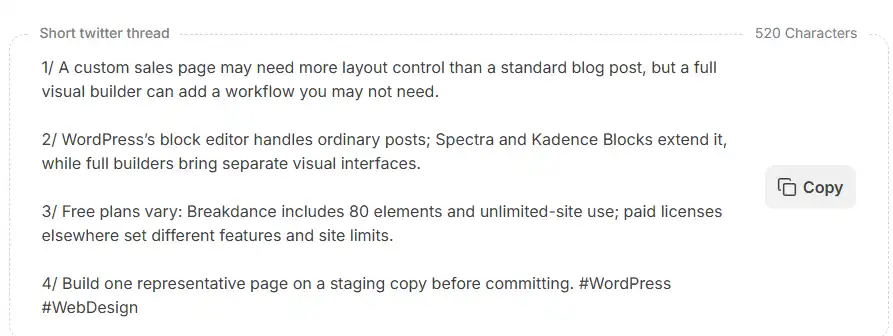 SEOWriting.AI generated platform-specific social media posts, with a Copy button for each post.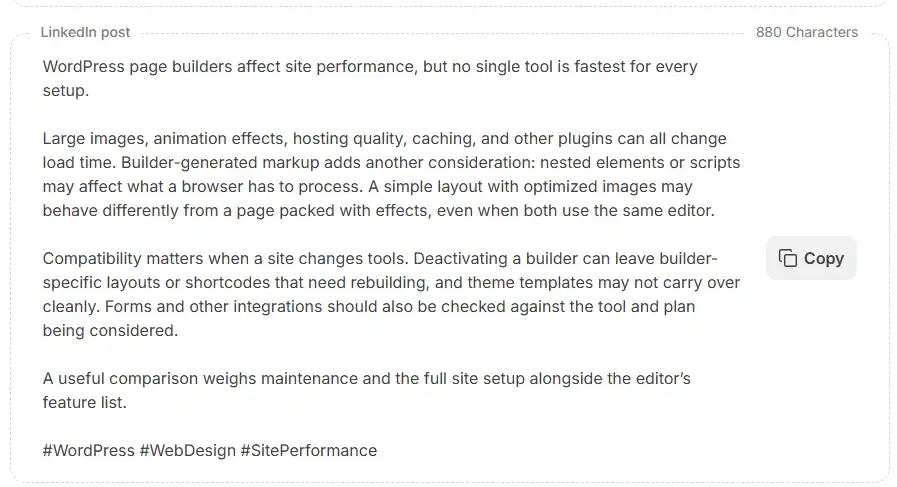
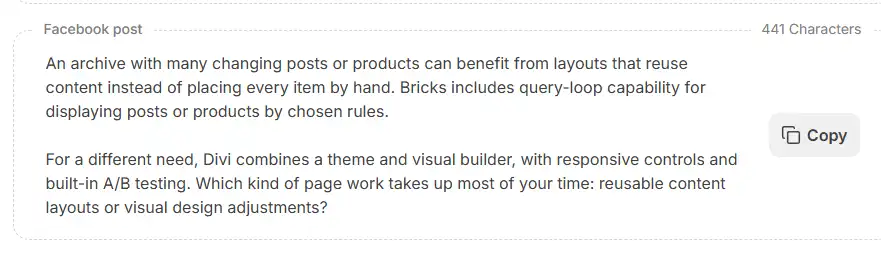 SEOWriting.AI generated platform-specific social media posts, with a Copy button for each post.
1. X (Twitter)
The tool generated a four-post thread covering the differences between WordPress editors and page builders, free-plan features, and the importance of testing a page before choosing a builder. It also included relevant hashtags.
Generated content length: 520 characters
2. LinkedIn
The LinkedIn post focused on WordPress page-builder performance, discussing images, animation effects, hosting, caching, builder-generated markup, and compatibility. It presented the information in a more detailed format and included relevant hashtags.
Generated content length: 880 characters
3. Facebook
The Facebook post highlighted Bricks’ query-loop capability and Divi’s visual design features. It also ended with a question encouraging readers to share their preferences.
Generated content length: 441 characters
My observation: The tool generated different content for each platform instead of simply reusing the same text everywhere. Each generated post also had a Copy button, allowing me to copy the content directly without selecting and copying the text manually. This makes social sharing easier, as you get platform-specific promotional posts that you can review, customize, and share on your social media accounts.
WordPress Draft and Rank Math SEO Analysis
After generation, I checked the article in my WordPress dashboard. The post was successfully created as a draft, and the two categories I had selected, Technology and WordPress, were assigned correctly.
The generated post also included its permalink, meta description, and five focus keywords.
- Permalink:
best-wordpress-page-builder-plugins-in-2026-free-and-paid-options-compared - Meta description: “Compare the best wordpress page builder plugin options for 2026, with free and paid picks, key features, pricing, pros and cons, and advice for your site.”
- Focus keywords: WordPress page builder plugin, WordPress page builder, WordPress page builders, page builder, and page builders.
The meta description was relevant to the article and clearly summarized its subject. However, the generated permalink was quite long and could have been shorter.
I also checked the article using the Rank Math SEO plugin, which showed an overall score of 82/100. The primary focus keyword, “WordPress page builder plugin”, appeared five times, including in the article title.
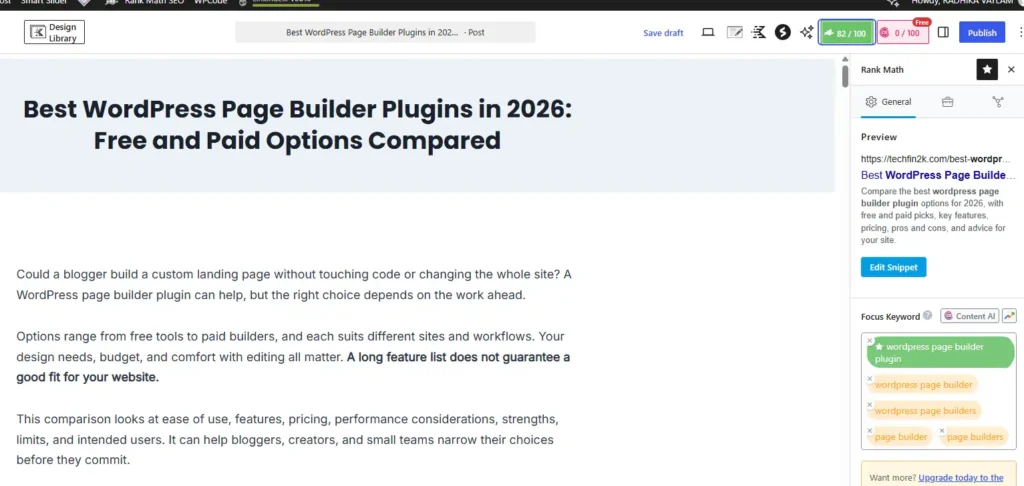
Rank Math also suggested changing the external links from nofollow to dofollow to improve the SEO score. These links had been set to nofollow according to my selected generation settings.
Overall, the article was successfully transferred to WordPress with its categories and SEO metadata. The permalink and keyword usage were among the details I reviewed as part of the SEO assessment.
Overall Experience: What Worked Well and What Needs Improvement
After testing SEOWriting.AI’s One-Click Blog Post feature with the new SEOWriting Engine, I found that it offers several useful options for generating long-form articles. The different settings allow users to customize the article structure, writing style, research, images, links, and social media content before starting generation.
If you’re exploring other AI-powered tools for your blogging workflow, you can also check out my guide to AI tools for bloggers
The tool generated the requested sections, three AI-generated images, internal and external links, and platform-specific social media posts. The generation used one credit, and the WordPress integration worked successfully, transferring the generated article directly to my website as a draft.
However, the generated content still required careful checking. I found incorrect pricing information, missing entries in the comparison table, repeated explanations, and issues with text appearing inside the AI-generated images. Some pricing details and sections needed manual corrections, and the generated permalink could also have been shorter.
Another important point is that the tool’s research and writing capabilities do not eliminate the need for fact-checking. During my test, I had to verify pricing information myself and provide the correct details when using the AI Editor’s Ask AI feature.
Overall, SEOWriting.AI provides a convenient way to create a detailed first draft and automate several parts of the content creation process. However, I would not recommend publishing the generated article without reviewing its accuracy, structure, links, images, and SEO details first.
SEOWriting.AI Pricing and Plans
| Plan | Monthly billing | Yearly billing |
|---|---|---|
| Starter | $19/month | $14/month ($168/year) |
| Professional | $79/month | $59/month ($708/year) |
| Professional Plus 1 | $159/month | $119/month ($1,428/year) |
| Professional Plus 2 | $307/month | $230/month ($2,760/year) |
The free option includes three articles. Paid plans offer higher article allowances, with the Starter plan supporting up to 50 articles, Professional up to 250, Professional Plus 1 up to 500, and Professional Plus 2 up to 1,000 articles.
Save 50% on Annual Plans with SEOWriting.AI Coupon Code TECHFIN
SEOWriting.AI already offers a 25% discount when you choose annual billing. You can save an additional 25% by applying my exclusive coupon code TECHFIN at checkout.
Here are the available discounts:
- Monthly plans: Get 25% OFF using TECHFIN.
- Yearly plans: Get a total of 50% OFF, including the existing 25% annual billing discount and an additional 25% coupon discount.
Coupon Code: TECHFIN
Enter the code at checkout to claim your discount. Discounts are calculated before applicable taxes.
Affiliate Disclosure: This article contains affiliate links. If you purchase SEOWriting.AI through my link, I may earn a commission at no additional cost to you. This helps support TechFin2k and allows me to continue creating tutorials and reviews.
Final Verdict: Is SEOWriting.AI Worth Trying?
Based on my hands-on test, SEOWriting.AI offers a convenient way to generate long-form SEO articles with several customization options. Features such as real-time search data, AI-generated images, automatic linking, WordPress integration, and social media content can simplify parts of the content creation workflow.
However, my test also showed that the generated content needs editorial attention. Pricing details, comparison tables, repetition, and image text required checking or correction. I would therefore treat it as a tool for creating a first draft rather than a replacement for content research, fact-checking, and editing.
For bloggers and website owners who regularly create content, it is worth trying the free option first to explore the interface. If you need more articles and additional features, you can compare the paid plans and use the TECHFIN coupon code for the available discount.
You can visit the SEOWriting.AI pricing page to check the plans and use TECHFIN at checkout.
Frequently Asked Questions About SEOWriting.AI
1. Can SEOWriting.AI generate a complete blog post with one click?
Yes. Its One-Click Blog Post feature can generate a complete article based on your keyword, selected settings, article structure, and other instructions. The generated content should still be reviewed and edited before publishing.
2. Does SEOWriting.AI support WordPress integration?
Yes. You can connect your WordPress website and send generated articles directly to your dashboard as drafts or publish them, depending on your selected settings.
3. Does SEOWriting.AI generate AI images and internal links automatically?
Yes. It can generate images and add internal and external links based on the settings you configure. You should check the image quality, link relevance, and accuracy before publishing.
4. Is SEOWriting.AI content ready to publish without editing?
Not necessarily. Based on my testing, some pricing information, comparison-table entries, and repeated explanations required manual review and correction. It is better to treat the generated article as a first draft.
Enjoying our content?
Make TechFin2K a preferred source on Google to see more of our content when it is relevant to you.
