
Last Updated on July 27, 2026 by RADHIKA VATLAM
AI tools have been helping website owners generate content for several years, but a newer category of tools is taking automation a step further: AI agents that can perform tasks directly on a website.
Foenix.ai is one such platform designed around AI agents for WordPress. Instead of simply generating text and leaving you to implement the recommendations yourself, Foenix aims to analyze a website, perform specific tasks, and make approved changes directly in WordPress.
But how well does that work in practice?
For this Foenix AI review, I wanted to go beyond reading the feature list or testing the platform with a simple demo website.
I connected Foenix to a WordPress test site containing content copied from TechFin2K and gave it a real task: analyze an existing long-form article, identify useful internal linking opportunities, respond to my feedback, and finally add an approved internal link directly to WordPress.
The result was more interesting than simply whether Foenix could insert a link.
After refining its analysis, Foenix proposed seven internal links. When I challenged several of those recommendations and asked it to apply stricter contextual criteria, it rejected six of its own seven suggestions, retained one, and then successfully added that approved link to WordPress.
In this article, I’ll show:
- How Foenix analyzed a real 4,430-word WordPress article
- Why 6 of its 7 refined internal-link recommendations were ultimately rejected
- Whether it successfully made the approved WordPress edit
- How much time and how many credits the complete test used
This is the first in a series of hands-on Foenix tests. I plan to test more of its WordPress automation capabilities separately rather than judging the entire platform from a single workflow.
Disclosure: I received access and testing credits from Foenix so I could evaluate the platform. I am also a Foenix affiliate. If you purchase through my affiliate link, I may earn a commission at no additional cost to you. The observations and results in this article are based on my own hands-on testing.
What Is Foenix AI?
Foenix.ai is an AI-powered platform built around the concept of using AI agents to perform WordPress website tasks.
This is somewhat different from the workflow of a typical AI writing tool.
With a conventional AI assistant, you might ask the AI to analyze an article, suggest internal links, or rewrite a section. You then have to review the output, open WordPress, find the appropriate section, make the edit yourself, and update the post.
An AI agent can potentially handle more of that workflow.
Instead of stopping at:
“What internal links should I add to this article?”
the broader workflow can become:
Analyze the website → Find relevant content → Recommend a change → Receive feedback → Refine the recommendation → Make the approved WordPress change.
That distinction was one of the main reasons I wanted to test Foenix.
Rather than judging the platform based only on its dashboard or advertised capabilities, I wanted to see whether an AI agent could complete a useful website-management task from analysis through execution.
For my first test, I chose internal linking.
Why I Chose Internal Linking for My First Foenix Test
Internal linking may sound like a simple SEO task, but doing it properly becomes increasingly time-consuming as a website grows.
A useful internal link is not just a link between two pages that happen to share similar keywords. It should fit naturally within the context of the source article and lead readers to genuinely useful related information.
Doing this manually can involve reading the target article, searching through existing content, comparing potentially relevant posts, choosing an appropriate destination, and finding natural anchor text.
This made internal linking a useful first test for Foenix.
I wasn’t interested in simply asking whether the AI could suggest some internal link. I wanted to test a more demanding workflow:
Could Foenix analyze an existing article, search the site’s content for relevant opportunities, respond intelligently to my feedback, and then make an approved change directly in WordPress?
That would test not only the quality of its recommendations but also how it handled the complete process from analysis to actual WordPress execution.
My Foenix AI Internal Linking Test Setup
I didn’t want to run my first experiment directly on the live TechFin2K website, so I created a separate WordPress test environment at foenix.techfin2k.com and copied my website content there.
This gave Foenix a realistic content library to work with while keeping the experiment separate from my main live site.
For the test:
- The target Hostinger Features Explained article was approximately 4,430 words long.
- The test website contained around 126 posts/articles.
- I started this specific test with 400 Foenix credits.
- Foenix was connected to the WordPress test site so it could analyze the content and, once approved, perform the final edit.
I set one important condition at the beginning: Foenix should analyze the article and recommend internal-linking opportunities without making any changes yet.
I deliberately separated analysis from execution so I could evaluate the recommendations before allowing the agent to modify the WordPress article.
That also made the test more useful. Instead of measuring only whether Foenix could technically insert a hyperlink, I could evaluate the quality of its reasoning and see how it responded when I questioned its recommendations.
Step 1: Asking Foenix to Analyze the Article for Internal Linking Opportunities
I started by asking Foenix to analyze my existing “Hostinger Features Explained” article and determine whether its current internal links were sufficient or whether I had missed any useful internal linking opportunities.
Rather than asking Foenix to immediately add links, I specifically instructed it to analyze the article first and show me its findings without making any changes to the website.

The exact prompt I used to ask Foenix to review the article for missing internal linking opportunities before making any changes.
I didn’t want Foenix to assume that more internal links were automatically better. I wanted it to examine the links already present, identify genuinely useful opportunities, and explain its reasoning before taking action.
Foenix then began analyzing the article and searching the connected site’s content for potentially relevant internal-linking opportunities.
The initial analysis took approximately three minutes.
Speed, however, wasn’t the only thing I wanted to evaluate. The more important question was whether the recommended links would actually be relevant and useful to someone reading the article.
Step 2: Reviewing Foenix’s Initial Internal Linking Analysis
After completing its initial analysis, Foenix found that the 4,430-word article contained four existing internal links. It reviewed those links and considered them relevant to the sections where they appeared.
Foenix then recommended increasing the total to around 10–12 internal links, which meant adding approximately 6–8 more links.
It also identified sections without internal links and presented what it called its “Top 5 Quick Wins (highest relevance).”
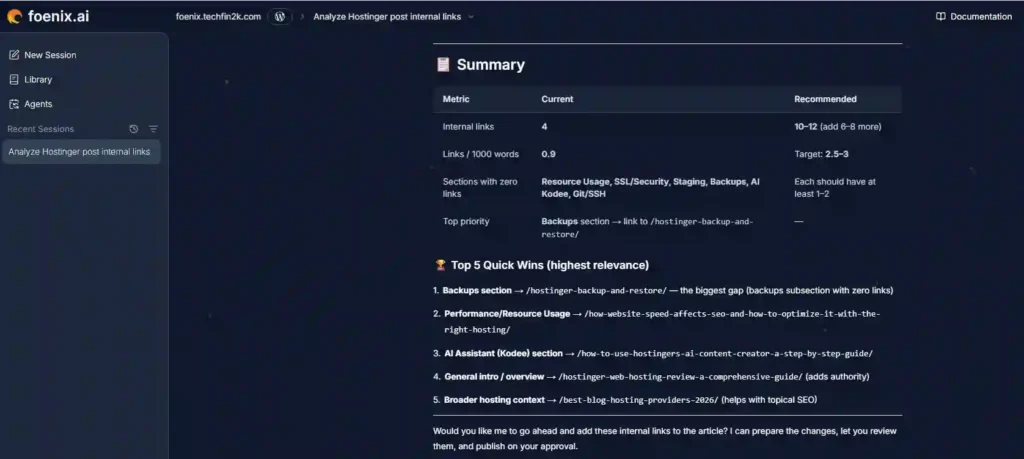
The five opportunities Foenix prioritized were:
- Backups section → Hostinger backup and restore guide
- Performance/Resource Usage → Website speed and SEO guide
- AI Assistant (Kodee) section → Hostinger AI Content Creator guide
- General introduction/overview → Full Hostinger web hosting review
- Broader hosting context → Best blog hosting providers comparison
Foenix ranked the Backups section as the top priority, noting that the article discussed Hostinger’s backup features but had no internal link in that section. It suggested linking to my existing Hostinger backup and restore guide.
However, there was something I wanted to examine more closely.
Foenix had recommended adding 6–8 internal links, but its summary highlighted only five opportunities as the highest relevance.
Rather than adding links simply to reach a target number, I wanted to know which opportunities Foenix genuinely considered strong enough based on the actual context of the article.
I also wanted each recommendation tied to a specific passage—not suggested merely because another post happened to cover Hostinger, hosting, or a broadly related topic.
So I asked Foenix to refine its recommendations.
Step 3: Asking Foenix to Refine Its Recommendations
For the second round of analysis, I made the requirements more specific.
I asked Foenix to identify only the strongest internal-linking opportunities it would actually recommend adding.
For each recommendation, I required:
- The exact existing passage where the link would fit
- The proposed anchor text
- The destination URL
- An explanation of why that destination would help a reader in that specific context
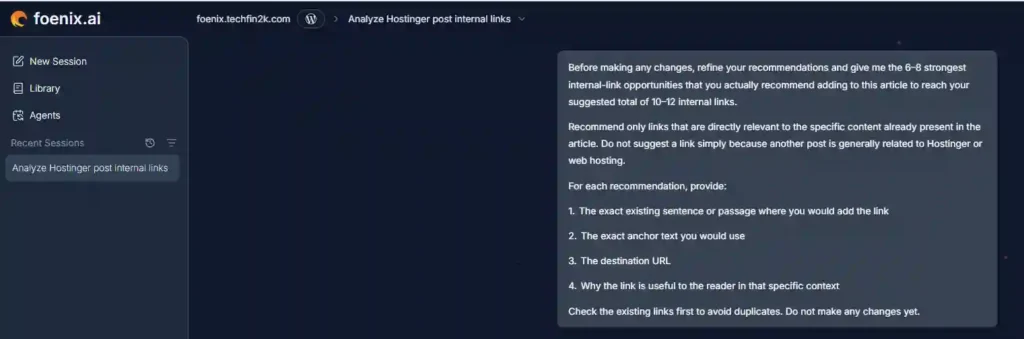
I also asked Foenix to check links already present in the article to avoid unnecessary duplication.
As before, it was not authorized to change anything yet.
Foenix performed another round of analysis and returned a more specific set of recommendations.
This refinement took approximately three additional minutes.
The results were more detailed—but having exact passages and destinations also made it much easier to examine whether the recommendations actually held up under closer scrutiny.
Step 4: Foenix Returned Seven More Specific Recommendations
After the second round of analysis, Foenix returned seven internal-linking recommendations.
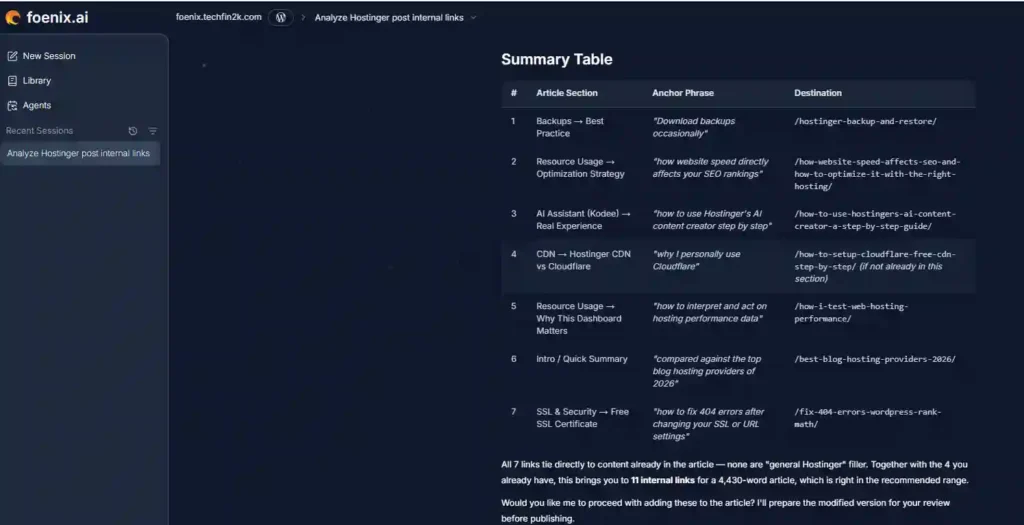
The seven recommendations covered:
- Backups → My Hostinger backup and restore guide
- Resource Usage/Optimization → My article about website speed and SEO
- AI Assistant (Kodee) → My Hostinger AI Content Creator tutorial
- CDN → My Cloudflare setup guide
- Resource Usage Dashboard → My web hosting performance-testing methodology
- Introduction/Quick Summary → My best blog hosting providers comparison
- SSL & Security → My WordPress 404-error guide
Foenix calculated that adding all seven to the four existing links would bring the article to 11 internal links.
Interestingly, Foenix had already rejected some possibilities during its own analysis.
For example, it considered linking the Staging section to my WordPress installation guide, but recognized that the destination was not specifically about staging and dropped the idea.
It also briefly considered a website migration guide before concluding that the relationship was too weak.
That showed some ability to reconsider potential links rather than automatically retaining every idea it generated.
However, I still did not approve the seven recommendations.
Now that Foenix had provided specific passages and destinations, I could compare them directly with the source content.
That manual review revealed several problems.
Step 5: Manually Reviewing Foenix’s 7 Recommendations
The Suggested Anchor Text Wasn’t in the Existing Passage
For the performance-related recommendation, Foenix suggested using the anchor text:
“how website speed directly affects your SEO rankings”
However, that phrase did not actually appear in the existing passage Foenix had quoted.
The original passage discussed practical optimization steps such as optimizing images, removing unused plugins, and enabling caching.
That raised an important question:
Was Foenix recommending a link using words already present in the article, or was it proposing that new text be added specifically to create the link?
I wanted that distinction to be explicit before approving anything.
Kodee and Hostinger’s AI Content Creator Were Different Tools
A more significant issue appeared in another recommendation.
Foenix suggested linking the section about Kodee to my tutorial about Hostinger’s AI Content Creator.
Although both involve AI and Hostinger, they are different tools.
The AI Content Creator is designed for generating website content, while Kodee is an AI assistant used for hosting and site-management assistance, troubleshooting, and related tasks.
Because the destination article did not actually cover Kodee, I considered this a semantic mismatch rather than a useful internal-linking opportunity.
The Cloudflare Recommendation Could Be Redundant
Foenix also recommended linking to my Cloudflare setup guide from the CDN section.
However, that same destination was already linked within the article.
A second link is not automatically wrong, but I wanted Foenix to determine whether another link to the same destination would genuinely help the reader or merely duplicate an internal link already available in the section.
The SSL-to-404 Recommendation Appeared Too Indirect
Another recommendation connected the section explaining Hostinger’s free SSL certificate with my tutorial about fixing 404 errors in WordPress.
Foenix reasoned that SSL changes, domain modifications, or URL migrations can sometimes be associated with URL-related problems.
But the actual SSL passage did not discuss URL changes, migrations, or 404 errors. The 404-error guide therefore did not directly support what a reader was learning at that point in the article.
I considered the connection too indirect.
Taken together, these issues showed that several recommendations that initially appeared plausible did not hold up as well when examined at the exact passage-to-destination level.
Rather than approving all seven suggestions, I asked Foenix to reconsider the entire set using a stricter standard.
Step 6: Asking Foenix for a Final Critical Re-Evaluation
I sent Foenix a detailed follow-up prompt identifying the problems I had found and asked it to critically re-check its recommendations.
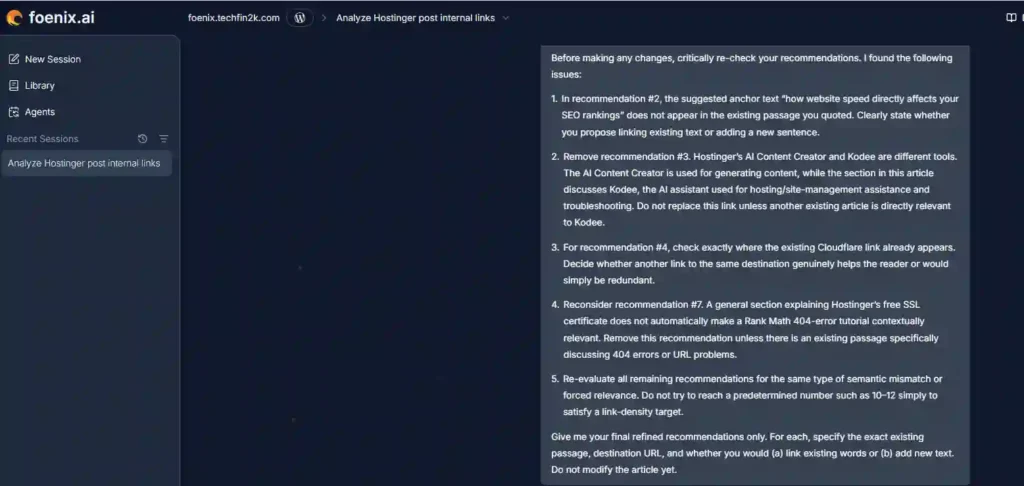
I also changed one important part of the evaluation criteria:
Foenix no longer needed to reach a predetermined number of internal links.
Instead, I asked it to retain only recommendations that could still be justified based on contextual relevance, accuracy, and usefulness to the reader.
For any recommendation it kept, I also asked it to specify the exact existing passage, destination URL, and whether it would link existing words or require new text.
Foenix then re-evaluated all seven recommendations.
The result changed substantially.
Step 7: Foenix Rejected 6 of Its 7 Recommendations
After receiving my feedback, Foenix re-checked the seven recommendations against the article’s actual content and existing links.
Of the seven internal links it had previously recommended, Foenix rejected six and retained only one.
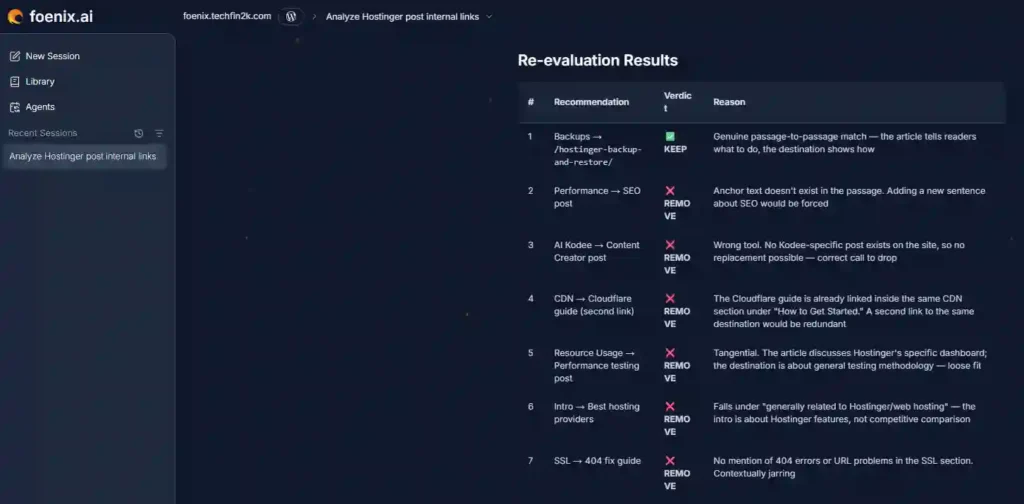
Its final assessment was:
- Backup guide — Keep: The existing passage tells readers to download backups, while the destination article provides step-by-step instructions for doing so.
- Performance/SEO guide — Remove: The proposed anchor text did not exist in the passage, and adding a new SEO sentence solely to create the link would have been forced.
- Kodee/AI Content Creator — Remove: Foenix acknowledged that these were different tools and found no Kodee-specific article on the site to use instead.
- Cloudflare guide — Remove: Foenix confirmed that the same guide was already linked within the CDN section, making another link unnecessary.
- Resource Usage/Performance Testing — Remove: The relationship was too indirect because one section discussed Hostinger’s specific resource dashboard while the destination covered general hosting-performance testing.
- Best Hosting Providers comparison — Remove: The comparison was broadly related to Hostinger but not sufficiently relevant to the specific introductory passage.
- SSL/404 guide — Remove: The SSL passage did not discuss 404 errors or URL problems, making the connection contextually weak.
The One Link That Passed the Final Review
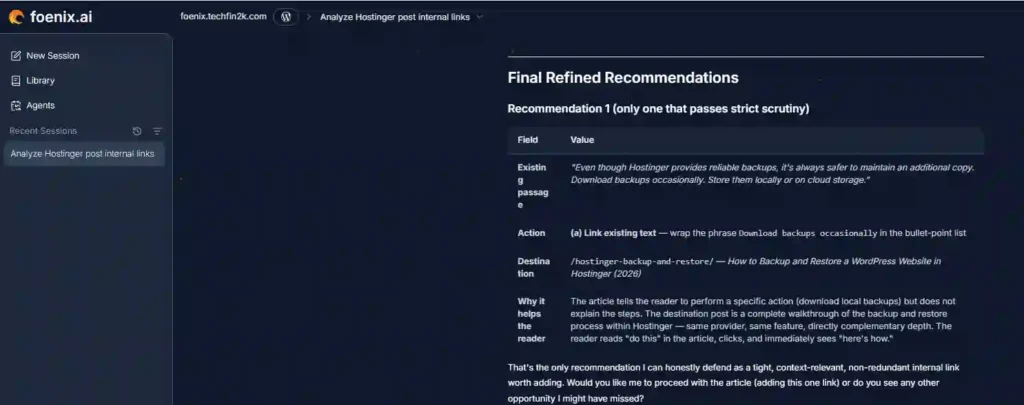
After rejecting the other six suggestions, Foenix retained only the recommendation in the Backups section.
The existing article already advised readers:
Foenix recommended linking those existing words directly to my step-by-step Hostinger backup and restore guide.
This was a strong contextual relationship.
The source article told readers what they should do, while the destination guide explained how to do it.
No new sentence had to be inserted simply to create an internal-link opportunity, and the destination directly supported an action already recommended in the existing content.
Foenix ultimately concluded that this was the only one of the seven recommendations that remained sufficiently relevant, useful, and non-redundant after the stricter review.
At that point, I was ready to approve one strong link rather than add weaker links simply to reach a target count.
Step 8: Approving the Final Link and Letting Foenix Make the Change
I instructed Foenix to link the existing text “Download backups occasionally” to my Hostinger Backup and Restore guide.
My instruction was deliberately restrictive:
Foenix was allowed to make only this one approved change.
I specifically told it not to modify any other text, formatting, links, images, headings, or metadata.

Foenix then accessed the relevant section of the WordPress article, added the internal link, and performed a verification check.
Foenix’s Change Report
After completing the task, Foenix reported that the link had been added and verified successfully.
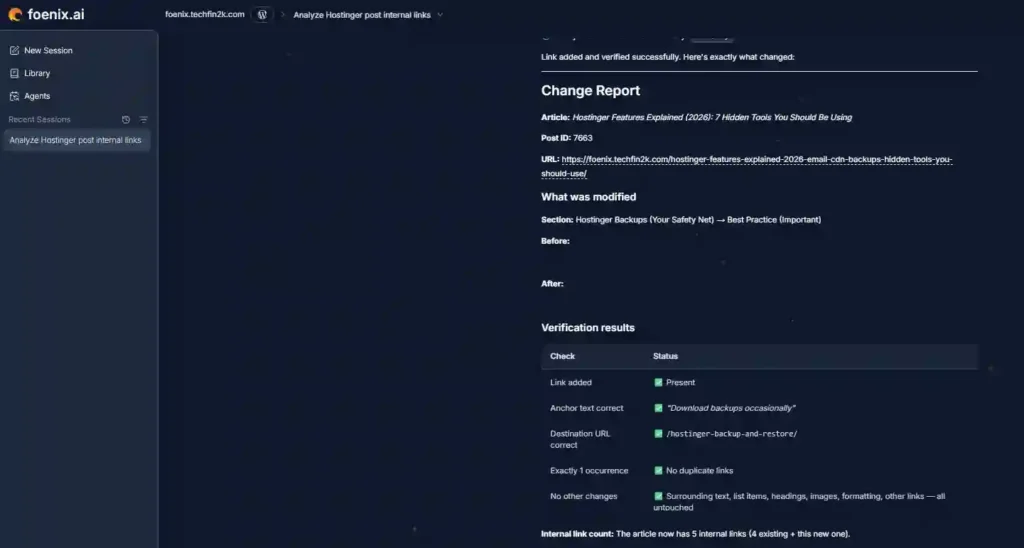
According to its verification:
- The correct anchor text — “Download backups occasionally” — was linked.
- The link pointed to the intended Hostinger Backup and Restore article.
- Only one occurrence of the link was added.
- No duplicate link was created.
- The surrounding text, formatting, headings, images, and other links remained unchanged.
- The article now contained 5 internal links, up from the original 4.
I Verified the Change Myself in WordPress
I did not rely only on Foenix’s confirmation.
After the task was completed, I opened the article myself and checked the section where the change had been made.
The existing text “Download backups occasionally” was correctly linked to the intended Hostinger Backup and Restore article.
I also checked the surrounding content and confirmed that the edit had been made cleanly without altering the nearby text or formatting.
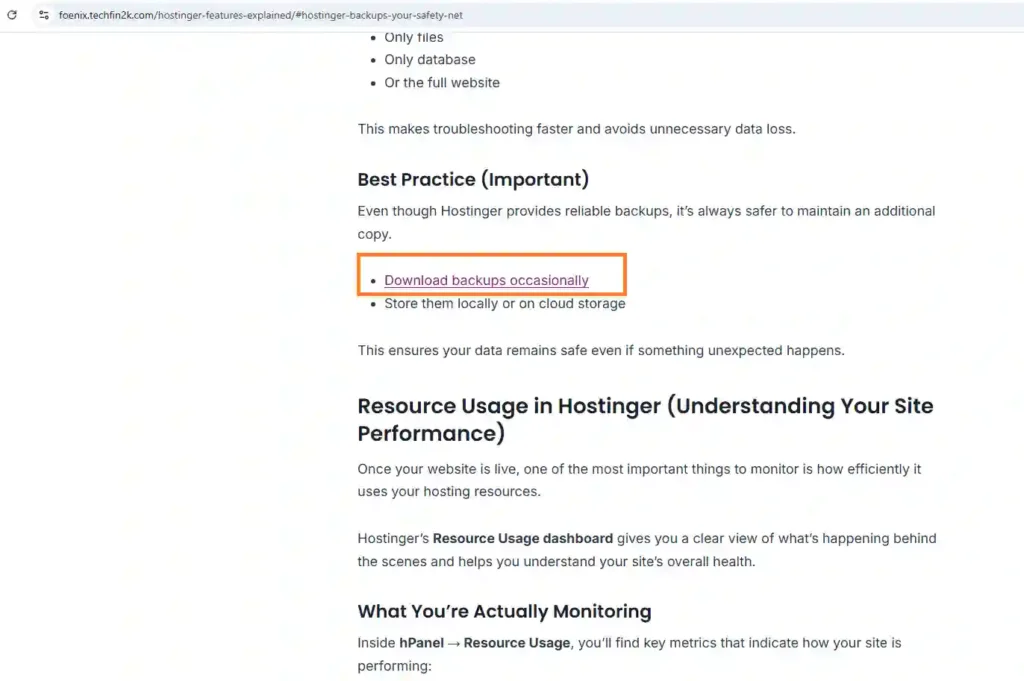
The technical execution of the final approved change was therefore successful.
What made the test more interesting, however, was the path to that result: Foenix moved from several broadly plausible recommendations to just one link that survived stricter contextual review, and then executed that approved change correctly.
Foenix Internal Linking Test Results at a Glance
Here is what happened across the complete test:
- Target article: Approximately 4,430 words
- Content available on test site: Around 126 posts/articles
- Existing internal links: 4
- Refined recommendations returned by Foenix: 7
- Recommendations rejected after stricter review: 6
- Final recommendations approved: 1
- Internal links after the edit: 5
- Total test duration: Approximately 27 minutes
- Starting credit balance: 400
- Ending credit balance: 346
- Credits used: Approximately 54
- Final WordPress edit: Successfully completed and manually verified
These numbers are specific to this test and should not be treated as fixed benchmarks for every Foenix task.
How Long Did the Test Take and How Many Foenix Credits Did It Use?
The complete workflow took approximately 27 minutes and used 54 Foenix credits, with the balance decreasing from 400 to 346.
This was not a simple one-prompt internal-linking task.
The workflow included the initial article analysis, refined recommendations, manual evaluation, follow-up instructions, critical reevaluation, the final WordPress edit, and verification.
The 54-credit figure therefore represents this specific multi-stage experiment—not the cost of simply inserting one hyperlink.
Credit usage is likely to vary depending on the complexity of the task, the amount of analysis required, and the number of follow-up instructions or agent actions involved.
For that reason, I would treat 54 credits as one real-world usage example, not as a fixed cost for internal linking or a basis for estimating exactly how many articles every user could process each month.
What Foenix Did Well — and Where It Could Improve
What Foenix Did Well
The strongest part of Foenix in this test was not simply its ability to insert a hyperlink. WordPress tools can already automate basic linking tasks.
What stood out was its ability to work through a multi-step analysis-and-action workflow.
Foenix was able to:
- Analyze an existing article on the connected WordPress site
- Search the site’s content for potentially relevant destinations
- Return specific recommendations
- Respond to detailed follow-up instructions
- Reconsider earlier suggestions after receiving criticism
- Remove recommendations that no longer passed stricter criteria
- Wait for approval before the final edit
- Execute the authorized WordPress change correctly
- Verify the result after making the edit
Its ability to revise its own recommendations was particularly interesting.
When I challenged specific suggestions, Foenix did not simply continue defending all seven links to reach its earlier target. It reconsidered them and eventually retained only one.
The final WordPress execution also worked as instructed. I manually checked the article and confirmed that the approved link had been added correctly without unwanted surrounding changes.
Where Foenix Could Improve
The biggest weakness was the quality of some recommendations during the earlier stages of the analysis.
Several suggestions appeared plausible at a broad topical level but became weaker when evaluated against the exact source passage.
For example, Foenix initially:
- Connected Kodee with an article about Hostinger’s AI Content Creator, even though they are different tools.
- Proposed anchor text for a performance link that did not exist in the quoted passage.
- Suggested another link to a Cloudflare guide already linked in the relevant section.
- Connected a general SSL explanation with a 404-error tutorial even though the passage did not discuss 404 errors or URL problems.
- Suggested some destinations based more on broad topical relationships than on a strong passage-to-destination connection.
Foenix did recognize and remove these weaker recommendations after I explicitly asked it to apply stricter scrutiny.
However, ideally, that semantic filtering would happen earlier in the initial analysis.
For internal linking, more links are not automatically better. A strong recommendation should be based on whether the destination genuinely helps someone reading that specific passage—not primarily on reaching a target number.
What This Test Taught Me About Using AI Agents for WordPress
This test highlighted an important difference between using a conventional AI chatbot and giving an AI agent access to a WordPress site.
A chatbot can analyze text and suggest what you might change. An agent such as Foenix can go further: it can inspect the connected site, work across existing content, and—when authorized—carry out the change itself.
That makes the workflow potentially much more useful for repetitive website-management tasks.
At the same time, this test showed why the quality of the instructions matters.
My initial request produced a relatively broad set of opportunities. When I required exact passages, destinations, contextual justification, and later removed the requirement to reach a specific link count, the recommendations became much more selective.
The final result—one strong link instead of seven questionable additions—was better because the task criteria became stricter.
This is the main practical lesson I would take from this first Foenix test: define clearly what the agent is allowed to do, review consequential recommendations before execution, and use explicit approval boundaries when allowing it to modify a live website.
Foenix AI Pros and Cons Based on My Hands-On Test
Pros
- Can analyze existing content on a connected WordPress site.
- Searches site content for potentially relevant internal-linking opportunities.
- Can respond to detailed follow-up instructions and refine its analysis.
- Was able to reconsider and reject weaker recommendations.
- Supports a controlled workflow where analysis can happen before execution.
- Can make an approved WordPress edit rather than only recommending what the user should do.
- Correctly completed and verified the final approved internal-link change in this test.
Cons
- Some initial recommendations were only broadly related rather than strongly contextually relevant.
- It confused two different Hostinger AI tools in one recommendation.
- One proposed anchor phrase did not exist in the original passage.
- It initially suggested a potentially redundant link to an already-linked destination.
- Its early focus on a target internal-link count contributed to recommendations that did not all survive stricter scrutiny.
- More complex workflows can require several rounds of instructions, adding time and credit usage.
Is Foenix AI Good for Internal Linking?
Based on this test, Foenix can do more than simply identify keywords and automatically insert related links.
It was able to analyze an existing WordPress article, search the connected site for relevant content, explain its recommendations, respond to corrections, reevaluate questionable suggestions, and ultimately make an approved change directly in WordPress.
However, I would not treat the first set of AI-generated recommendations as automatically ready for publication.
The most useful workflow in my test was:
Analyze → Review → Refine → Approve → Execute → Verify
This approach allows the agent to handle much of the site analysis and WordPress execution while keeping control over which recommendations actually become live changes.
The most revealing result was not that Foenix suggested seven links.
It was that after stricter contextual evaluation, six were rejected and only one remained strong enough to use.
That suggests Foenix can be useful for internal linking, but the quality of the instructions and review criteria matters considerably.
Is Foenix AI Worth Trying?
Foenix is particularly interesting for WordPress site owners who want to experiment with AI agents that can work directly with their websites, rather than tools that only generate text or provide recommendations.
My first test focused specifically on internal linking, so I would not judge the entire platform based on this one workflow.
Within this test, Foenix showed both sides of agent-based automation:
Its early recommendations were not always contextually strong enough, but it responded to detailed feedback, reconsidered weaker suggestions, and successfully completed the final approved WordPress edit.
Disclosure: This is an affiliate link. If you sign up through it, I may earn a commission at no additional cost to you. My findings in this review are based on my own hands-on testing.
Watch My Foenix AI Internal Linking Test
If you would rather see the workflow in action, I also recorded the test showing how I used Foenix to analyze the article, refine its internal-linking recommendations, challenge questionable suggestions, and make the final approved change in WordPress.
The video shows the workflow in action, while this written review provides more detail about the prompts, recommendations, corrections, and final results.
What I’ll Test Next With Foenix
Internal linking was only my first hands-on Foenix test.
In future tests, I plan to explore other WordPress automation capabilities, including content creation, SEO optimization, updating older content, scheduled workflows, and website-maintenance tasks.
I’ll evaluate these workflows separately so I can examine not only whether Foenix completes each task, but also how accurately it performs and how much oversight is required.
Final Verdict: My Foenix AI Review So Far
My first hands-on experience with Foenix was promising, but it also highlighted an important distinction between automation and reliable automation.
Foenix successfully analyzed a real WordPress article, searched the connected site for relevant content, generated recommendations, responded to detailed feedback, and completed the final approved edit correctly.
At the same time, its initial recommendations were not all strong enough to use.
The most notable result was that after stricter review, Foenix rejected six of the seven internal links it had previously recommended.
That result reveals both a limitation and a positive capability.
The limitation is that stronger contextual filtering would ideally happen earlier. The positive sign is that Foenix was able to reconsider its earlier reasoning, respond to corrections, remove weaker recommendations, and then execute the one approved change correctly.
For this internal-linking test, the final outcome was successful: one contextually relevant link was identified, approved, added to WordPress, and manually verified.
I would not draw a final conclusion about everything Foenix can do from this single experiment. Internal linking is only one workflow, and I plan to evaluate its other agents and automation capabilities in future hands-on tests.
For now, Foenix appears to be an interesting approach to WordPress automation because it combines AI analysis with the ability to take action on a connected site. My test also suggests that, for consequential content and SEO changes, the best results may come from giving the agent clear criteria and approval boundaries rather than treating every initial recommendation as final.
Frequently Asked Questions About Foenix AI
What is Foenix AI?
Foenix is an AI-agent platform designed to automate and assist with WordPress website tasks. Rather than only generating recommendations, its agents can analyze connected website content and, depending on the workflow and authorization, carry out actions directly in WordPress.
Does Foenix work with WordPress?
Yes. In my hands-on test, I connected Foenix to a WordPress test website and used it to analyze an existing article and add an approved internal link directly to the WordPress content.
Can Foenix automatically add internal links?
In my test, Foenix successfully identified an internal-linking opportunity and added the approved link directly to the WordPress article.
However, several earlier recommendations were rejected after stricter contextual review, so I prefer reviewing important AI-generated link suggestions before authorizing changes.
How long did the Foenix internal-linking test take?
The complete test took approximately 27 minutes, including analysis, multiple rounds of feedback and reevaluation, the WordPress edit, and final verification.
How many Foenix credits did the internal-linking test use?
This specific test started with 400 credits and ended with 346, meaning approximately 54 credits were consumed.
That usage included multiple rounds of analysis, feedback, reevaluation, the WordPress edit, and verification, so other workflows may use a different number of credits.
Is Foenix AI fully automatic?
Foenix is designed around AI-agent automation, but the degree of automation can depend on the task and the instructions given.
In my test, I deliberately used a controlled workflow where Foenix analyzed and recommended changes first, and I authorized only the final approved edit.
Is there a Foenix AI coupon code?
Yes. You can use coupon code TECHFIN to receive 30% off your first month of Foenix.
Is this a sponsored Foenix review?
I received access and testing credits so I could evaluate Foenix, and I participate in its affiliate program.
The observations in this review are based on the workflow and results I experienced during my hands-on testing. If you purchase through my affiliate link, I may earn a commission at no additional cost to you.
Enjoying our content?
Make TechFin2K a preferred source on Google to see more of our content when it is relevant to you.

Test approfondi et très intéressant.
Cependant concernant l’outil testé 27 Mn pour insérer un lien c’est pas très efficace
Thank you for your feedback! You’re right that 27 minutes for a single link would not be efficient. However, Foenix was analyzing the entire site with 120+ posts to understand the content and identify relevant linking opportunities, which contributed to the time taken. Hopefully, the execution speed will improve as the tool develops.