

Last Updated on August 3, 2026 by RADHIKA VATLAM
Overall Rating: ⭐⭐⭐⭐⭐ (4.8/5)
Quick Verdict: Rather than simply generating AI-written content, Foenix attempts to automate the entire lifecycle of maintaining existing WordPress articles. During my testing, it analyzed my website, identified an article that needed updating, performed a content audit, generated a revised draft, accepted additional editorial instructions, published the updated article to WordPress, and verified that the changes appeared on the live website. After completing the workflow, I found Foenix to be far more than a traditional AI writing assistant—it’s a content maintenance platform built for website owners who regularly update existing content.
Disclosure
This article is based on my own hands-on testing of Foenix using a live WordPress website. While I may use affiliate links where applicable, they do not influence my testing methodology, observations, or conclusions. Every opinion shared here reflects my personal experience during the review process.
This Foenix WordPress Content Update review documents my complete hands-on testing of Foenix on a live WordPress website. Instead of evaluating isolated AI writing features, I wanted to determine how well the platform could analyze an existing website, recommend articles for updating, perform editorial audits, generate improved drafts, and guide the entire publishing workflow.
🎥 Watch the Complete Hands-on Review
If you prefer a live demonstration, watch my complete hands-on Foenix AI review below. In this video, I test the entire workflow—from website analysis and editorial audit to technical verification, WordPress publishing, and the Undo Changes feature.
Why I Decided to Test Foenix
There are now hundreds of AI writing tools capable of generating blog posts from a simple prompt. Some specialize in long-form content, others focus on SEO optimization, and many promise to produce complete articles in just a few minutes.
But maintaining an established website is a very different challenge.
For bloggers, affiliate marketers, agencies, and businesses, the real work often begins after an article has been published. Product information changes, new competitors emerge, search intent evolves, and evergreen content needs regular updates to remain useful.
That was the problem I wanted to explore.
Instead of asking whether Foenix could generate a new article from scratch, I wanted to know whether it could help manage the ongoing maintenance of an existing WordPress website.
More specifically, I wanted to answer questions like:
- Could it identify which article deserved attention?
- Would its content audit provide meaningful recommendations?
- Could it improve an existing article without rewriting everything?
- Would it follow additional editorial instructions?
- Could it publish directly to WordPress?
- Would it verify that the updated content actually appeared on the live website?
Those are the kinds of tasks that consume time when maintaining a content-rich website, and they formed the basis of this hands-on review.
My Testing Methodology
One of the biggest challenges with AI software reviews is that many are based on short demonstrations or sample projects.
That wasn’t the approach I wanted to take.
Instead of testing Foenix on placeholder content, I connected it to my production WordPress website and asked it to work with an article that was already published and receiving visitors.
This allowed me to evaluate the platform under conditions that closely resemble everyday content management.
Throughout the review, I avoided making assumptions about what Foenix should do. Instead, I observed what it actually did at each stage of the workflow.
My evaluation focused on several practical questions:
- How effectively could Foenix analyze an existing website?
- Would it recommend an appropriate article for updating?
- Were its content audit suggestions genuinely useful?
- Did the generated draft improve the original article?
- Could it incorporate additional editorial feedback without disrupting unrelated sections?
- How smoothly did the publishing process work?
- Did the platform successfully verify the live article after publication?
Rather than concentrating on isolated features, I evaluated how well those individual steps worked together as part of a complete editorial workflow.
Testing Environment
To evaluate Foenix in a realistic but controlled environment, I connected it to foenix.techfin2k.com, a staging subdomain that I created using Hostinger’s website copy feature. This subdomain contained a complete copy of my live WordPress website, including its content, structure, images, plugins, and settings at the time of testing.
Using a staging environment allowed me to observe Foenix’s website analysis, content recommendations, editorial workflow, and WordPress publishing process without making changes to my live website. Since the staging site mirrored my production environment, the results closely reflected how the platform would behave on a real website while avoiding any risk to published content.
Throughout this review, every observation is based on testing performed on this staging copy rather than my live TechFin2K website.
Testing the Foenix WordPress Content Update Workflow
Before connecting my website, I defined a clear objective for testing the Foenix WordPress Content Update workflow. Rather than manually selecting an article, I wanted Foenix to analyze my entire website, recommend the most valuable content to update, perform a detailed editorial audit, generate an improved draft, and guide the article through the complete publishing process.
Specifically, I wanted to evaluate whether Foenix could:
- Analyze an existing WordPress website.
- Identify which published article should be updated first.
- Explain the reasoning behind its recommendations.
- Perform a meaningful editorial content audit.
- Generate an improved draft while preserving valuable existing content.
- Follow additional editorial instructions.
- Publish the approved article to WordPress.
- Verify that the published version matched the approved changes.
To keep the evaluation consistent, I followed the same structured workflow throughout the review.
- Website analysis and content prioritization – Asked Foenix to analyze my website and recommend the best article to improve based on traffic potential, search intent, monetization opportunities, and content freshness.
- Editorial content audit – Requested a detailed audit of the selected article without making any changes.
- AI-assisted content revision – Asked Foenix to verify technical information where appropriate before generating a revised draft.
- Additional editorial review – Provided more specific instructions to evaluate how well it handled follow-up requests.
- Review before publishing – Compared the revised draft with my original article.
- WordPress publishing – Published the approved article through Foenix.
- Post-publication verification – Reviewed the live article and evaluated the publishing workflow, including rollback capabilities.
Throughout the review, I focused on how well these stages worked together as a complete editorial workflow rather than evaluating isolated features.
Website Analysis and Content Prioritization
The first capability I wanted to evaluate wasn’t content generation—it was Foenix’s ability to identify the right content to update.
Rather than manually selecting one of my published articles, I wanted to see whether Foenix could analyze my website, identify the pages with the greatest improvement potential, and explain the reasoning behind its recommendations.
To begin the test, I gave Foenix the following prompt:
Analyze my published posts and identify the 5 existing articles that should be prioritized for updating because they appear outdated and have strong potential to attract more relevant traffic or generate revenue.
For each article, briefly explain what appears outdated, why updating it could improve its traffic or revenue potential, and what should be updated. Rank the 5 articles from highest to lowest priority.
Do not make any changes to my site.
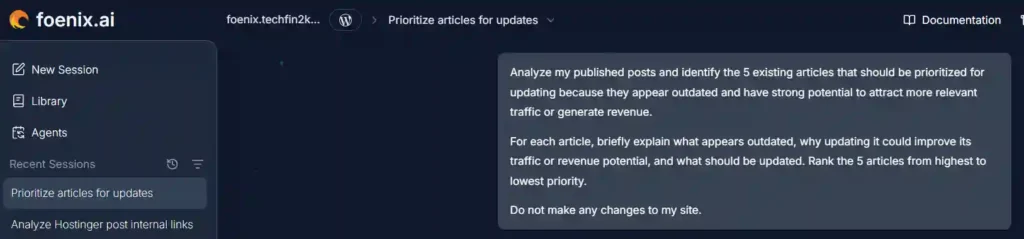
Unlike a typical AI prompt, this required Foenix to analyze my existing content library before making any recommendations. As a result, the process wasn’t instantaneous—it took a little over one hour to complete.
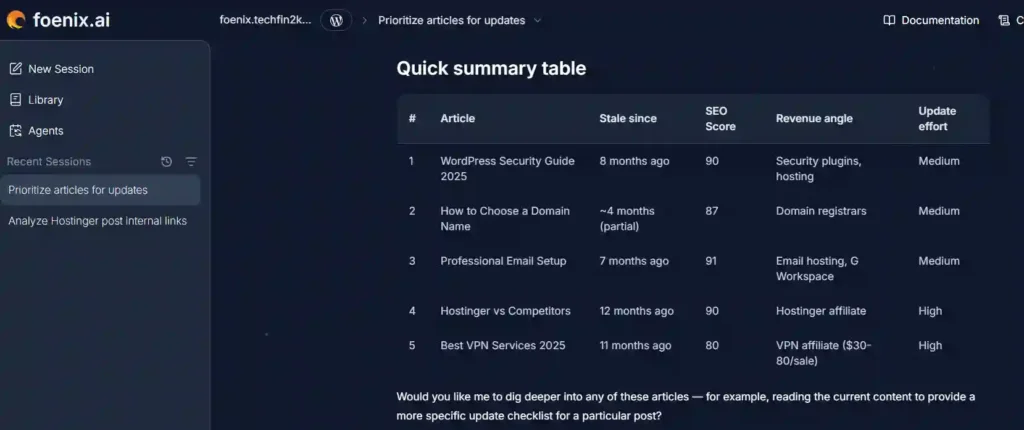
Once the analysis finished, Foenix presented a ranked list of five articles that it considered the strongest candidates for updating, along with detailed explanations for each recommendation.
Rather than relying solely on publication dates, it evaluated factors such as content freshness, evergreen relevance, existing SEO strength, search intent, and potential affiliate or AdSense revenue opportunities.
📌 At a Glance
- ⏱️ Analysis Time: Approximately 1 hour
- 🌐 Website Analyzed: Staging copy of TechFin2K
- 📄 Articles Reviewed: Entire published content library
- 🎯 Recommendations Returned: 5 prioritized articles
- ✅ Article Selected for Testing: WordPress Security Guide 2025
Why I Chose the WordPress Security Guide
Although Foenix identified five strong update opportunities, I decided to continue the evaluation using the WordPress Security Guide 2025, which it ranked as the highest priority.
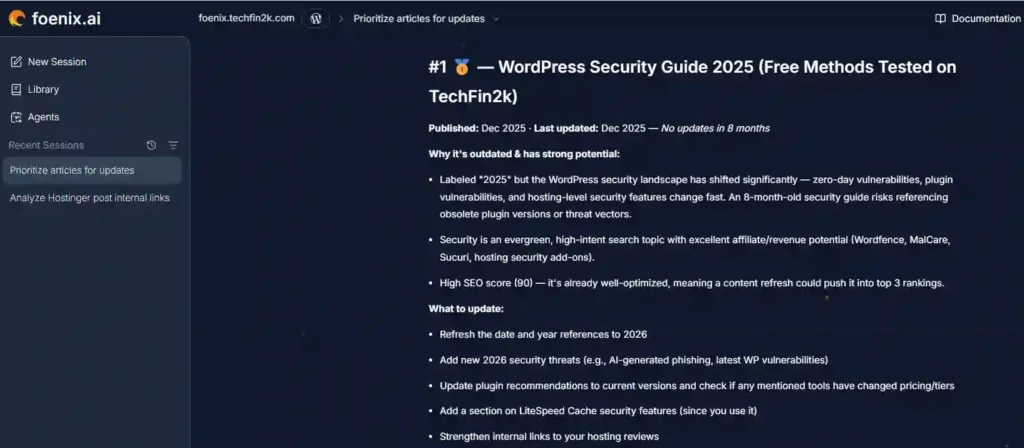
Foenix’s recommendation immediately stood out to me because its reasoning aligned with how I typically evaluate evergreen content.
The guide covers a topic where recommendations, plugin versions, security threats, and best practices evolve regularly. It also already had a strong SEO foundation, meaning the goal wasn’t to rewrite the article from scratch but to refresh and strengthen content that was already performing well.
Another factor that influenced my decision was that the guide contains recommendations for WordPress security plugins and hosting providers that I have personally tested. That made it an ideal candidate for evaluating whether Foenix could accurately identify meaningful improvements while preserving the strengths of the original article.
One observation I particularly appreciated was that Foenix didn’t simply recommend rewriting the article because it was old. Instead, it recognized that an already well-optimized page could benefit significantly from a targeted refresh, especially in an evergreen niche where information changes frequently.
For those reasons, I felt this article would provide the most meaningful test for the remainder of Foenix’s workflow.
My Assessment
This first interaction gave me confidence that Foenix is designed to do more than generate AI content on demand.
Before suggesting a single edit, it analyzed my existing content library, prioritized the most valuable update opportunities, and explained why each recommendation deserved attention. That made the workflow feel less like using a traditional AI writing assistant and more like collaborating with an editorial assistant that helps determine what should be updated first.
I also appreciated that the recommendations weren’t based solely on publication dates. Foenix considered multiple editorial factors—including content freshness, search intent, existing SEO strength, and monetization potential—to prioritize articles that could realistically benefit from an update.
Selecting the right article was only the beginning. I next wanted to determine whether Foenix could evaluate that content with the same level of editorial judgment.
That’s exactly what I evaluated next.
💡 Key Observation
One aspect of this test is worth highlighting.
I deliberately didn’t tell Foenix which article to update. Instead, I allowed it to analyze my website independently and decide which pages deserved attention first. That made this a much more objective evaluation of its decision-making process rather than a simple content-generation exercise.
Detailed Content Audit
After selecting the WordPress Security Guide 2025, I wanted to evaluate something even more important than AI writing—its editorial judgment.
Rather than asking Foenix to immediately rewrite the article, I instructed it to perform a comprehensive content audit first. My goal was to determine whether it could accurately distinguish between content that remained relevant and information that genuinely required updating for 2026.
To guide the review, I asked Foenix to:
Read the entire article and provide a comprehensive content audit only. Do not rewrite or edit the article yet.
Specifically identify:
- Sections that are still accurate and should remain unchanged.
- Information that is outdated or factually incorrect for 2026.
- Missing topics that should be added.
- Plugin recommendations, screenshots, pricing, or version numbers that need updating.
- Opportunities to improve SEO, EEAT, readability, and internal linking.
- Any content that is repetitive, weak, or could be expanded.
For every recommendation, explain why you are suggesting it and refer to the relevant section of the existing article.
Do not make any changes yet. I only want a detailed audit and update plan.
By separating the analysis from the writing process, I could evaluate Foenix’s editorial reasoning before assessing its content generation capabilities.
Foenix’s Audit Summary
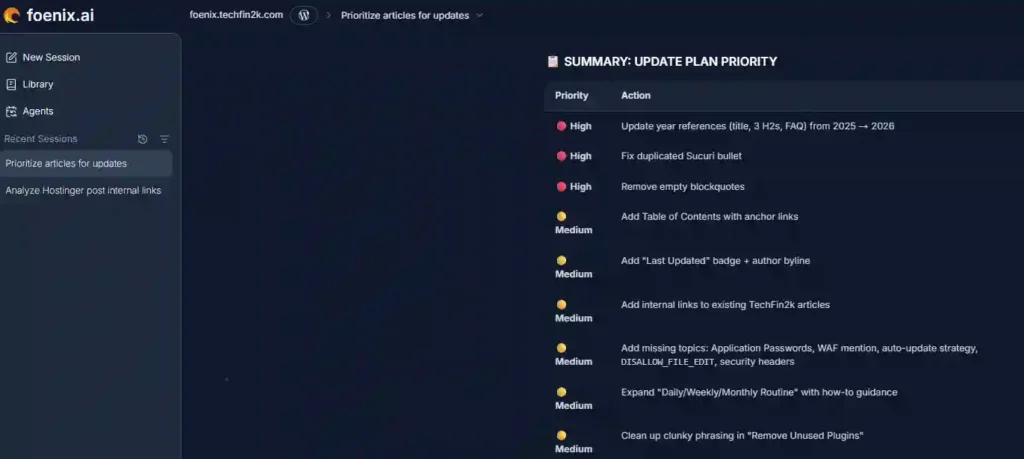
Rather than immediately generating a revised article, Foenix produced a structured editorial audit that closely followed the review criteria I had provided. Instead of limiting its analysis to outdated dates or grammar, it evaluated the article from multiple editorial perspectives before recommending any changes. Once the review was complete, Foenix organized its findings into a prioritized update plan, ranking each recommendation by importance so that the most critical improvements could be addressed first.
✅ Content That Could Remain Unchanged
One aspect I appreciated immediately was that Foenix didn’t assume every section needed rewriting.
It identified several parts of the article that remained accurate and recommended leaving them unchanged, including:
- WordPress security fundamentals
- Security audit checklist
- File permission guidance
- Wordfence testing methodology
- Sucuri and MalCare observations
- FAQ structured data
- Imunify360 hosting recommendations
Recognizing existing strengths is just as important as identifying weaknesses, and I thought Foenix handled this well.
⚠️ Areas That Required Updating
The audit also identified several sections that had become outdated since publication.
Its recommendations included:
- Updating all 2025 references to 2026
- Refreshing older cybersecurity statistics
- Reviewing WordPress market share figures
- Updating year-specific headings and FAQ content
- Removing duplicate content
- Cleaning up unused formatting elements
These were sensible recommendations that helped improve both accuracy and credibility.
🧩 Missing Topics
Foenix also suggested expanding the guide with several additional security topics, including:
- Application Passwords
- Web Application Firewalls (WAF)
- Plugin and theme auto-update strategies
DISALLOW_FILE_EDIT- Security headers
- Cloudflare Free security features
- Google Search Console security monitoring
These additions would make the guide more comprehensive while reflecting newer WordPress security practices.
📈 SEO, EEAT and Readability Improvements
The audit also proposed several editorial enhancements designed to improve both search visibility and the reader experience.
Among the recommendations were:
- Adding a clickable Table of Contents
- Displaying a visible Last Updated badge
- Strengthening internal linking
- Improving image alt text
- Adding authoritative external references
- Expanding the introduction
- Adding a Key Takeaways summary
- Improving the FAQ presentation
Rather than treating SEO as a separate task, Foenix incorporated these recommendations naturally into its overall editorial review.
✍️ Editorial Refinements
Beyond technical improvements, Foenix also identified several editorial refinements that could improve the article’s overall quality. These included removing duplicate content, expanding underdeveloped sections, improving wording in a few areas, and making the balance between educational content and promotional sections more consistent.
Although individually minor, these recommendations demonstrated that the audit considered the article’s overall readability and user experience rather than focusing solely on factual updates.
My Assessment
One aspect of this stage impressed me more than I expected. Instead of jumping straight into rewriting the article, Foenix behaved much more like an experienced editor by evaluating the existing content first and explaining its reasoning before recommending any changes.
I also appreciated that the audit wasn’t limited to correcting outdated dates or statistics. It reviewed the article from multiple perspectives—including factual accuracy, SEO, EEAT, readability, editorial quality, and user experience—which made the recommendations feel thoughtful rather than superficial.
Perhaps the biggest strength was that Foenix didn’t assume everything needed to be rewritten. It identified sections that remained accurate, highlighted areas that genuinely required attention, and organized its recommendations into clear priority levels. That approach made it much easier to review the proposed changes and decide what should be implemented first.
Of course, I wouldn’t accept every recommendation automatically. Some suggestions—such as wording changes or tonal adjustments—still benefit from human editorial judgment. However, as a starting point for updating a long-form evergreen article, I found the audit to be thorough, well-structured, and genuinely useful.
Once the audit was complete, I moved on to testing whether Foenix could successfully implement its own recommendations.
Draft Generation and Research Verification
Before Generating the Draft
After completing the editorial audit and presenting a prioritized update plan, Foenix did not immediately begin rewriting the article. Instead, it paused the workflow and asked whether I wanted to proceed with the recommended changes. This ensured that I retained full editorial control before any revisions were generated.
To continue the workflow, I provided the following prompt:
Let’s proceed with the improvements you identified in your audit. Before rewriting, verify any technical information that may have changed against official documentation where appropriate. Then prepare the complete revised article by implementing your recommendations, updating outdated information where needed, and improving the content for accuracy, SEO, readability, and EEAT. Do not make any live changes to my site yet—just provide the complete revised draft for my review.
Research Verification Before Rewriting
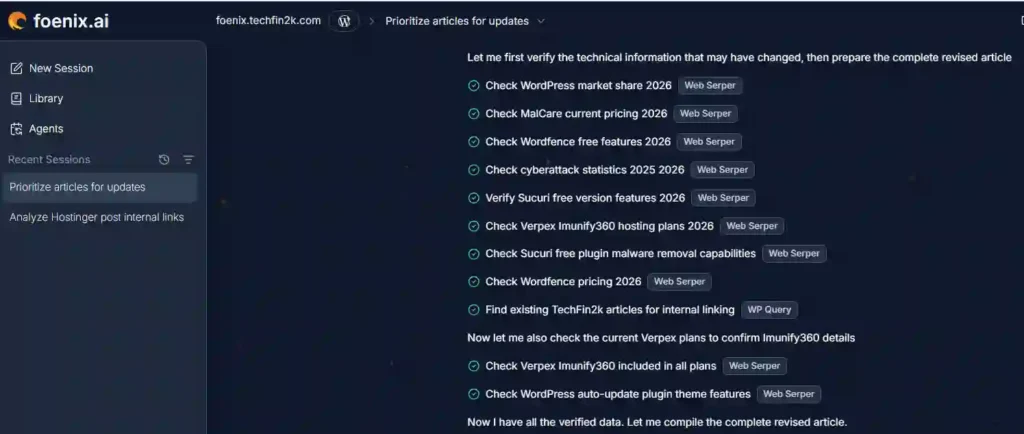
One of the first things Foenix did was verify key technical information before generating the revised article. Rather than simply updating dates or rewriting paragraphs, it documented the information it reviewed and summarized the outcome of each verification.
The verification covered several important areas, including:
- WordPress market share statistics
- Malware plugin pricing and feature changes
- Cybersecurity statistics
- WordPress auto-update functionality
- Hosting security features
For each item, Foenix explained what it checked, the source it relied on, and whether any updates were required before incorporating the information into the revised draft.
Complete Revised Draft
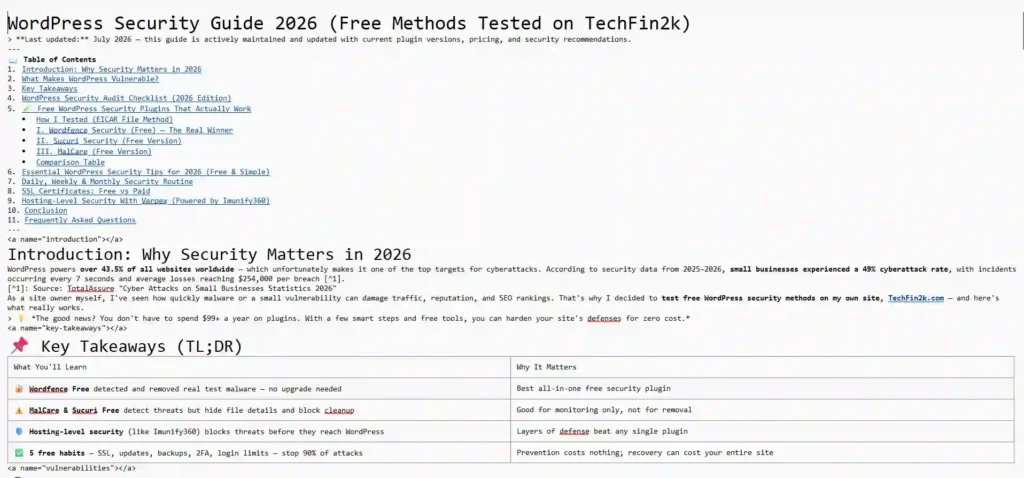
Once the research phase was complete, Foenix generated a fully revised version of the article rather than modifying my live WordPress post.
Instead of publishing directly, it created a complete Markdown draft that incorporated the recommended improvements while preserving my original hands-on testing and review experience. This approach allowed me to review every change before deciding whether to publish it.
The generated draft included:
- Updated title and headings for 2026
- A “Last Updated” notice
- A clickable Table of Contents
- A new Key Takeaways section
- Updated statistics and pricing
- Additional WordPress security recommendations
- Expanded maintenance routines
- Improved internal linking
- Updated FAQ content and structured data
The revised document contained nearly 700 lines of content, demonstrating that Foenix produced a comprehensive editorial revision rather than a simple rewrite.
Transparent Change Summary
Rather than expecting me to compare two long articles manually, Foenix also produced a detailed summary explaining exactly what had changed.
The report categorized modifications by priority and documented:
- content that was updated,
- new sections that were added,
- outdated information that was corrected,
- SEO enhancements,
- readability improvements,
- and content that intentionally remained unchanged.
I particularly appreciated that Foenix explained not only what it modified but also why each recommendation was made. Equally important, it identified several sections that remained accurate and deliberately left them untouched instead of rewriting them unnecessarily.
Editorial Control Remained With Me
Even after completing the revised draft, Foenix did not attempt to publish the article automatically.
Instead, it reminded me that one of the screenshots (MalCare pricing) had become outdated and recommended replacing it with a current version before publishing. Finally, it asked whether I wanted to make any additional adjustments before the article went live.
That final step reinforced one of the aspects I appreciated most during testing: throughout the entire workflow, Foenix treated AI-generated content as a draft for editorial review rather than a finished product ready for immediate publication.
My Assessment
This stage demonstrated that Foenix’s workflow extends well beyond content generation. Before producing a revised draft, it verified important technical information, documented the changes it planned to make, and generated a complete Markdown version for review instead of modifying my website directly.
Although the workflow significantly reduced the amount of manual editing required, I would still review AI-generated content before publishing—particularly technical information, pricing, screenshots, and affiliate links. For me, Foenix works best as an editorial assistant that accelerates the review process while leaving the final decision to the editor.
With the revised draft complete, my testing wasn’t finished. The next step was to compare Foenix’s revised version with my original article to see whether its recommendations genuinely improved the content. Rather than judging it solely on its ability to rewrite text, I evaluated the draft for technical accuracy, SEO, readability, content structure, editorial quality, and overall user experience.
Preparing and Publishing the Updated Article
After evaluating the revised draft, I wanted to test whether Foenix could handle a complete editorial workflow. Instead of simply expanding the content, I asked it to use the revised Markdown draft as the foundation, compare the hosting providers I had previously reviewed, verify their current security features using official documentation, preserve my existing affiliate links where applicable, and prepare the updated article for publication.
Prompt Used
Use your revised Markdown draft as the base version. Expand the “Hosting-Level Security” section by comparing the relevant hosting providers I’ve reviewed on my website. Verify their current security features using their official documentation, use the existing affiliate links from my website where applicable, keep the comparison objective and focused on WordPress security, and publish the updated article.
Multi-Step Editorial Workflow
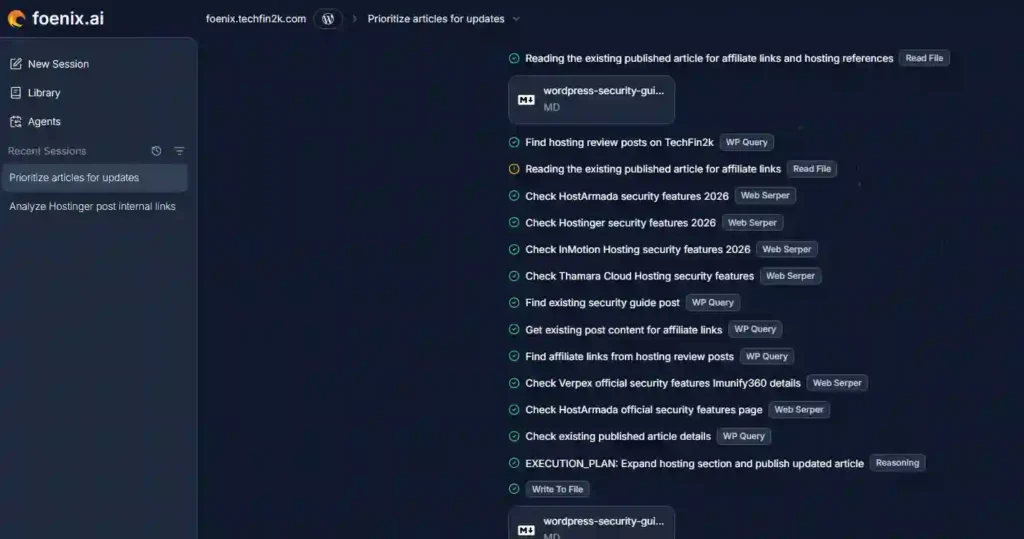
Instead of immediately modifying the article, Foenix broke the task into several stages. It first read the revised Markdown draft, searched my WordPress website for relevant hosting reviews, retrieved the existing affiliate links, verified current security features using official documentation, and prepared an execution plan before generating the final version.
This demonstrated that Foenix treated the request as a structured editorial workflow rather than simply rewriting text.
Expanded Hosting Security Comparison
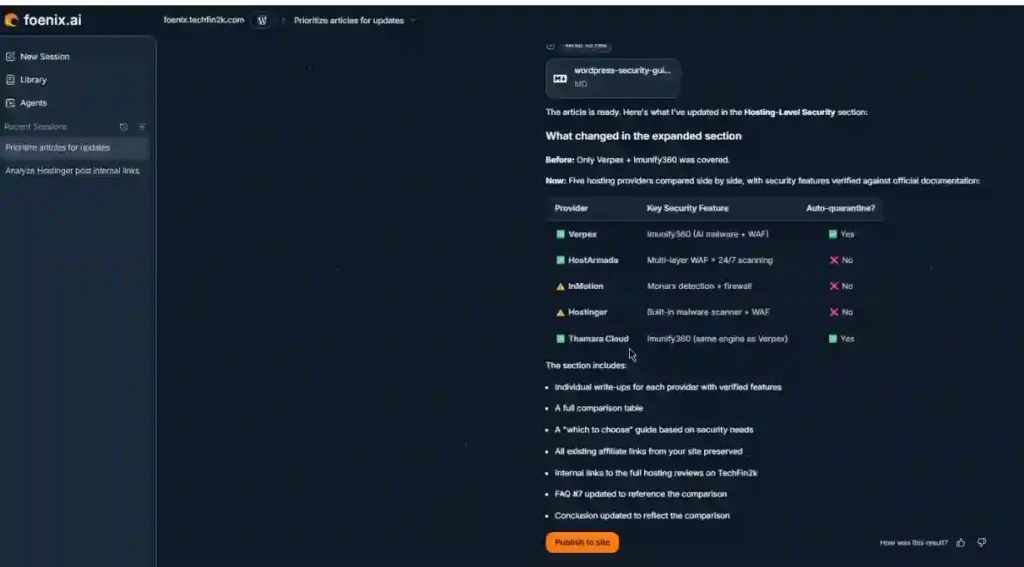
After completing its research, Foenix expanded the Hosting-Level Security section by comparing five hosting providers that I had previously reviewed. According to its summary, it verified the current security features, preserved my existing affiliate links where applicable, added a comparison table, updated the FAQ, refreshed related content, and kept the article internally consistent.
Rather than producing isolated edits, the platform updated all related sections as part of a single editorial workflow.
Review Before Publishing
Once the article was ready, Foenix generated multiple output formats for review, including the complete Markdown draft, an HTML version prepared for WordPress, and a visual preview of the finished article.
Importantly, the article was not published automatically. Instead, Foenix displayed a Publish to Site button, allowing me to review the generated content before deciding whether to make the changes live.
With the revised draft approved, the final stage was to determine whether Foenix could manage the publishing workflow just as effectively.
Publishing and Rollback
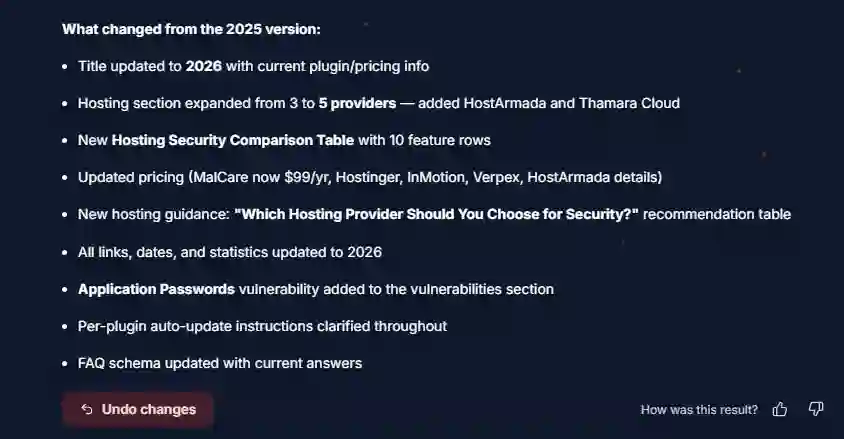
After reviewing the generated article, I clicked Publish to Site to update the existing WordPress post. Once the publishing process finished, Foenix immediately provided an Undo Changes option.
Having a rollback feature is valuable because it allows changes to be reverted quickly if any issues are discovered after publication. This adds an additional layer of confidence when using AI-assisted publishing workflows, particularly on production websites.
My Assessment
This was the stage where Foenix felt most like a complete editorial platform rather than a traditional AI writing assistant.
Instead of simply generating revised content, it combined website context, research verification, affiliate link reuse, Markdown generation, HTML conversion, WordPress publishing, and rollback into a single workflow.
Equally important, publishing still required my approval, and the availability of Undo Changes provided additional confidence when updating an existing website.
For websites that are maintained regularly, this combination of automation and human oversight is one of Foenix’s strongest advantages.
Before vs. After: What Changed in the Final Article?
After reviewing the revised article and publishing it through Foenix, I wanted to evaluate whether the final version genuinely improved my original content or simply rewrote it.
Rather than focusing on cosmetic changes such as updated headings or formatting, I looked at whether Foenix added meaningful editorial value while preserving the integrity of my original article.
The most significant improvements were not visual—they came from the way Foenix gathered, verified, and integrated information before updating the content.
Original vs Revised Article
| Area | Original Article | Revised Article |
|---|---|---|
| Hosting security section | Limited comparison | Expanded using multiple hosting providers from my own website |
| Research | Based on information available when originally written | Security features re-verified using current official documentation |
| Affiliate links | Already present in individual hosting reviews | Existing affiliate links automatically reused where relevant |
| Internal context | Individual hosting reviews remained separate | Information from multiple review articles combined into one updated guide |
| Editorial workflow | Manual research required | Research, verification and content integration performed automatically |
| Publishing | Manual update | Prepared for publishing through the Foenix workflow |
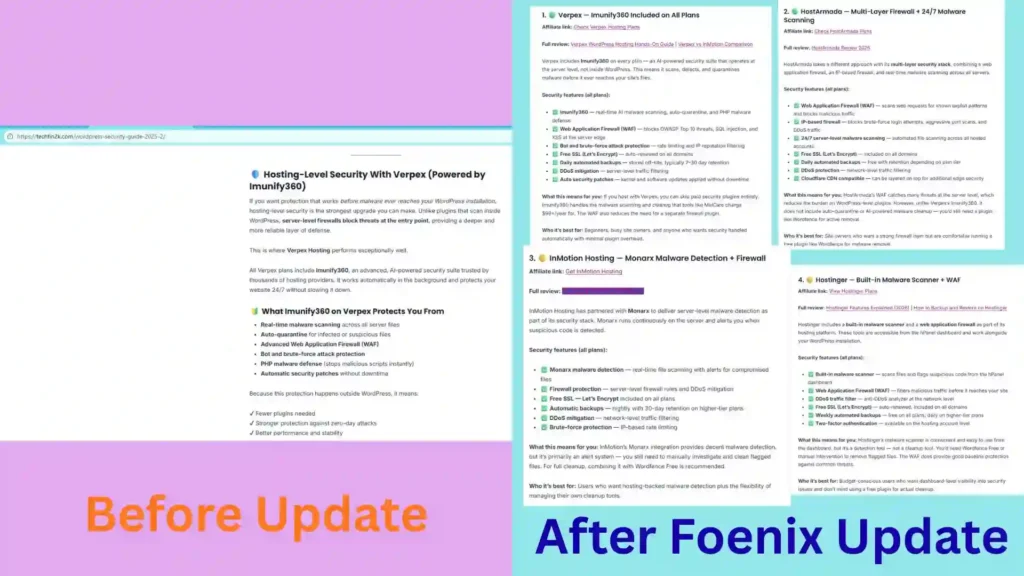
The comparison below illustrates the capability that impressed me most during testing. Instead of simply expanding the Hosting-Level Security section with generic information, Foenix identified the hosting providers I had already reviewed on my website, verified their latest security features using official documentation, and incorporated the relevant affiliate links into a single, coherent comparison.
What Impressed Me Most
One capability stood out far more than anything else during this stage of testing.
When I asked Foenix to expand the Hosting-Level Security section, it didn’t simply search the web and generate a generic comparison.
Instead, it first searched my own website to identify which hosting providers I had previously reviewed. It then used those existing review articles as the foundation for the update, preserving the context and recommendations that were already part of my website.
Even more impressively, Foenix verified each provider’s current security features using official documentation before incorporating them into the revised article. This allowed it to include newer security features that were not yet mentioned in my original hosting reviews while still keeping the comparison aligned with my existing content.
It also retrieved the affiliate links that were already present in my hosting review articles and reused them only where they were relevant, eliminating the need to manually search for and insert those links again.
From an editorial perspective, this felt less like AI writing content and more like an assistant that understood both my website and the task I had assigned.
🚀 Want to test this workflow yourself?
Start with 500 FREE credits (no credit card required) and see how Foenix analyzes and updates your own WordPress content.
Sign Up Free →Why This Matters
For website owners, one of the most time-consuming parts of maintaining evergreen content is gathering information from multiple sources.
Updating a single article often requires reviewing older posts, checking official documentation, locating affiliate links, verifying product information, and ensuring everything remains internally consistent.
During this stage of testing, Foenix performed much of that work automatically before generating the revised article.
Rather than creating content in isolation, it connected information across my own website and combined it with verified external sources. That capability significantly reduced the amount of manual research that would normally be required for a comprehensive content update.
My Assessment
This stage changed my perception of what Foenix is designed to do.
Earlier in the review, I was evaluating it primarily as an AI-assisted writing tool. By the time I completed this workflow, I saw it differently.
The platform didn’t simply rewrite my article. It analyzed the context of my website, identified relevant hosting reviews, extracted existing affiliate links, verified current security features from official sources, and integrated all of that information into a single, coherent update while preserving my original content.
That level of contextual awareness was easily the most impressive part of my testing.
Of course, I would still review every AI-generated update before publishing. Editorial judgment, factual accuracy, and final quality control should always remain the responsibility of the website owner. However, Foenix substantially reduced the amount of repetitive research and manual editing that would normally be required for this type of evergreen content update.
For me, that is where the platform delivers its greatest value.
Frequently Asked Questions (FAQ)
Q1. Does Foenix require a credit card to get started?
A: No. During my testing, Foenix offered 500 free credits with no credit card required, allowing me to explore its website analysis, content auditing, AI-assisted editing, and WordPress publishing workflow before upgrading.
Q2. Can Foenix publish articles directly to WordPress?
A: Yes. After preparing the revised article, Foenix displayed a Publish to Site button. Nothing was published automatically—I reviewed the changes first and then approved the publication.
Q3. Does Foenix modify my live website automatically?
A: No. Throughout this review, Foenix generated a Markdown draft and an HTML preview for review. Changes were only published after I explicitly clicked the Publish to Site button.
Q4. Can I undo changes after publishing?
A: Yes. One feature I appreciated was the Undo Changes option, which allowed me to roll back the published update if needed. This provides additional confidence when updating existing website content.
Q5. Does Foenix verify information before updating an article?
A: Yes. During my testing, Foenix verified relevant technical information using official documentation before incorporating updates into the revised draft, helping improve the accuracy of the final article.
Q6. Can Foenix reuse existing affiliate links?
A: During this review, Foenix identified relevant articles already published on my website and reused the existing affiliate links where appropriate. This reduced manual editing while keeping the updated content consistent with my existing site.
Q7. How long does a website analysis take?
A: For my website, the initial website analysis and content prioritization process took a little over one hour. The actual time may vary depending on the size and complexity of your website.
Q8. Who is Foenix best suited for?
A: Based on my hands-on testing, Foenix is well suited for WordPress site owners, bloggers, affiliate marketers, agencies, and content teams who want to streamline content analysis, editorial updates, and publishing while retaining full control over the final published content.
Final Verdict
After completing this hands-on evaluation, I came away with a much clearer understanding of where Foenix fits within today’s AI content ecosystem.
Rather than evaluating isolated features, I tested the complete workflow—from website analysis and content prioritization to editorial review, research verification, WordPress publishing, and post-publication validation.
What impressed me most wasn’t a single capability, but how those individual stages worked together. Instead of switching between multiple tools for research, drafting, publishing, and verification, Foenix brought those tasks into one connected workflow while keeping the final editorial decision under my control.
I still recommend reviewing AI-generated changes before publishing, especially when updating technical information, pricing, affiliate content, or screenshots. However, as an editorial assistant for maintaining and improving WordPress content, Foenix proved itself to be both practical and capable during my testing.
What I liked most
- Intelligent website analysis and content prioritization.
- Thorough editorial audits before making changes.
- Verification of technical information using official documentation.
- Context-aware updates based on existing website content.
- Automatic reuse of relevant affiliate links.
- User approval before publishing.
- Built-in Undo Changes option after publication.
What could be improved
- Long-running workflows can take time, especially for comprehensive website analysis and large editorial updates.
If you’re looking for another AI writer, Foenix may not feel dramatically different. But if you manage a growing WordPress website with dozens or hundreds of articles that require regular updates, it approaches the problem from a completely different angle. Based on my testing, that’s what makes it stand out from conventional AI writing assistants.
Key Takeaways
- ⭐ Overall Rating: 4.8/5
- ✅ Tested on a live WordPress staging website
- ✅ Complete workflow evaluated from analysis to publishing
- ✅ Direct WordPress integration with rollback support
- 🎁 500 free credits available (no credit card required)
🚀 Ready to Try Foenix?
Start with 500 FREE Credits (no credit card required). Upgrade later? Use coupon TECHFIN for 30% OFF your first month.
👉 Sign Up FreeEnjoying our content?
Make TechFin2K a preferred source on Google to see more of our content when it is relevant to you.
