
I recently ran Foenix AI’s SEO Audit on my WordPress website to see how well it could identify and address real SEO issues—not just provide a list of recommendations.
This is the first article in my Foenix AI SEO Audit testing series. Instead of accepting the audit results at face value, I am taking the individual issues identified by Foenix and testing them on the actual website.
The complete audit analyzed 128 posts and took approximately 5 minutes and 30 seconds to complete. It identified several different types of SEO issues, including problems related to meta descriptions, ALT text, H1 headings, internal links, and SEO titles.
For this first test, I focused on meta descriptions.
I wanted to see whether Foenix could do more than simply identify meta description issues. More importantly, I wanted to see whether the fixes it suggested actually worked well on my WordPress posts.
I had previously tested Foenix’s ability to make WordPress content updates, so this time I wanted to examine a different part of its SEO workflow.
So I allowed Foenix to work on the affected posts and then manually reviewed what it produced.
In the following sections, I will walk through the meta-description findings, the changes Foenix made, and my own checks of the results to determine how well this part of the Foenix AI SEO Audit actually performs.
Before looking at the audit findings, I want to show the exact instruction I gave Foenix AI so you can see how the test was conducted.
How I Ran the Foenix AI SEO Audit
I submitted the following prompt to Foenix AI and allowed it to analyze the website based on the instructions provided.
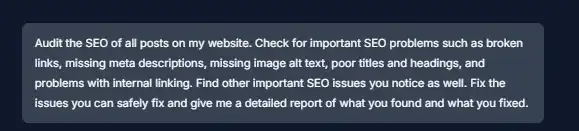
The prompt did not tell Foenix to focus specifically on meta descriptions. I wanted the audit to identify the SEO issues on its own before I selected one of them for detailed testing.
The audit took approximately 5 minutes and 30 seconds to complete.
What Did the Foenix AI SEO Audit Find?
Once the analysis was complete, Foenix returned a detailed SEO audit with findings across several areas of my website.
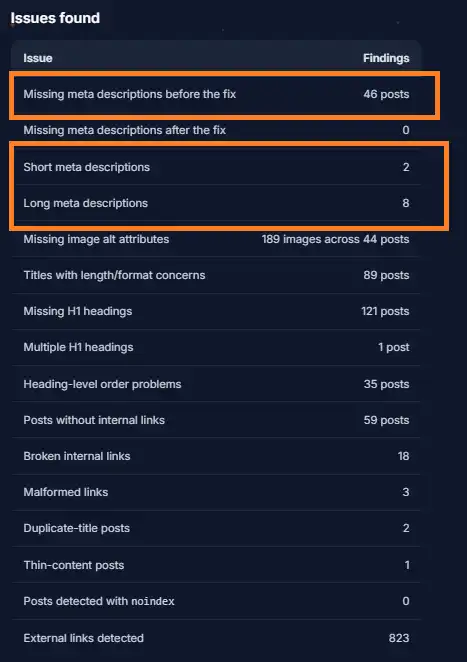
The audit reported issues involving meta descriptions, ALT text, H1 headings, internal links, SEO titles, and other on-page SEO elements.
Rather than trying to address all of these findings at once, I decided to examine them one at a time. This allows me to check whether each reported issue is actually present and whether Foenix can handle the recommended fix correctly.
For the first test in this series, I chose meta descriptions.
Meta Description Findings
Foenix reported three categories of meta-description issues:
- 46 empty or missing meta descriptions
- 2 short meta descriptions
- 8 long meta descriptions
That resulted in 56 meta-description findings for us to examine.
The next step was to see how Foenix handled these findings and whether the fixes it generated were actually suitable for the affected WordPress posts.
Testing Foenix AI’s Meta Description Fixes
Foenix generated descriptions for the 46 posts where the meta description was missing or empty.
For the 2 short and 8 long descriptions, Foenix preserved the existing descriptions rather than rewriting them automatically.
Foenix specifically reported:
“Short/long descriptions: Existing descriptions were preserved rather than rewritten automatically.”
This meant that the first stage of my testing focused on the 46 descriptions that Foenix actually generated.
I then manually reviewed a sample of those generated descriptions to see whether they were complete, relevant to the article, and suitable for use.
Testing the 46 Generated Meta Descriptions
I did not manually inspect all 46 descriptions in detail. Instead, I selected four generated descriptions for an initial quality check.
The result was mixed.
Of the four descriptions I reviewed, one was good, while the other three were incomplete and ended with ....
Example 1: A Good Generated Description
The first example showed that Foenix could generate a complete and relevant meta description from the article content.
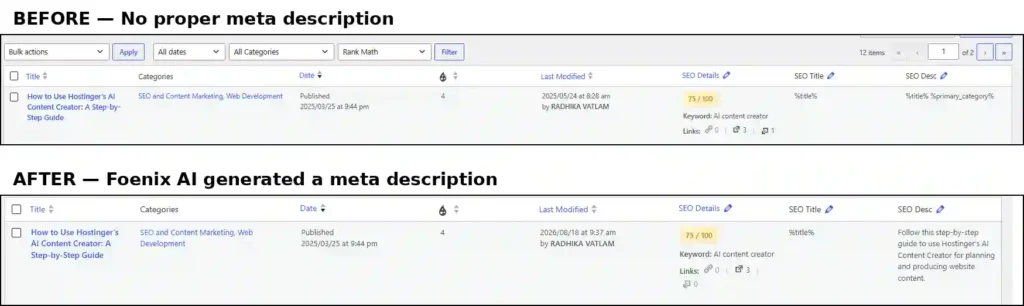
This description was complete and accurately reflected the article, so I considered this particular result successful.
However, the other three examples revealed a significant problem.
Example 2: Meta Descriptions Ending With ...
In three of the four examples I checked, the descriptions generated by Foenix ended with the literal ..., indicating that the descriptions were incomplete.
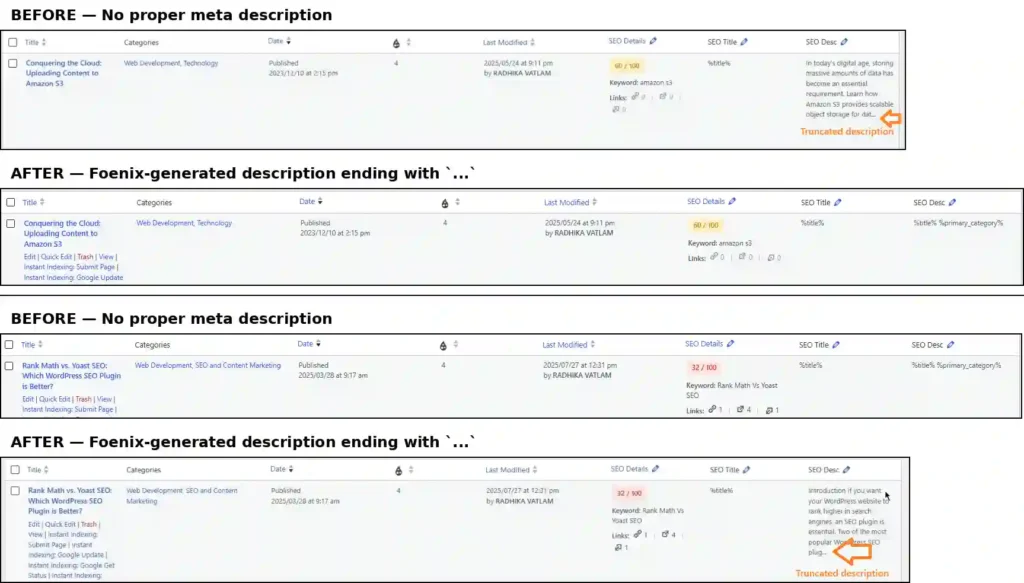
The screenshot above shows two of the three truncated examples I found during the initial review. In both cases, the meta description was empty before Foenix processed the post and contained incomplete text ending in ... afterward.
This was not simply a matter of the description being slightly too short. The generated text was visibly incomplete.
Foenix also explained that the descriptions had been generated from the article content, which helped explain why some of the generated text appeared to have been cut off.
At this point, I did not want to manually rewrite the descriptions myself. Instead, I wanted to see whether Foenix could recognize the problem and correct its own output.
I Asked Foenix to Fix the Incomplete Descriptions
After finding the incomplete descriptions, I gave Foenix a second, more specific instruction. The exact prompt I submitted is shown in the screenshot below.
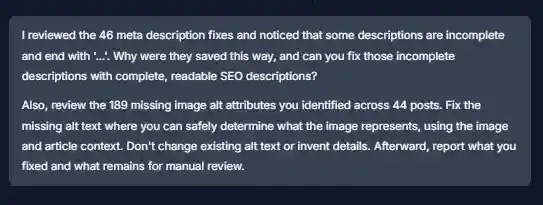
For the meta-description part of the test, the important change was that I specifically asked Foenix to analyze the entire article and create complete, readable descriptions instead of leaving the incomplete text ending in ....
I also included the missing image ALT-text task in the same prompt because Foenix had identified that issue in the original audit. I will examine that part separately in the next article of this series.
Foenix AI Reworked the Incomplete Meta Descriptions
After I submitted the second prompt, Foenix analyzed the incomplete descriptions and prepared a separate correction dataset. It then attempted to apply the changes, detected a problem with the initial correction batch, and rolled back the partial changes before retrying the updates using a safer approach.
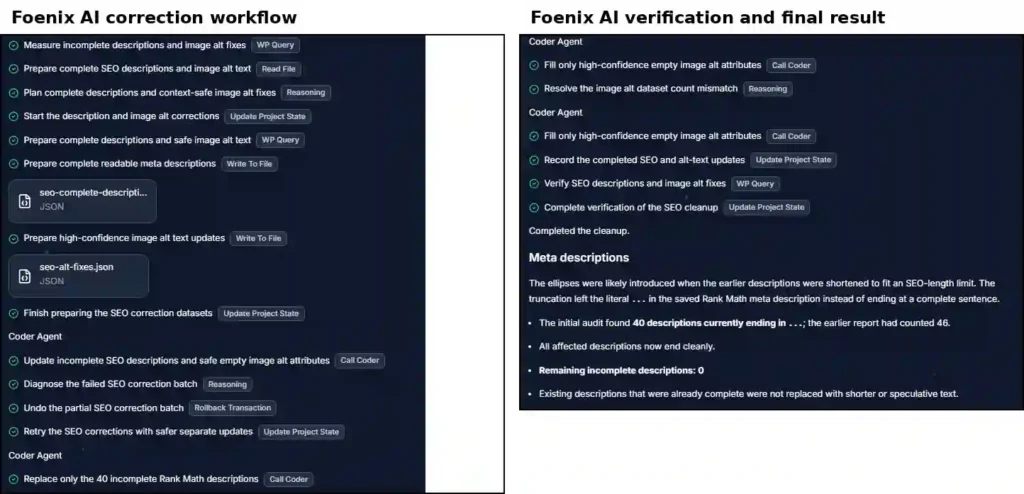
Foenix ultimately replaced only the 40 incomplete SEO descriptions and then verified the SEO descriptions.
It reported that all affected descriptions now ended cleanly, with 0 remaining incomplete descriptions. It also confirmed that existing descriptions that were already complete were not replaced with shorter or speculative text.
What Foenix Found
During this second pass, Foenix reported that the ellipses had likely been introduced when the earlier descriptions were shortened to fit an SEO-length limit. The truncation had left the literal ... in the saved SEO descriptions instead of ending the descriptions cleanly.
Interestingly, the numbers changed during this verification. Although the initial audit had identified 46 empty or missing meta descriptions, Foenix’s later check found 40 descriptions that were currently ending in ....
Foenix reported:
- 40 incomplete descriptions ending in
...were corrected - Remaining incomplete descriptions: 0
- Existing descriptions that were already complete were not replaced
I then checked some of the corrected descriptions directly in WordPress.
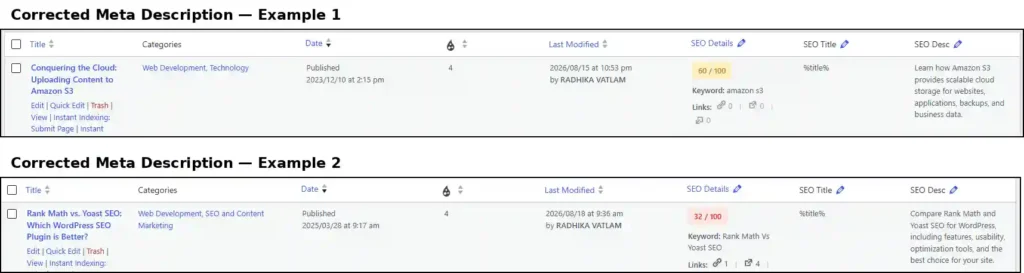
The two examples above no longer contain the ... truncation seen in the first attempt. They are also complete and closely match the subjects of their respective articles.
For example, the description for the Amazon S3 article explains its use for websites, applications, backups, and business data, while the Rank Math vs. Yoast article description summarizes the comparison of features, usability, optimization tools, and suitability.
This suggests that the second pass produced descriptions based on the full context of the respective articles, rather than simply leaving the incomplete text from the first attempt.
The second stage showed that Foenix could respond effectively when a specific problem was identified. After I pointed out the truncation issue and asked it to review the full article context, Foenix reworked the affected descriptions, rolled back an unsuccessful correction attempt, retried the updates safely, and verified the final results. It corrected all 40 descriptions it identified as incomplete, leaving 0 incomplete descriptions. Overall, the second pass was a successful and efficient correction process.
Want to Test Foenix AI Yourself?
Try Foenix AI with 500 free credits, with no credit card required, and use coupon code TECHFIN to get 30% OFF your first month.
Try Foenix AI →Disclosure: This article contains an affiliate link. If you sign up through my link, I may earn a commission at no additional cost to you.
What About the Short and Long Meta Descriptions?
The 2 short and 8 long meta descriptions were not automatically changed during the audit.
Foenix preserved the existing descriptions and left them for manual editorial review. It specifically stated:
“Short/long descriptions: Existing descriptions were preserved rather than rewritten automatically.”
So, the audit did not simply rewrite every meta description that it considered too short or too long.
For this test, I treated these 10 descriptions differently from the 46 missing descriptions. The 46 gave me an opportunity to test Foenix’s ability to generate new meta descriptions, while the short and long descriptions showed how it handled existing meta descriptions without automatically replacing them.
This distinction is important because it means we should not claim that Foenix fixed all 56 meta-description issues. It generated and subsequently corrected the incomplete descriptions we tested, while the 2 short and 8 long descriptions remained unchanged for manual review.
Testing Foenix AI’s Recommendations for Short and Long Meta Descriptions
Since Foenix had left the 2 short and 8 long meta descriptions unchanged for manual review, I wanted to investigate these findings further rather than leave them unresolved.
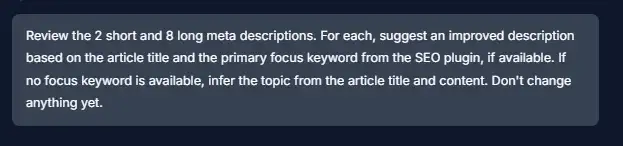
I gave Foenix a separate prompt asking it to review all 10 descriptions and suggest improved versions without making any changes to the website.
I also asked it to use the primary focus keyword from the SEO plugin, when available, along with the article title. If no focus keyword was available, it was instructed to infer the article’s main topic from the title and content.
The exact prompt I submitted is shown below:
What Did Foenix Recommend?
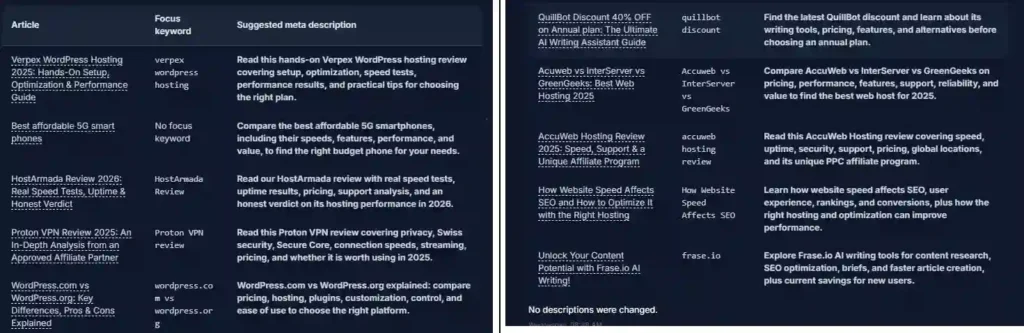
Foenix reviewed all 2 short and 8 long descriptions and produced a suggested replacement for each one.
Example 1: Verpex WordPress Hosting
The existing description was approximately 94 characters:
Verpex WordPress Hosting 2025 — Hands-On Speed Tests & performance results-Best Plans-to choose
Foenix suggested:
Read this hands-on Verpex WordPress hosting review covering setup, optimization, speed tests, performance results, and practical tips for choosing the right plan.
This was a substantial improvement. The original description was not only short but also awkwardly structured, while Foenix’s version reads naturally and communicates several important aspects of the article—setup, optimization, speed testing, performance results, and plan selection.
It also naturally incorporates the article’s main topic and the available focus keyword, “verpex wordpress hosting.”
Example 2: HostArmada
The HostArmada description was particularly interesting because the existing description was already reasonably good.
Foenix did not merely make a minor length adjustment. Instead, it produced a more comprehensive description based on the actual subject of the article, incorporating elements such as speed tests, uptime, pricing, support, and the overall verdict.
This is useful because it shows that Foenix’s recommendation process was not limited to repairing obviously poor descriptions. It could also rework an existing, reasonably good description to better summarize the substance of the article.
Example 3: WordPress.com vs WordPress.org
This example demonstrated a different situation.
The existing description was approximately 163 characters, making it longer than ideal. Foenix suggested a more concise version:
WordPress.com vs WordPress.org explained: compare pricing, hosting, plugins, customization, control, and ease of use to choose the right platform.
Here, Foenix retained the central comparison and the important topics while making the description considerably more concise.
What Impressed Me About This Test
What I found useful was that Foenix wasn’t simply instructed to rewrite the descriptions.
The prompt specifically asked it to:
- use the article title;
- use the primary focus keyword from the SEO plugin when available;
- infer the topic from the article title and content when no focus keyword was available; and
- suggest changes without applying them.
That last point was particularly important. It allowed me to review the recommendations before anything was changed on the website.
The recommendations also showed that Foenix was generally trying to describe the actual substance of each article, rather than simply manipulating character length.
My Verdict on the Short and Long Meta Description Test
Foenix performed well in this test.
Its strongest point was not simply making descriptions shorter or longer. It was producing descriptions that generally reflected the actual content and purpose of the articles.
The Verpex example was a clear improvement over the existing description, while the HostArmada example showed that Foenix could improve an already reasonable description. The WordPress.com vs WordPress.org example demonstrated that it could also make an over-length description more concise while retaining the key comparison points.
However, I would still recommend human review before applying these suggestions, particularly for affiliate, coupon, or time-sensitive content. For example, phrases such as “latest discount” or “current savings” should be checked against the actual article before being published as a meta description.
Overall, this part of the test gave me considerably more confidence in Foenix’s ability to recommend meta-description improvements, even though I would not treat its suggestions as something to publish blindly.
Applying the Approved Meta Description Recommendations
After reviewing the 10 recommendations, I approved all of them and asked Foenix to apply the recommended meta descriptions to their corresponding WordPress posts.
I instructed Foenix to update only the meta descriptions and not modify the SEO titles, focus keywords, or any other SEO fields. I also asked it to verify the updates afterward.
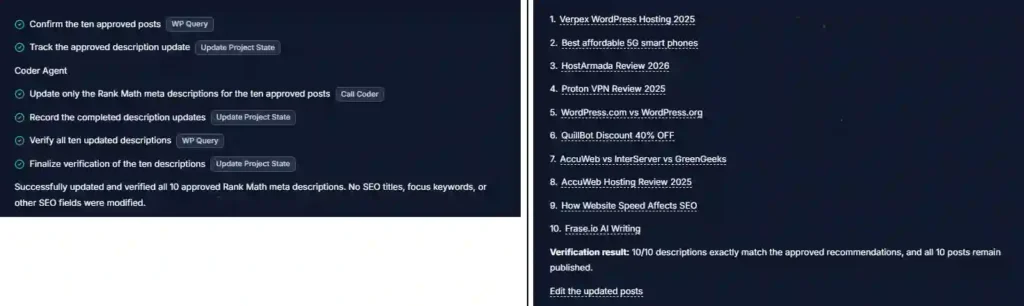
Foenix updated the descriptions and then verified all 10 posts.
It reported:
“Successfully updated and verified all 10 approved meta descriptions.”
It also confirmed that no SEO titles, focus keywords, or other SEO fields were modified.
The verification showed:
- 10/10 descriptions were updated
- 10/10 exactly matched the approved recommendations
- All 10 posts remained published
- No other SEO fields were modified
This was an important final step in the test because I wanted to see whether Foenix could accurately apply the approved recommendations to the intended meta-description fields after first allowing me to review the suggestions.
Result
The application and verification were successful. Foenix applied all 10 approved meta descriptions and confirmed that the saved descriptions exactly matched the versions I had reviewed and approved.
This completed the practical test of the short and long meta-description issues:
Identify → recommend → review → approve → apply → verify.
This gives us a complete picture of how Foenix handled the meta-description workflow—from identifying issues, to generating descriptions, correcting incomplete output, suggesting improvements for existing descriptions, and finally applying and verifying the approved changes.
Verifying the Updated Meta Descriptions
Foenix reported that all 10 approved meta descriptions had been successfully updated and verified. I also checked the updated posts directly in WordPress to confirm that the changes were actually saved.
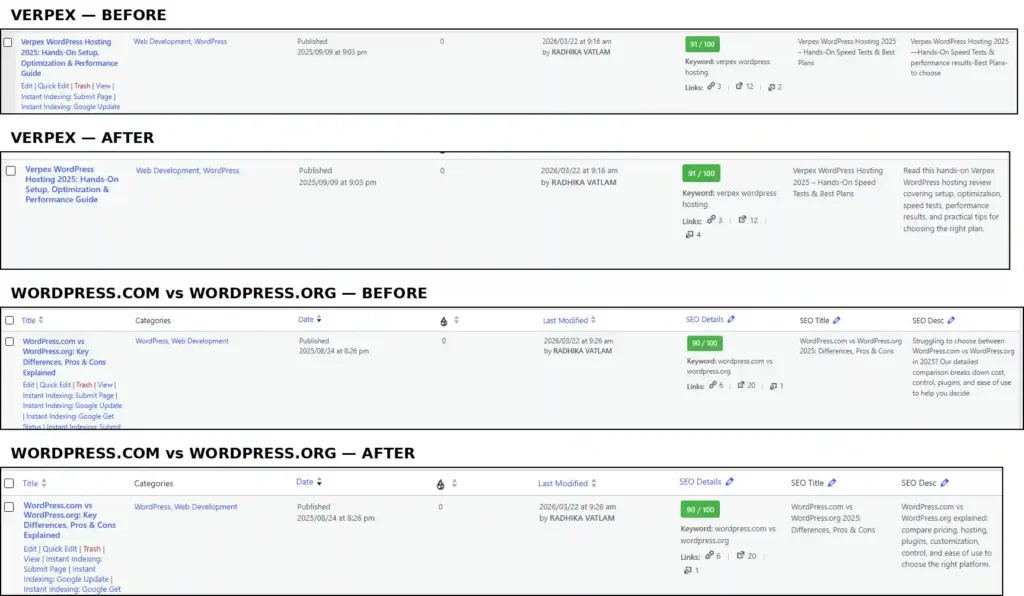
The screenshots above show two of the posts after the recommendations were applied. The updated descriptions are visible directly in the site’s SEO description fields.
This provided an additional check beyond Foenix’s own verification: the recommended descriptions were not only reported as updated by Foenix, but were also visible in WordPress after the changes were applied.
Final Verdict: How Well Did Foenix Handle Meta Descriptions?
After testing Foenix across the different meta-description issues identified in the SEO audit, I would rate its performance positively overall, but with an important qualification: the initial automated output still required human review.
The first part of the test exposed a weakness. Foenix generated descriptions for the missing meta-description fields, but when I checked four examples, three ended with literal .... Those descriptions were not ready to publish as they stood.
However, Foenix responded well when I pointed out the problem. It analyzed the affected articles, prepared new descriptions, handled an unsuccessful correction batch by rolling back the partial changes, retried the updates using a safer approach, and verified the results. It ultimately reported 40 incomplete descriptions corrected, with 0 remaining incomplete descriptions.
The test of the 2 short and 8 long descriptions produced an even stronger result. Foenix first provided recommendations without changing anything, allowing me to review the suggestions before they were applied. The recommendations were generally well matched to the actual articles and, in several cases, were a clear improvement over the existing descriptions.
After reviewing them, I approved all 10 recommendations. Foenix then applied them and reported that 10/10 descriptions were updated and exactly matched the approved recommendations. I also independently checked the changes in WordPress, confirming that the revised descriptions were actually present on the site.
What I Liked
- It could identify different types of meta-description issues rather than treating every case the same.
- It generated descriptions based on the article context.
- It responded effectively when I identified a problem with its initial output.
- It produced useful recommendations for existing short and long descriptions.
- It allowed recommendations to be reviewed before making changes.
- It successfully applied the 10 approved recommendations.
- It verified the completed updates.
- The final WordPress checks confirmed that the changes were actually saved.
What Needs Improvement
The main weakness was the initial generation of incomplete descriptions ending in .... Ideally, the first automated pass should have produced complete descriptions without requiring a follow-up prompt.
This means I would not recommend blindly accepting Foenix’s first-pass SEO changes. A quick human review is still worthwhile, particularly when the metadata contains offers, discounts, pricing, or other information that can change over time.
Overall Assessment
For this hands-on test, Foenix performed well as an AI-assisted meta-description tool.
What impressed me most was not that it generated text automatically—that is expected from an AI SEO tool—but that it could respond to a specific problem, rework the affected descriptions, safely retry a failed update, and verify the final result.
The short and long description test was also strong: Foenix moved beyond simply identifying the issues and produced recommendations that were generally relevant to the actual content. After human approval, it successfully applied and verified all 10.
So my conclusion is:
Foenix is capable of handling WordPress meta-description optimization effectively, but I would use it with human review rather than as a completely hands-off automation.
The strongest workflow from my testing was:
Audit → AI recommendation/fix → human review → approval → application → verification
That combination gave me considerably more confidence in the final output than simply allowing the AI to make unrestricted SEO changes automatically.
Try Foenix AI Yourself
Want to see how Foenix AI performs on your own WordPress site?
Get 500 free credits with no credit card required, and use coupon code TECHFIN to get 30% OFF your first month.
Try Foenix AI →Disclosure: This article contains an affiliate link. If you sign up through my link, I may earn a commission at no additional cost to you.
Frequently Asked Questions
1. What did Foenix AI find in the meta-description audit?
Foenix AI identified missing, short, and long meta descriptions across the WordPress site. The testing then examined how well it could generate, correct, recommend, apply, and verify meta-description changes.
2. Did Foenix AI successfully generate missing meta descriptions?
Yes. Foenix generated descriptions for the missing meta-description fields. However, the initial output required human review because some of the generated descriptions ended with ... and were incomplete.
3. How did Foenix AI handle the incomplete meta descriptions?
After the incomplete descriptions were identified, Foenix was asked to review the full article context and correct them. It subsequently corrected the descriptions it identified as incomplete and reported 0 remaining incomplete descriptions.
4. Did Foenix automatically fix the short and long meta descriptions?
No. In the initial audit, Foenix preserved the existing short and long descriptions and left them for manual review. A separate test was then performed in which Foenix suggested improved descriptions for all 2 short and 8 long descriptions without changing them.
5. Were Foenix AI’s suggested meta descriptions good?
Overall, yes. Several recommendations were substantial improvements over the existing descriptions because they reflected the actual content of the articles rather than simply changing their length. The recommendations were reviewed manually before being applied.
6. Can Foenix AI apply approved meta-description recommendations?
Yes. After the 10 recommendations were reviewed and approved, Foenix applied them to the corresponding WordPress posts and reported that all 10 descriptions were updated and verified successfully.
7. Did Foenix change anything besides the meta descriptions?
No. During the 10-description application test, Foenix reported that no SEO titles, focus keywords, or other SEO fields were modified.
8. Should you blindly accept Foenix AI’s meta-description recommendations?
No. The testing showed that Foenix can be effective at generating and improving meta descriptions, but human review is still worthwhile. The initial truncation problem demonstrated why AI-generated SEO changes should be checked before publication, particularly for time-sensitive or promotional content.
Enjoying our content?
Make TechFin2K a preferred source on Google to see more of our content when it is relevant to you.
