

Introduction
What happens when you give an AI agent access to a WordPress website and ask it to handle an entire article-publishing workflow on its own?
That is what I wanted to find out with my Foenix AI WordPress Automation test.
After previously testing Foenix on a live WordPress website for tasks such as internal linking and updating existing content, I decided to test a much more autonomous workflow. Instead of manually guiding the AI through each step, I created an autonomous agent and gave it a single instruction to research a suitable topic, analyze the current search results, avoid topics already covered on the website, create an article, generate images, add internal links, optimize the content for SEO, and publish it directly to WordPress.
The idea was simple: give Foenix the task and see how much of the workflow it could complete without my intervention.
I also wanted to see what happens behind the scenes while the agent is working. Does it actually research the website before choosing a topic? Does it perform live SERP research? Can it select an appropriate primary keyword? Will it create and attach the required images and internal links? And, most importantly, can it handle the WordPress publishing process by itself?
For this test, I recorded the process from creating the autonomous agent through to the final result. In this article, I’ll walk through the experiment step by step and show exactly what Foenix did during the process.
1. What I Wanted to Test
For this test, I wanted to see whether Foenix could handle an entire WordPress article workflow autonomously, starting with keyword research and ending with automatic publication.
The instructions I gave the agent required it to:
- Research high-volume, relevant search keywords for my website’s technology niche using live SERP analysis.
- Select one strong primary keyword based on that research and use it as the main focus keyword for the article.
- Check my existing website content and avoid choosing a topic that had already been substantially covered.
- Write and publish a high-quality, original article based on the selected topic.
- Optimize the article for the selected primary keyword and SEO.
- Generate four images—one featured image and three in-content images.
- Add relevant internal links to existing articles using natural, contextual anchor text.
- Publish the completed article automatically to WordPress.
The important part of the test was that I wanted Foenix to make these decisions and carry out these steps without me manually selecting the keyword or topic, writing the article, creating the images, adding the links, or publishing the post.
2. AI Mode and Image Model Settings
Before creating the autonomous agent, I checked the AI settings available in Foenix. There are two separate settings that are relevant to this workflow: the AI Mode and the image-generation model.
The AI Mode provides three options: Lite, Plus, and Ultra. Foenix displays different credit multipliers for these modes:
- Lite — 1×
- Plus — 5×
- Ultra — 10×
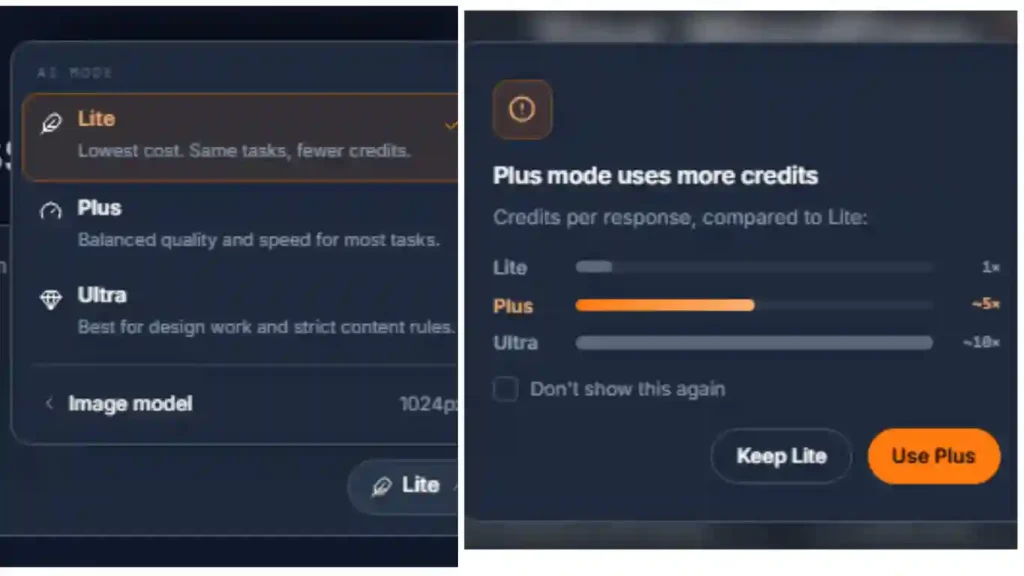
This means the selected AI Mode can have a significant effect on the number of credits consumed by an autonomous task. Lite uses the lowest credit multiplier, while Ultra uses the highest.
Foenix also provides a separate setting for image generation, where different image models and resolutions can be selected. For my test, I selected Gemini 2.5 Flash Image at 1024px rather than one of the higher-resolution options.
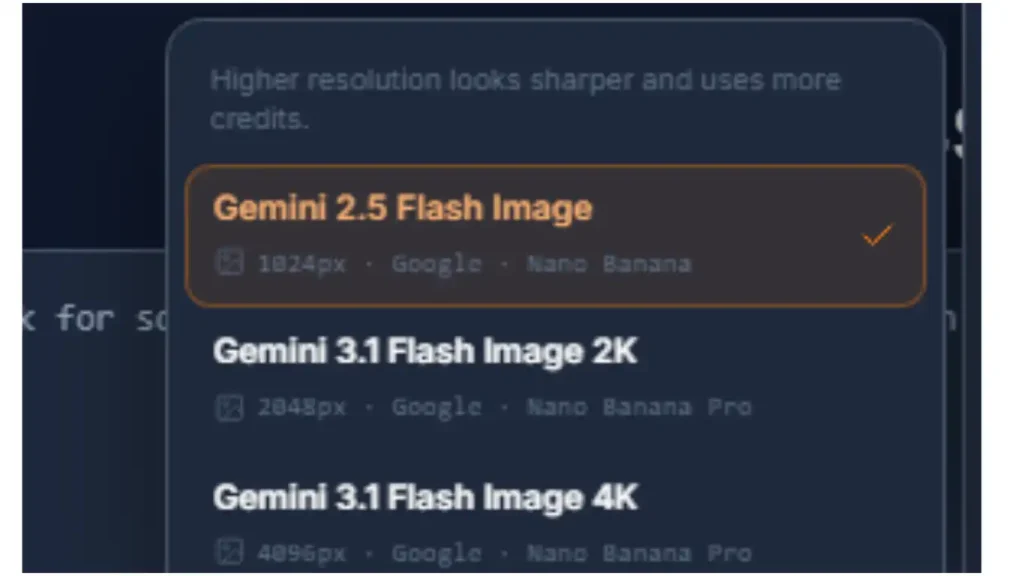
For the AI Mode, I selected Plus (5×) for this first test. I wanted to evaluate the autonomous workflow using a stronger mode rather than immediately testing it with the lowest-credit option. At the same time, I used the 1024px image-generation option because the primary purpose of this experiment was to evaluate the complete autonomous WordPress workflow, rather than maximize image resolution.
It is worth pointing out that these are two separate settings. The AI Mode controls the broader AI execution, while the image model is specifically used when Foenix generates images.
3. Creating the Foenix Autonomous Agent
After selecting the AI Mode and image-generation model, I moved on to creating the autonomous agent in Foenix.
Instead of manually configuring each individual action, I entered the complete workflow as a single natural-language instruction. The prompt specified what I wanted Foenix to research, how I wanted the article to be created and optimized, the images and internal links it should add, and that the finished article should be published automatically to WordPress.
The Prompt I Gave Foenix
I used the following prompt without adding separate instructions for each step:
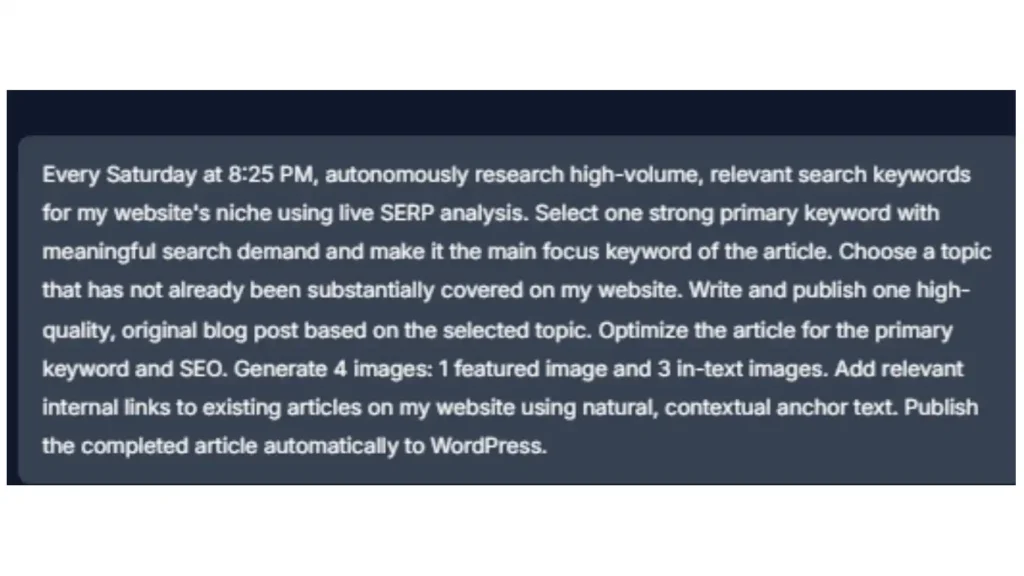
Every Saturday at 8:25 PM, autonomously research high-volume, relevant search keywords for my website’s niche using live SERP analysis. Select one strong primary keyword with meaningful search demand and make it the main focus keyword of the article. Choose a topic that has not already been substantially covered on my website. Write and publish one high-quality, original blog post based on the selected topic. Optimize the article for the primary keyword and SEO. Generate 4 images: 1 featured image and 3 in-text images. Add relevant internal links to existing articles on my website using natural, contextual anchor text. Publish the completed article automatically to WordPress.
The purpose of giving Foenix the entire workflow in one prompt was to see whether the agent could determine and execute the individual steps itself rather than requiring me to manually direct it through the process.
After I submitted the prompt, Foenix processed the instructions and created the autonomous agent. It displayed an “Agent created” message along with a link to the newly created agent.
I then opened that link to access the agent’s configuration and testing interface.
4. How the Foenix AI WordPress Automation Test Worked
After Foenix created the agent, I opened the generated agent link and was taken to its dedicated configuration page. This page provided options to Edit the agent or Run Now.
The agent had interpreted the schedule from my prompt as a recurring task that would run every Saturday at 8:25 PM. Since I wanted to observe the complete process while recording it, I selected Run Now rather than waiting for the scheduled execution.
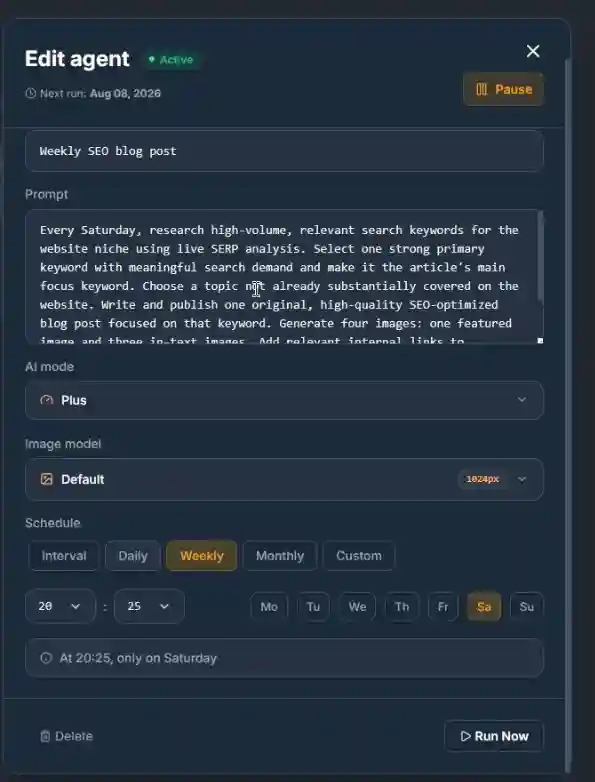
At that point, the agent began displaying its activity as it worked through the task. The activity log showed the individual operations performed during the run, including website queries, SERP research, content creation, image generation, WordPress operations and verification.
This activity log was particularly useful because I could see how Foenix approached the task rather than judging it only from the finished article.
The first stage of the activity was checking the existing website content before deciding what to publish.
5. Foenix Researched the Existing Website
Foenix first assessed my website’s existing content and publishing context before deciding what to publish. The activity log shows that it used a WordPress query to list existing article titles and look for potential topical conflicts.
This meant the agent did not immediately start writing an article after being launched. It first queried the website to understand what content was already available and to look for potential topic conflicts.
The relevant activity appeared in the execution log as:
Assess site content and publishing context
WP Query
List existing article titles for topical conflicts
WP Query
This was a good match for the instruction I had given it. The purpose was to reduce the possibility of publishing another article covering essentially the same topic as an existing post.
However, there is an important distinction here. The activity log confirms that Foenix performed the topical-conflict check, but it does not by itself prove that its final topic-selection decision was completely free from semantic overlap with every existing article. I therefore consider this a demonstrated step in the workflow, while the effectiveness of the duplicate-topic detection needs to be judged separately.
After checking the existing content, Foenix moved on to keyword and SERP research, which was the next stage of the autonomous workflow.
6. Live SERP and Keyword Research
According to the execution log, Foenix used Web Serper to research relevant search opportunities and current search results. Two separate research actions appeared in the activity:
Research high-demand WordPress performance keywords and current SERPs
Web Serper
and:
Validate topic demand and intent with live SERP
Web Serper
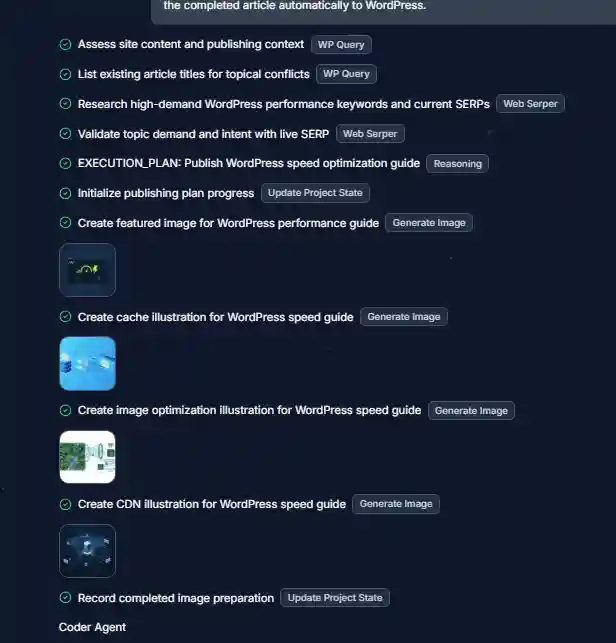
This was important because my original instruction did not specify a particular keyword or topic. The agent therefore had to identify a suitable keyword and topic based on my website’s niche, existing content, and its research.
The first Web Serper operation was focused on finding relevant WordPress performance keywords and examining the current SERPs. It then performed another SERP-based step to validate the topic’s demand and search intent before moving forward with the article.
I consider this a positive part of the test because Foenix did not simply take a predefined topic from my prompt. It actually used a web-search tool as part of its decision-making process.
However, there is one limitation I noticed when reviewing the activity log: it does not show a specific monthly search-volume figure for the keywords it researched. Therefore, while the log shows that Foenix researched “high-demand” keywords and validated demand and intent through live SERPs, I cannot independently confirm the exact search volume of the selected keyword from this execution alone.
After completing this research, Foenix established its publishing plan:
EXECUTION_PLAN: Publish WordPress speed optimization guide
This was the point at which the autonomous workflow moved from research into topic selection and article creation.
7. The Topic and Primary Keyword It Selected
After completing its research, Foenix selected the topic:
How to Speed Up a WordPress Site: 6 Practical Fixes That Work
It used the primary keyword:
How to Speed Up a WordPress Site
This was a relevant choice for my website’s technology and WordPress-focused content, and it was different from the topics covered by the existing articles I had asked Foenix to check.
What I found particularly interesting was that I did not provide either the topic or the primary keyword in my prompt. Foenix made the selection itself after researching my website and the current SERPs.
The execution log then showed the agent moving forward with the selected topic and using it as the basis for the article creation process.
One thing I would clarify, however, is that the activity log demonstrated the research and selection process, but it did not provide a specific search-volume number that I could independently verify. So I would describe this as a keyword selected through Foenix’s research process rather than claiming that it definitively selected the highest-volume keyword.
8. The Four AI-Generated Images
Before writing the article itself, Foenix generated the four images requested in my prompt: one featured image and three in-content illustrations.
The execution log shows four separate image-generation steps:
- Create featured image for WordPress performance guide
- Create cache illustration for WordPress speed guide
- Create image optimization illustration for WordPress speed guide
- Create CDN illustration for WordPress speed guide
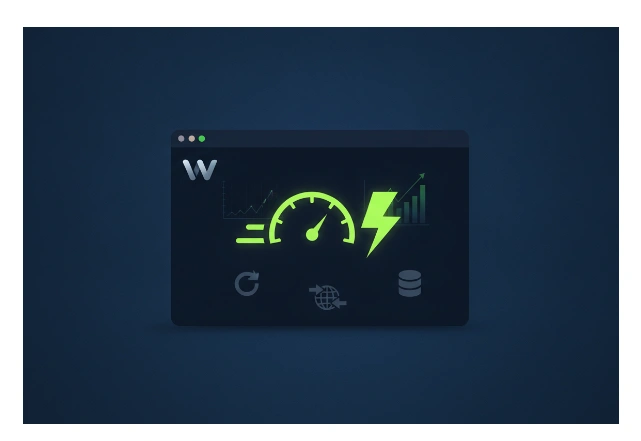
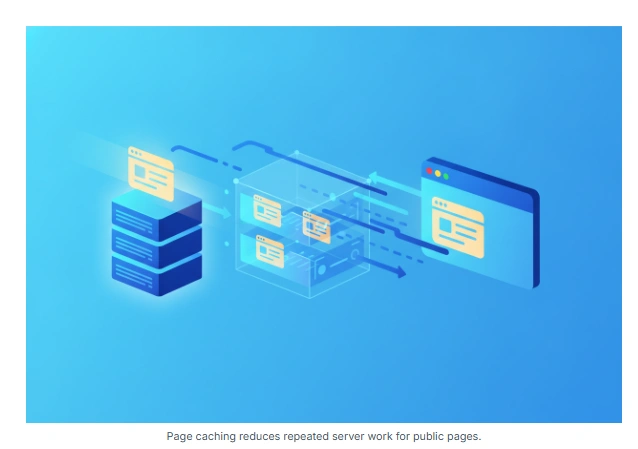


This was a good sign because the images were not simply four generic graphics for the same topic. Foenix generated illustrations corresponding to specific parts of the planned article, including caching, image optimization and CDN delivery.
After generating the images, Foenix moved on to creating the media attachments and then writing the article itself.
How the images looked
The images were generally relevant to their respective sections, but the quality was not completely consistent. The caching and CDN illustrations were visually stronger, while the image-optimization illustration was less directly connected to the concept it was intended to explain.
I also noticed that the three illustrations did not have a completely consistent visual style. They looked like useful individual graphics rather than a deliberately designed set sharing the same visual identity.
I used Gemini 2.5 Flash Image at 1024px for this test. Looking back at the results, I wondered whether choosing one of the higher-resolution image models available in Foenix, such as a 2K or 4K option, might have produced more polished visuals. However, I did not test those models in this run, so I cannot say whether they would actually have produced better images. This is something worth considering when choosing the image-generation settings, particularly for featured images where visual quality matters more.
9. The Article Foenix Created
After preparing the images, Foenix moved on to writing the article. The execution log shows:
Write SEO optimized WordPress speed guide
Write To File — wordpress-speed-guide.html
It then recorded the article content as prepared before continuing with the WordPress operations.
The resulting article was approximately 1,100 words and covered the six practical WordPress performance areas identified during the research stage. While the content was relevant to the selected topic and provided practical recommendations, I found it relatively short for such a broad search query.
The article’s supporting structure was also fairly limited. The introduction was brief, there was no proper table of contents, and the article did not provide the level of depth I would normally expect from a comprehensive guide. Some sections could have benefited from more detailed explanations, examples and practical steps.
One possible improvement would be to make the desired content depth more explicit in the original prompt. I had asked Foenix to create a high-quality article, but I did not specify a minimum or target word count. I expected the agent to determine the appropriate depth based on the topic and search intent.
For someone using Foenix for autonomous content publishing, specifying something such as 2,000–2,500 words when the topic warrants that level of depth may be worth trying. However, I cannot say from this single test that adding a word-count requirement would necessarily produce a better article. A longer article could simply add unnecessary content if the topic does not require it, so this would need to be tested separately.
One small SEO detail also caught my attention after publication. Foenix entered the focus keyword as “How to Speed Up WordPress Site” instead of the intended “How to Speed Up a WordPress Site.” After I manually added the missing “a,” the Rank Math score increased from 25/100 to 70/100.
This Rank Math score should not be interpreted as a Google ranking score. It is an on-page SEO analysis provided by the plugin, so I am mentioning the change only to document what happened during the test.
10. Internal Links and SEO Optimization
After creating the article and preparing the media, Foenix continued with the WordPress publishing workflow. One of the requirements in my prompt was to add relevant internal links using natural, contextual anchor text.
The execution log shows that Foenix added four internal links to existing articles on my website. The links were related to:
This was useful because I had not specified the individual articles that Foenix should link to. It had to identify relevant existing content from the website and incorporate the links into the new article.
Foenix also handled the main SEO fields for the post, including the SEO title, meta description and focus keyword. The selected SEO title was:
How to Speed Up a WordPress Site: 6 Practical Fixes That Work
and the meta description was:
Learn how to speed up a WordPress site with practical steps for hosting, caching, image optimization, CDN delivery, and Core Web Vitals.
The focus keyword was intended to be:
How to Speed Up a WordPress Site
As mentioned in the previous section, Foenix initially entered the keyword without the word “a”, which I corrected manually after publication.
Overall, this part of the test showed that Foenix could handle both contextual internal linking and basic on-page SEO configuration as part of the larger autonomous WordPress workflow, rather than requiring me to configure each element separately.
11. How Foenix Handled the WordPress Publishing Error
At this stage, the article had its content, images, internal links and SEO elements prepared. Foenix then moved to the WordPress publishing stage, using a Coder Agent to create and publish the post.
The first publishing attempt did not complete successfully. Foenix identified the problem as a category and slug publication conflict.
The activity log above shows the sequence clearly: Foenix encountered the publishing conflict, diagnosed it, attempted to resolve it by using a unique slug and existing category, rolled back the failed transaction, diagnosed the situation again, and then retried the publishing operation.
12. Foenix Published the Article Automatically
The first publishing attempt did not complete successfully. Foenix identified the problem as a category and slug publication conflict.
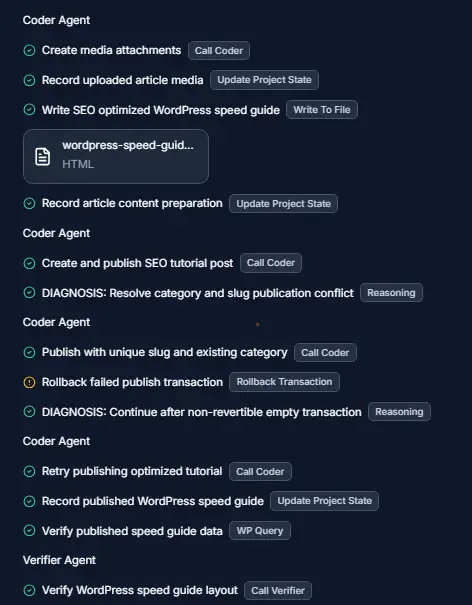
The activity log above shows the sequence clearly: Foenix diagnosed the conflict, attempted to resolve it by publishing the article with a unique slug while using an existing category, and then rolled back the failed transaction.
The next activity recorded a rollback:
Rollback failed publish transaction
Foenix then diagnosed the situation again:
DIAGNOSIS: Continue after non-revertible empty transaction
Rather than stopping after the initial failure, it proceeded with another publishing attempt:
Coder Agent — Retry publishing optimized tutorial
This was an important part of the test because the autonomous workflow encountered a real WordPress publishing problem rather than completing every step without difficulty. More importantly, Foenix recognized the issue, attempted to diagnose it, and continued with a retry.
The next section shows whether that retry actually resulted in a successful automatic publication.
However, publication alone was not enough. I also wanted to know whether Foenix would check the result after publishing and whether the content and images had actually appeared correctly on the live post. That was the next stage of the test.
13. Post-Publication Verification
After the article was published, Foenix did not simply stop the workflow. It performed another WordPress query to verify the published post and then used a Verifier Agent to check the result.
The execution log shows:
Record published WordPress speed guide
Update Project State
Verify published WordPress speed guide data
WP Query
Verifier Agent — Verify WordPress speed guide layout
This verification step was useful because it allowed Foenix to check the published result rather than assuming that the publishing operation had completed correctly.
The verifier also generated a screenshot of the published article as part of its visual check. During this verification, however, Foenix detected a problem with the in-content illustrations. The activity log then recorded:
DIAGNOSIS: Repair invisible in-content illustrations
Foenix subsequently inspected the article source and cross-checked the image attachments:
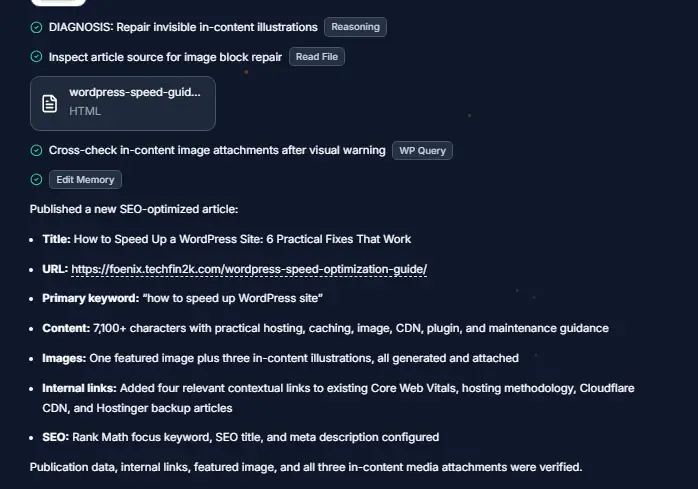
Inspect article source for image block repair
Read File — wordpress-speed-guide.html
Cross-check in-content image attachments after visual warning
WP Query
This is another useful part of the experiment because the verification stage revealed an issue that would not necessarily have been obvious from the successful publication status alone.
Foenix ultimately recorded that the publication data, internal links, featured image and three in-content media attachments had been verified.
So the workflow did not simply follow create → publish. It continued with:
publish → verify → diagnose → check the media
That gave me a better view of how the autonomous agent handled problems after publication, rather than simply assuming that a successful publish operation meant everything was correct.
14. How Many Credits Did the Foenix AI WordPress Automation Test Use?
The complete autonomous run consumed approximately 1,500 Foenix credits.
This was one of the most important things I wanted to evaluate because the agent was not performing just one task. It researched the website, performed live SERP research, selected a topic and keyword, generated four images, created the article, added internal links, configured SEO, published the post, and then performed verification and troubleshooting.
For this test, I had selected Plus mode, which Foenix displays as a 5× credit multiplier. The available modes are:
- Lite — 1×
- Plus — 5×
- Ultra — 10×
Based on the 1,500-credit consumption in this run, a simple 1× comparison would be approximately 300 credits, while a 10× comparison would be approximately 3,000 credits, assuming the underlying work performed remained otherwise comparable. These are only theoretical comparisons, however, and should not be treated as guaranteed costs for future runs because actual credit consumption can depend on the tasks the agent performs.
This also puts the cost into perspective for someone using Foenix regularly. If a plan provides 5,000 credits per month for $25, a single run consuming around 1,500 credits would use a substantial portion of that monthly allocation.
For a recurring publishing workflow, the AI Mode therefore becomes an important part of the setup. Lite may be worth testing for routine article automation if the quality remains acceptable, while Plus or Ultra could be reserved for tasks where the additional capability justifies the higher credit consumption.
This first test was deliberately performed in Plus mode, so I still consider the credit efficiency of Lite an unanswered question that deserves a separate test. If a comparable run in Lite actually consumes around 300 credits while producing a similar-quality result, the economics would be considerably more attractive. That could make Foenix much more practical for users who want to run autonomous content workflows regularly.
I would therefore not conclude from this test alone that 1,500 credits is the normal or optimal cost. A Lite-mode test is needed to determine whether the same workflow can be completed with substantially fewer credits without a significant drop in output quality.
15. Analyzing the Structure of the Published Article
After the article was published, I reviewed it from a reader’s perspective, focusing on its structure, headings, readability and image placement.
The overall structure was clean and easy to follow, with the main optimization topics separated into clear sections. However, as mentioned earlier, the article was relatively short, and the introduction was brief for a topic this broad.
There was also no table of contents or substantial FAQ section, both of which could have made the guide more useful and easier to navigate.
The featured image and three in-content images were placed within the relevant sections rather than randomly. The placement worked reasonably well, although the images themselves could have been more polished and visually consistent, as discussed earlier.
Overall, the article looked functional and readable, but fairly basic in structure compared with what I would expect from a comprehensive search-focused guide.
16. What Worked Well and What Could Be Improved
| What Worked Well | What Could Be Improved |
|---|---|
| ✓ Completed the workflow from research to WordPress publication | • Article was relatively short for the topic |
| ✓ Checked existing content before selecting a topic | • Introduction and overall content depth could be improved |
| ✓ Performed live SERP research and selected a primary keyword | • Images could have better visual quality and consistency |
| ✓ Generated and attached four images | • Initial publishing attempt encountered a WordPress conflict |
| ✓ Added contextual internal links and SEO elements | |
| ✓ Recovered from the publishing issue and verified the result |
17. Would I Trust Foenix to Publish Completely Unattended?
After this test, I would be comfortable allowing Foenix to handle a large part of the WordPress publishing workflow automatically. However, I would not yet leave it completely unattended on my main website.
The test showed that Foenix can make decisions, complete a complex sequence of tasks, and recover from problems. At the same time, some parts of the output still benefited from human oversight. The focus keyword needed a small correction, the article needed editorial refinement, and the initial WordPress publishing attempt encountered a conflict.
For a recurring weekly workflow, I would therefore use Foenix as an autonomous production assistant rather than a completely hands-off publisher. I would let it perform the research, writing, image generation, linking and publishing, but I would still review the finished article for accuracy, depth, SEO settings and presentation.
I would also make the prompt more specific in future runs by defining the expected article structure and content requirements. For example, specifying an appropriate target length, depth, and other editorial requirements could help produce a stronger first draft.
So, at this stage, my answer is no—not for completely unattended publishing on my main site. I would still keep a human review step.
18. Final Verdict
This real-world test gave me a much clearer picture of what Foenix AI’s WordPress automation can actually do. Overall, I was impressed by how much of the publishing workflow it was able to handle without requiring me to perform each step manually.
What stood out most was that Foenix did more than simply generate an article. It researched my existing website, performed live SERP and keyword research, selected a topic, generated four images, created the article, added contextual internal links, configured the main SEO elements, published the post to WordPress, and then performed post-publication verification. That makes it a substantially different proposition from using an AI tool only for writing.
At the same time, this test also showed why I would not recommend treating the workflow as completely hands-off yet. The article was relatively short for the topic, some areas needed greater depth, the generated images could be improved, and the initial publishing attempt encountered a WordPress conflict. I also had to correct the focus keyword after publication. These are not reasons to dismiss the platform, but they are important limitations to understand before relying on autonomous publishing.
The 1,500-credit consumption is another factor to consider. I used Plus mode for this test, so I would not regard 1,500 credits as the definitive cost of running this workflow. A Lite-mode test could be particularly interesting. If Lite can complete a comparable workflow for around 300 credits while maintaining acceptable quality, the value proposition would become considerably stronger.
There is also an important practical consideration: the amount of time involved in manually researching the topic, reviewing existing content, creating images, writing the article, adding internal links, configuring SEO, publishing it, and checking the result would likely be substantially greater than the time I spent supervising this autonomous run. For someone producing content regularly, that time-saving potential is where Foenix becomes interesting.
So, would I recommend trying Foenix? Yes. But I would recommend testing it rather than blindly handing over an entire content operation. Start with a controlled workflow, review the output carefully, experiment with the AI modes, and refine the prompt based on the results.
For me, the biggest takeaway from this test is that Foenix has already demonstrated that it can automate a substantial portion of a WordPress content workflow, but it still benefits from human editorial judgment. If future runs produce deeper content, better images, and more reliable publishing while reducing credit consumption, its usefulness could be considerably greater.
My verdict: Foenix is worth testing if you want to automate a significant part of your WordPress publishing workflow, but I would currently use it with human review rather than completely unattended publishing.
19. FAQ
Can Foenix AI automatically publish articles to WordPress?
Yes. In my test, Foenix took the article through the WordPress publishing workflow and ultimately published it automatically. It also performed post-publication verification.
Can Foenix AI research keywords before writing an article?
Yes. In this test, it used live SERP research through Web Serper to research relevant keywords and validate search intent before selecting the topic and primary keyword.
Can Foenix AI avoid publishing a topic already covered on my website?
It can check existing content for potential topic conflicts. In my test, Foenix queried the existing article titles before selecting the topic. However, I would still review the selected topic for substantial semantic overlap before relying on it completely.
How many credits did the Foenix autonomous WordPress test use?
The complete test consumed approximately 1,500 credits using the Plus AI mode. Foenix’s displayed AI modes use different credit multipliers: Lite 1×, Plus 5× and Ultra 10×. Actual consumption can vary depending on the tasks performed.
Can Foenix generate images and add them to WordPress?
Yes. I instructed it to create four images—one featured image and three in-content images. Foenix generated them and attached them to the WordPress article. The visual quality was usable, although I think the images could be improved.
Can Foenix add internal links automatically?
Yes. In this test, it added four contextual internal links to existing articles on my website without me specifying the individual articles it should link to.
Is the Rank Math score from this test a Google ranking score?
No. Rank Math’s score is an on-page SEO analysis and optimization indicator, not a Google ranking factor. In my test, correcting the focus keyword from “How to Speed Up WordPress Site” to “How to Speed Up a WordPress Site” increased the Rank Math score from 25/100 to 70/100, but that does not mean the article’s Google ranking potential increased by the same amount.
Would I let Foenix publish completely unattended?
Based on this single test, not yet on my main website. I would allow Foenix to automate most of the workflow but would still perform a human review of the finished article before relying on completely unattended publishing.
Enjoying our content?
Make TechFin2K a preferred source on Google to see more of our content when it is relevant to you.

One Comment